
highresolutions26855661
Participating Frequently
December 8, 2018
Answered

Incorporated Fonts (AIR Desktop)

  • December 8, 2018
  • 3 replies
  • 909 views

I am making a AIR Desktop (Windows) application using Animate 18.0.2.

In Animate library I have incorporated some fonts I wish to use (and set up the linkage):
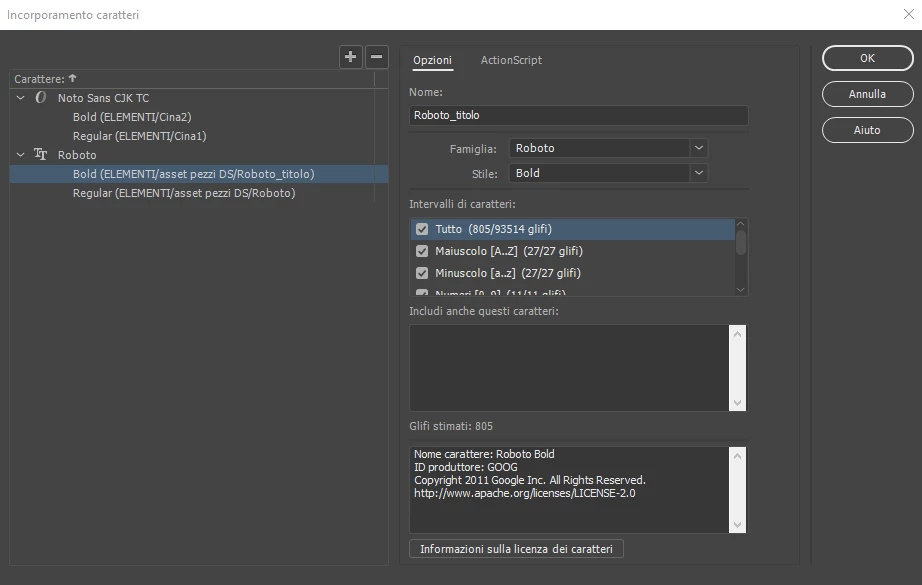
I use this code to dinamically select Roboto font:

var fontTitolo = new Roboto_titolo();
 
var formatoTitolo:TextFormat = new TextFormat();
formatoTitolo.font = fontTitolo.fontName;
formatoTitolo.size = 30;
 
var titolo:TextField = new TextField();
titolo.textColor = 0x163467;
titolo.defaultTextFormat = formatoTitolo;
titolo.htmlText = "hello";
titolo.x = 10;
titolo.y = 10;
titolo.width = 300;
titolo.height = 200;
titolo.multiline = true;
titolo.wordWrap = true;
titolo.antiAliasType = AntiAliasType.ADVANCED;
titolo.sharpness = 100;
titolo.thickness = 100;
 
container.addChild(titolo);

But when I execute the build (.exe) on a PC where the Roboto fonts I have incorporated aren’t installed also on the Operating System the texts are displayed in Times New Roman. On a PC where the fonts are installed on the Operating System the texts are displayed in right fonts.

Please help...  

This topic has been closed for replies.
Correct answer JoãoCésar17023019

Hi.

if possible try to use a text field already placed on stage (created at authortime by the Animate CC IDE) and you won't face this problem.

But if you do need to add your text field by code at runtime, you're gonna need to specify this in the app descriptor XML.

<embedFonts>

    <font>

          <fontName>Life is goofy</fontName>

          <fontPath>life_is_goofy.ttf</fontPath>

    </font>

</embedFonts>

Font embed AIR 24 / 25 [HELP]

You can also put your text field inside of a Movie Clip and at runtime add the Movie Clip containing the text field not the text field itself.

Regards,

JC

3 replies

JoãoCésar17023019
Community Expert
JoãoCésar17023019Community ExpertCorrect answer
Community Expert
December 12, 2018

Hi.

if possible try to use a text field already placed on stage (created at authortime by the Animate CC IDE) and you won't face this problem.

But if you do need to add your text field by code at runtime, you're gonna need to specify this in the app descriptor XML.

<embedFonts>

    <font>

          <fontName>Life is goofy</fontName>

          <fontPath>life_is_goofy.ttf</fontPath>

    </font>

</embedFonts>

Font embed AIR 24 / 25 [HELP]

You can also put your text field inside of a Movie Clip and at runtime add the Movie Clip containing the text field not the text field itself.

Regards,

JC

highresolutions26855661
Participating Frequently
December 12, 2018

Thank you JoãoCésar!!!!!!!!

The suggestion to modify the XML descriptor did not solve the problem... but the suggestion to use text field inside a MovieClip and add this at runtime is the solution!

JoãoCésar17023019
Community Expert
Community Expert
December 12, 2018

You're welcome!

Participant
December 11, 2018

What happens if you replace

titolo.htmlText = "hello";

with

titolo.text = "hello";

?

highresolutions26855661
Participating Frequently
December 12, 2018

The result is the same.

I have used

titolo.text = "This is Roboto with text";

for the the highlighted text:

As you can see when I remove the Roboto font from the system the text is yet displayed in Times New Roman. Roboto should instead look like this:

If you can, download the example in the previous post and let me know if you find a solution.

Thank you.

kglad
Community Expert
Community Expert
December 8, 2018

did you assign that linkage id/class?

highresolutions26855661
Participating Frequently
December 9, 2018

Yes, I have embed the fonts and set the linkage.

For example the embedded font Roboto have the linkage "Roboto_titolo" and I call it in this line of the code (see the full code on my first post):

var fontTitolo = new Roboto_titolo();

Thank you.

highresolutions26855661
Participating Frequently
December 10, 2018

attach a screenshot of your library showing your font's been assigned that linkage.


Thank you kglad.

This is the screenshot you asked me: