

_Waylander_
Inspiring
April 9, 2018
Answered

Issues with latest Animate 2018

  • April 9, 2018
  • 3 replies
  • 1296 views

I recently updated Animate CC, and now an animation I had been working on, no longer publishes an embedded mp4, or exports the Camera actions.  It has also introduced list of output errors that where not previously appearing in my published animation. 
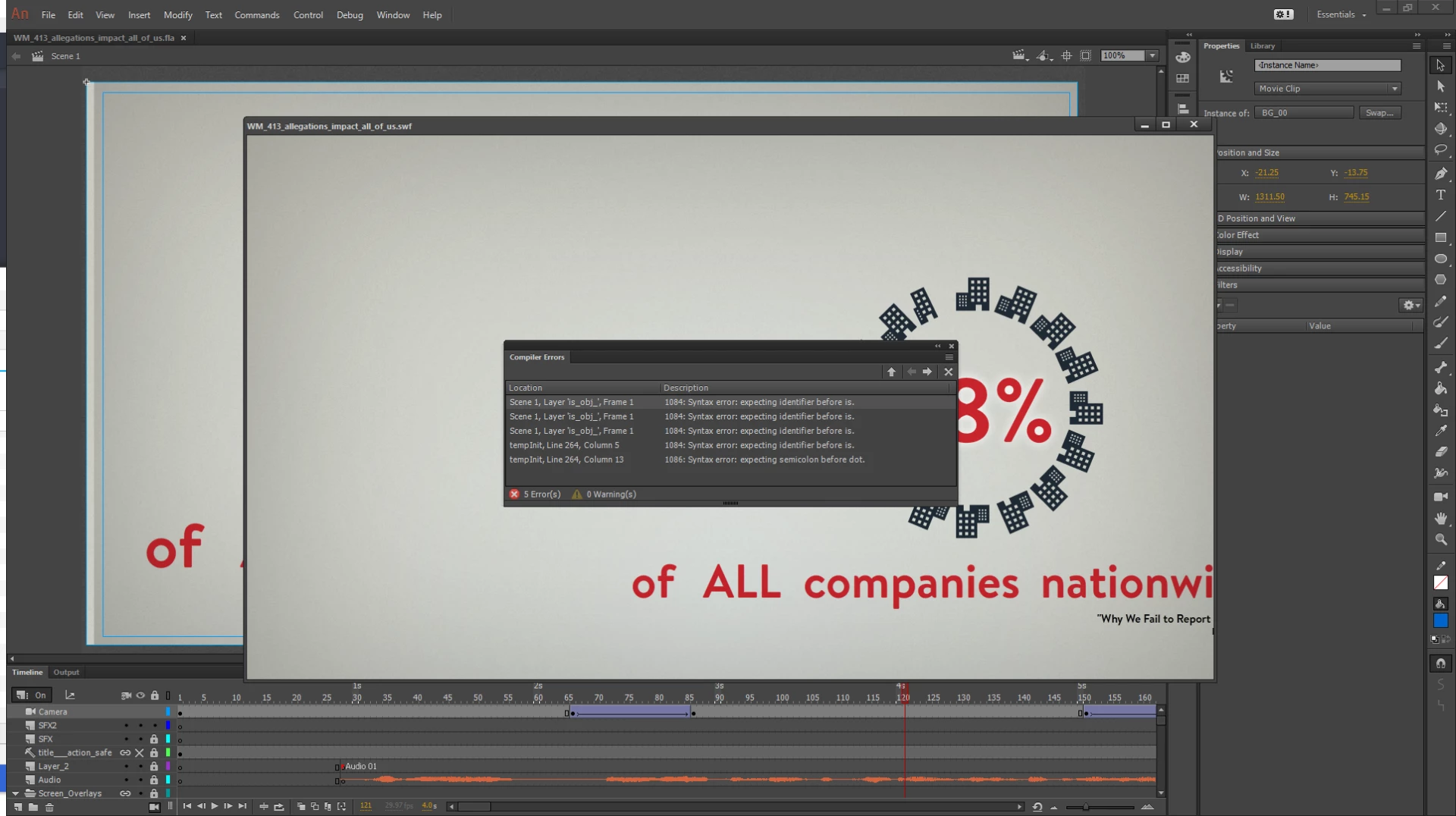
So just to point this out, there are the list of code errors, in the middle of the screen. I am not using any code of my own creation. Central to the Buildings should be an animation of a spinning globe, but it is not publishing, and that whole scene should now be central on the screen, via a camera pan and zoom.  

I can see all of the actions on the production stage, as you can see the position of the of on the stage behind.   

What are the errors that are appearing? the suggested layer does not exist in my animation and there are few objects on the first frame. And what is the "TempInit".

Anyone else having issues with Camera movements publishing?

    This topic has been closed for replies.
    Correct answer _Waylander_

    Thank you for the info. Let me check with the team and get back to you.

    Thanks,

    Preran


    Hi Preran,

    I am now thinking it is only to do with this particular animation I was working on. , as it was being built across AnimateCC updates.  I created some test movies, and they seem to publish and export fine.

    3 replies

    _Waylander_
    Inspiring
    April 11, 2018

    So I have discovered that it is ironically, the Advanced Layers that are causing the Camera motion and FLV not to play in my animation.  Ironic as the advanced layers are to give you more control over the stage assets. 

    So switching it off before you publish will resolve the issue, and everything publishes correctly. 

    Preran
    Community Manager
    Community Manager
    April 10, 2018

    Thank you for reporting the issue, and _keyframer, thank you for confirming.

    Would it be possible for you to share your Adobe ID, location, and phone number? We will get in touch with you and log a bug with the team, if required.

    Thanks,

    Preran

    _Waylander_
    Inspiring
    April 10, 2018

    Hi Preran,

    I have reported the issue to the help desk, and there are people looking into it.  I think Viyash... Possibly... I forget the name now.

    _keyframer
    Community Expert
    Community Expert
    April 9, 2018

    Yeah so I experienced this recently also and thought it was a buggy file. It still exports but yeah, the errors are unexpected. Never seen it before.

    Animator and content creator for Animate CC