
Participant
March 1, 2019
Question

Jagged lines

  • March 1, 2019
  • 3 replies
  • 4235 views

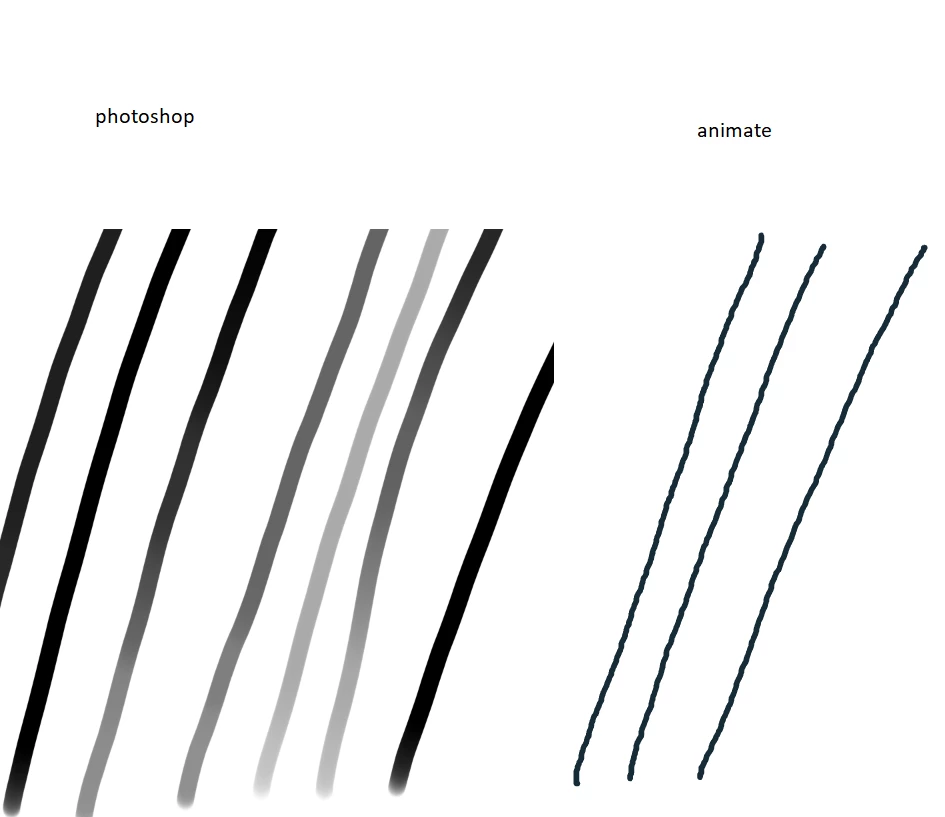
Lines made with the Brush tool in Adobe Animate are jagged. This has only started happening recently. This only happens in Adobe Animate, and not Adobe Photoshop or anything else I've tried.

I use a Huion GT-221 Pro and have uninstalled and reinstalled the driver.

Increasing the smoothing doesn't do much to improve results, and is only a surface fix for a deeper problem.

I don't know what else to try honestly. Older posts (6+ months) with similar problems only instruction seems to be to wait for the next version.

Attached are several lines drawn at various speeds in Photoshop and Animate. The lines in Animate are too jagged and those jags are too regular, irrespective of the speed at which the line was drawn.
    This topic has been closed for replies.

    3 replies

    chaosphoenix88
    Participating Frequently
    April 17, 2019

    Hello,

    I have a similar issue to this. I've ran a CPU test and GPU test and have passed them both. CPU is not overheated , GPU is fine as well. Does any have any idea what may cause this? I've included a video for this as well.

    Thank you for your help

    System Specs.

    Operating System: Windows 10 Home 64-bit (10.0, Build 17134) (17134.rs4_release.180410-1804)

                     Language: English (Regional Setting: English)

          System Manufacturer: System manufacturer

                 System Model: System Product Name

                         BIOS: BIOS Date: 09/26/17 18:11:07 Ver: 05.0000C (type: BIOS)

                    Processor: Intel(R) Core(TM) i7-8700K CPU @ 3.70GHz (12 CPUs), ~3.7GHz

                       Memory: 16384MB RAM

          Available OS Memory: 16314MB RAM

    Card name: NVIDIA GeForce GTX 1070

            Manufacturer: NVIDIA

               Chip type: GeForce GTX 1070

                DAC type: Integrated RAMDAC

             Device Type: Full Device (POST)

              Device Key:

    Device Problem Code: No Problem

    Driver Problem Code: Unknown

          Display Memory: 16244 MB

        Dedicated Memory: 8088 MB

           Shared Memory: 8156 MB

    chaosphoenix88
    Participating Frequently
    April 17, 2019

    I will add that I noticed that this only seems to occur when I am watching a video on my third monitor while Im drawing.

    Legend
    March 2, 2019

    When you have the Brush tool selected, what does it say in the Properties pane under Smoothing?

    Inspiring
    March 1, 2019

    In View > Preview Mode try changing the settings if you haven't already?

    Participant
    September 23, 2020

    Thank you for saving my life