
Known Participant
October 16, 2023
Question

line to movieclip collision

  • October 16, 2023
  • 1 reply
  • 2301 views

Dear All Thank you for your time

I have aproblem that cant seem to work out looked on line and read some books but cant find

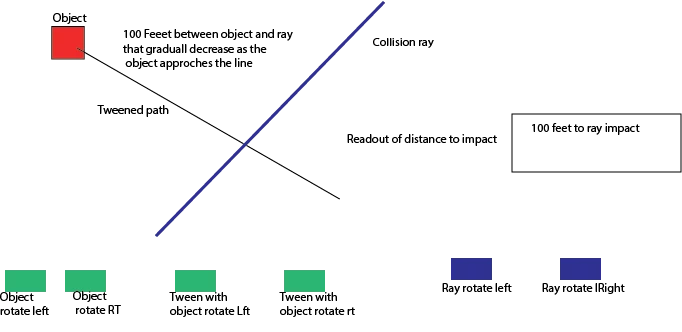
a solution. I have one movie clip that is tweened on a straight path that is movable with the mouuse

as wel as rotatable with buttons, the imbedde tweened object cabn also be moved with buttons . The collision object is a line that rotates 360deg with a button . That all works, what I cant figure out to do is display the distance to the line as the tweened object approaches the like a countdown to a colision.

added a photo to help explain.

Thank you all
    This topic has been closed for replies.

    1 reply

    kglad
    Community Expert
    Community Expert
    October 16, 2023

    you can get an exact answer for a disc/circle and an approximation for a square using:


    first, calculate the line segment's point of collision.

    then, calculate distance between your object's center of that point of collision


    if you need a more exact answer, you would need both collision points, the segment and the object.

    Known Participant
    October 17, 2023

    Dear Kglad

    Thank you for your reply

    I am not sure how acomplish to that, as both the object and the ray are on different time lines how and are both capable of moving to diffent places on the screen. I can work it out if static but not each a time a new ray position and a new path is chosen.

    Thank you peter


    kglad
    Community Expert
    Community Expert
    November 6, 2023

    Dear Kglad 

    Thanks It is supposed to look like this three dots in a row with blue dot in the center.

    What I get using the scale factors(root.yellowmc.dot1.x = x2/stage.scaleX) is this.

    Best Regrds 

    and thanks for your help

    Peter


    is the red dot, dot3?  (and choosing easy-to-remember names makes debugging easier.)


    if so, you never assign an x,y, so it's at the default 0,0


    what do different dots represent?