
Known Participant
October 16, 2023
Question

line to movieclip collision

  • October 16, 2023
  • 1 reply
  • 2301 views

Dear All Thank you for your time

I have aproblem that cant seem to work out looked on line and read some books but cant find

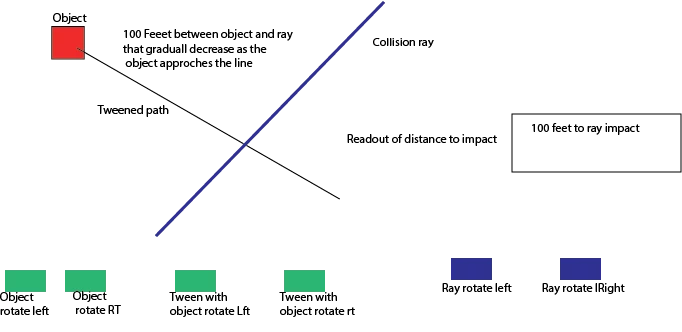
a solution. I have one movie clip that is tweened on a straight path that is movable with the mouuse

as wel as rotatable with buttons, the imbedde tweened object cabn also be moved with buttons . The collision object is a line that rotates 360deg with a button . That all works, what I cant figure out to do is display the distance to the line as the tweened object approaches the like a countdown to a colision.

added a photo to help explain.

Thank you all
    This topic has been closed for replies.

    1 reply

    kglad
    Community Expert
    Community Expert
    October 16, 2023

    you can get an exact answer for a disc/circle and an approximation for a square using:


    first, calculate the line segment's point of collision.

    then, calculate distance between your object's center of that point of collision


    if you need a more exact answer, you would need both collision points, the segment and the object.

    Known Participant
    October 17, 2023

    Dear Kglad

    Thank you for your reply

    I am not sure how acomplish to that, as both the object and the ray are on different time lines how and are both capable of moving to diffent places on the screen. I can work it out if static but not each a time a new ray position and a new path is chosen.

    Thank you peter


    Known Participant
    November 11, 2023

    what won't work?


    the code i just posted does work with the test fla you sent to position the yellow over the red.


    Dear Kglad

    The lines need to rotate with a button and move with the mouse,this means as a child its reference point it is not the same as the movie clip so the x and y of the graphic dot  shows a  static position whereas the parent  movie clip shows a stage position because the top and bottom points show different localities one global and one local   a straight line cannot be drawn between the two dots as the second point is not a global point rather a local point. 

     As such I cannot use the algorithim for finding the intersection of the two lines as they rely on all  points being refenced to the stage global position not to the local position. When I use the local to global it works as expected but only on my monitor not on laptops with a smaller screen size.

    As this will be shown on all types of screens including tablets it needs to be fit for all purposes. Looking at the video it looks like I need some trig functions to make it the rotation work


    Best Regards

    Peter