
Participant
September 21, 2016
Answered

Linking to an htm file/media on a local machine

  • September 21, 2016
  • 1 reply
  • 467 views

Hello This is probably a simple answer but I haven't used flash since version 3 so I am on a bit of a steep learning curve.

I am trying to produce a interactive presentation using animate CC with action script 3 which will all be presented locally on a laptop.

When I use the code

name1_button.addEventListener(MouseEvent.CLICK, fl_ClickToGoToWebPage_5);

function fl_ClickToGoToWebPage_5(event:MouseEvent):void

{

  navigateToURL(new URLRequest("wibble.htm"), "_blank");

}

to try and open the webpage wibble,htm it can't find the path of the file even though the wibble.htm is in the same directory as my swf and wrapper html file.

Is there a way to define a directory for paths of webpages and other media I want to link to somewhere in the program, or is there a better way to click on a button to open a webpage locally?

thanks

James
This topic has been closed for replies.
Correct answer kglad

don't use an absolute path.

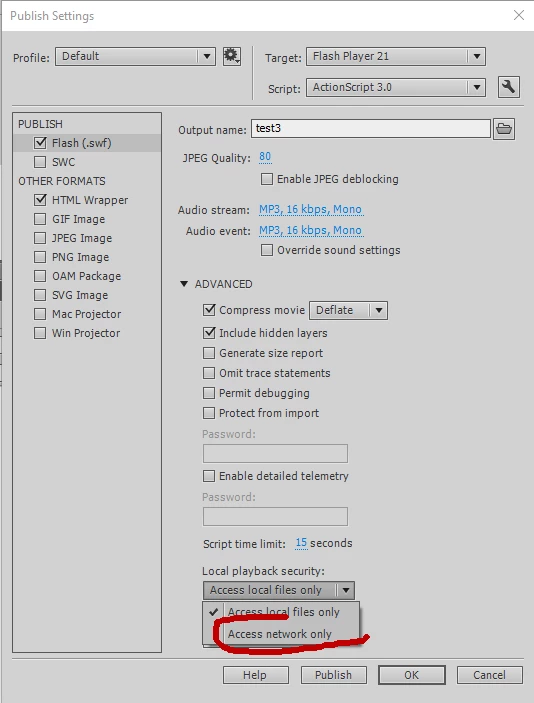
fix your security settings to allow the directory you're using to test per message 1.

or you can try changing your publish settings:

1 reply

kglad
Community Expert
Community Expert
September 21, 2016

make sure there is a wibble.htm (not eg, wibble.html).

if that doesn't help and you're testing locally adjust your security settings or test non-locally, Adobe - Flash Player : Settings Manager - Global Security Settings panel

Participant
September 22, 2016

Hello kglad, thanks for the ideas but I still can't seem to get it to link to local files. I've tried with both htm and html, also importing a video file none of which are found once it is in the browser on the local machine.

What is the syntax for specifying an absolute path to a file rather than a relative one?

e.g.

name1_button.addEventListener(MouseEvent.CLICK, fl_ClickToGoToWebPage_5);

function fl_ClickToGoToWebPage_5(event:MouseEvent):void

{

  navigateToURL(new URLRequest("c:\temp\wibble.htm"), "_blank");

}

kglad
Community Expert
Community Expert
September 22, 2016

Brilliant thanks so much, it was Chrome being odd. When I tried to add a folder in the security settings using the browse for folder option it wouldn't do it. I then tried this in IE and it worked. As a get around in chrome I just pasted the location rather than using the browse for folder.

Thanks for the help you are a star!

James


you're welcome.