
Inspiring
September 3, 2018
Answered

Long Timeline - Best Practices

  • September 3, 2018
  • 2 replies
  • 1042 views

Hi there,

I am creating a piece that would be about two minutes.

There will be about 5 separate topics/messages - some text, a character and some graphics. They will come one after the other. No interactivity - this will be exported as a video.

The objective is to remind several important things so I wanted to have a nicer way to present these concepts and export as a video. it is HTML5 Canvas.

I am working with 24 fps.

The thing is that if I use about 200 frames per topic the whole project becomes long and I just wanted to check if someone has a best practice when working with long timelines.

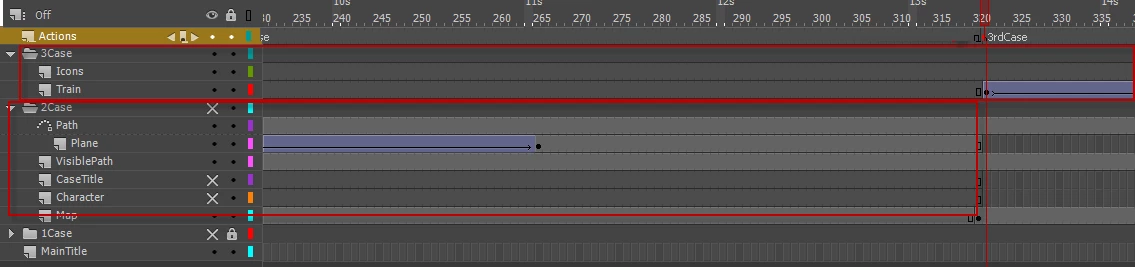
To give you an idea I am attaching an image. I am using folders for each topic/case and also labels. I am working only on the main timeline.

Is that the best way?

Thanks in advance

Bobby
    This topic has been closed for replies.
    Correct answer kglad

    Thanks ClayUUID

    This seems as a neat solution.

    So I will add a stop() on the main timeline on the same frame where the mc is.

    Then inside the mc itself I will add the script you say but I am not sure what to substitute it with.

    What should be "parent"? Thanks

    PS. Actually I have about 20 frames transition mc between the main mc so how would that work?


    on the first frame of your main timeline use

    this.stop();

    and place the first movieclip on frame 0, the next on frame 1 etc

    on the last frame of each movieclip (that has another movieclip following it) use:

    this.stop();

    exportRoot.gotoAndStop(exportRoot.currentFrame+1);

    on the last frame of the last movieclip use:

    this.stop();

    2 replies

    Community Expert
    September 5, 2018

    There are many different ways to do it. the way you are doing it is very organized. In the end, its whatever works best for you.

    kglad
    Community Expert
    Community Expert
    September 3, 2018

    i would create 5 movieclips and add them to the main timeline sequentially.

    i wouldn't necessarily call that a 'best' practice but i think a good argument could be made that it's a better approach than putting everything on the main timeline like you're doing.

    Inspiring
    September 4, 2018

    Thanks kglad

    I think this makes sense.

    I that case, if I have 5 separate movies on the main timeline and if each of the movies is about 300 frames, I need to place them appropriately with 300 frames between the Movies on the main timeline.

    Inspiring
    September 5, 2018

    No, the whole point of putting each animation in its own movieclip is to encapsulate it so changes to individual animations don't requiring changing anything else.

    Your main timeline should just have a single frame for each animation, containing only the movieclip containing the animation. In that frame you'd put a stop();  statement. Then on the last frame of each animation movieclip put:

    stop();

    MovieClip(parent).play();


    Thanks ClayUUID

    This seems as a neat solution.

    So I will add a stop() on the main timeline on the same frame where the mc is.

    Then inside the mc itself I will add the script you say but I am not sure what to substitute it with.

    What should be "parent"? Thanks

    PS. Actually I have about 20 frames transition mc between the main mc so how would that work?