


Copy link to clipboard
Copied
Hello I'm building a customized clock at the moment. For seconds i'm using 12 movieclips with bars inside (fig1)
For every second a bar lights up. I can get the number of "group" to pick and the number of "bar" to light up but i can't actually make them light up because I'm not sure how to actually select the group of bars according to the time. My movieclips are called "group0", "group1" etc. and inside I made different states depending on how many bars light up (fig2)
fig1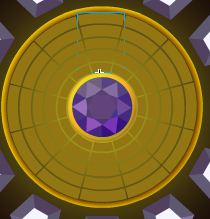 fig2
fig2
Here's my code:
var now:Date;
var hour:Number;
var min:Number;
var sec:Number;
var group_access:Number;
var specificbar:Number;
addEventListener(Event.ENTER_FRAME, settime);
function settime (evt:Event) {
//get time
now = new Date();
//check hours and set
if (now.getHours() > 12) {
hour = now.getHours() - 12;
} else if (now.getHours()==0) {
hour=12;
} else {
hour=now.getHours();
}
//set min and sec
min=now.getMinutes();
sec=now.getSeconds();
}
addEventListener(Event.ENTER_FRAME, setSecs);
function setSecs (evt:Event) {
//Task: Light up a bar every second
group_access = (Math.floor ( (sec*2 )/10) ); // to selects the right group of bars eg. 33 seconds will be group 6
specificbar = sec-(group_access * 5); // to light up the right bar inside the group
// Need help with this part to work out how to access the moviclip according to the seconds on the clock
}
Really worried right now, please help and thank you 


 1 Correct answer


if that's your trace output and you're trying to go to keyframes labeled bar4, bar0 etc, you should be using:
this ["group"+group_access].gotoAndStop("bar"+specificbar);

 8
Replies
8
8
Replies
8

Copy link to clipboard
Copied
you want to "light up":
this["group"+group_access]
Copy link to clipboard
Copied
Thank you so much i'm not getting any errors now but the bars are still not lighting up =(
i know it's selecting each group properly but it doesn't seem to be going to the different states in the each movieclip. I thought it might be because i labelled them with "bar" in front of the number but when i changed that it still doesn't work... maybe it's because i've written the code wrong? :
this ["group"+group_access].gotoAndStop(specificbar);
Copy link to clipboard
Copied
specificbar doesn't look right. use the trace() function to confirm:
trace(specificbar);
Copy link to clipboard
Copied
ok i've traced :
trace(group_access , specificbar);
result:
3 4
3 4
3 4
3 4
4 0
4 0
4 0
seems right =S
group no.3 and bar no. 4
then group 4
Copy link to clipboard
Copied
if that's your trace output and you're trying to go to keyframes labeled bar4, bar0 etc, you should be using:
this ["group"+group_access].gotoAndStop("bar"+specificbar);

Copy link to clipboard
Copied
You can make you code less verbose.
One should be careful with using event listeners, especially enter frame event. In your case, actually, it make more sense to use Timer.
In addition, int is faster and take less space than Number. Also, using integers elevates the need to use Math functions like floor().
Here is an example of how your code can be optimized:
import flash.events.TimerEvent;
import flash.utils.Timer;
var now:Date;
var hour:int;
var min:int;
var sec:int;
var group_access:int;
var specificbar:int;
var timer:Timer;
init();
function init():void
{
timer = new Timer(500);
timer.addEventListener(TimerEvent.TIMER, settime);
timer.start();
}
function setSecs():void
{
group_access = sec / 5; // to selects the right group of bars eg. 33 seconds will be group 6
specificbar = sec % 5; // to light up the right bar inside the group
this["group" + group_access].gotoAndStop("bar" + specificbar);
}
function settime(e:TimerEvent):void
{
now = new Date();
hour = now.getHours() - 12;
if (hour > 13)
{
hour = hour - 12;
}
else if (hour == 0)
{
hour = 12;
}
min = now.getMinutes();
sec = now.getSeconds();
setSecs();
e.updateAfterEvent();
}
Copy link to clipboard
Copied
wow thanks everyone  much appreciated
Copy link to clipboard
Copied
you're welcome.


Get ready! An upgraded Adobe Community experience is coming in January.
Learn more
 AdChoices