
Exit
  • Global community
    • Language:
      • Deutsch
      • English
      • Español
      • Français
      • Português
  • 日本語コミュニティ
  • 한국 커뮤니티
1

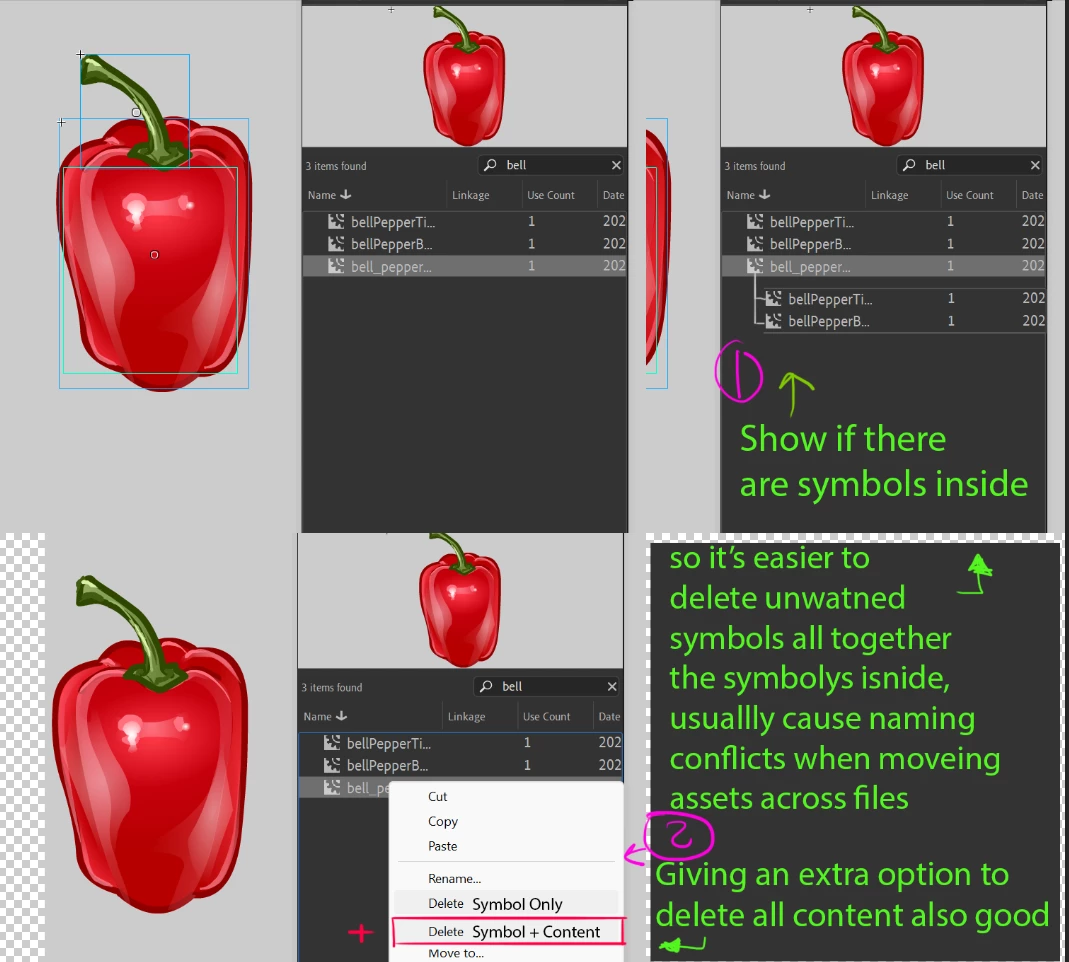
Missing Feature in Animate Library > when selecting any symbol please show list of symbols inside it
Explorer ,
Mar 13, 2023 Mar 13, 2023


Screenshot 2023-03-13 113240.png

Missing Feature in Animate Library  I think we can have.
when selecting any symbol please show list of symbol that are placed inside it.
it makes it way easier and efficient, when we move symbols from project to another,


Sometimes we use similar symbols inside multiple different assets and when we drag the ( main assets )  it gives the warning of pre-existing symbols.

This feature will allow us to skip this step, and will avoid creating more symbols or duplicates keep library clean, this also applies when using cc libraries not just local libraries 


Also would be great idea to have an  extra option in the menu where we choose to delete only the symbol, or the symbols existing inside it.

978
Translate
Report
Community guidelines
Be kind and respectful, give credit to the original source of content, and search for duplicates before posting. Learn more
community guidelines
Community Expert ,
Mar 13, 2023 Mar 13, 2023
Translate
Report
Community guidelines
Be kind and respectful, give credit to the original source of content, and search for duplicates before posting. Learn more
community guidelines
Explorer ,
Mar 13, 2023 Mar 13, 2023

Thank you !

Translate
Report
Community guidelines
Be kind and respectful, give credit to the original source of content, and search for duplicates before posting. Learn more
community guidelines
Explorer ,
Mar 13, 2023 Mar 13, 2023

took a look,  Adobe Animated is not listed in the HelpX  link above, however  I has "Adobe Vido & Audio apps" , and  that took  me back  to adobe community 🙂 thank you 

Translate
Report
Community guidelines
Be kind and respectful, give credit to the original source of content, and search for duplicates before posting. Learn more
community guidelines
Community Expert ,
Mar 13, 2023 Mar 13, 2023

use the wishform, 

kglad_0-1678724327296.png


Translate
Report
Community guidelines
Be kind and respectful, give credit to the original source of content, and search for duplicates before posting. Learn more
community guidelines
Explorer ,
Mar 13, 2023 Mar 13, 2023

yaay I just did I will try the other method too Thank you  for taking the time to elaborate and  respond ! Appreciate it

Translate
Report
Community guidelines
Be kind and respectful, give credit to the original source of content, and search for duplicates before posting. Learn more
community guidelines
Community Expert ,
Mar 13, 2023 Mar 13, 2023
LATEST

you're welcome 

Translate
Report
Community guidelines
Be kind and respectful, give credit to the original source of content, and search for duplicates before posting. Learn more
community guidelines
Community Expert ,
Mar 13, 2023 Mar 13, 2023
Translate
Report
Community guidelines
Be kind and respectful, give credit to the original source of content, and search for duplicates before posting. Learn more
community guidelines
Community Expert ,
Mar 13, 2023 Mar 13, 2023

I think it's broken only if you try to visit the wishform from within Animate (Help > Submit Bug/Feature Request...).


But this link seems to be working:

https://www.adobe.com/products/wishform.html


Regards,

JC

Translate
Report
Community guidelines
Be kind and respectful, give credit to the original source of content, and search for duplicates before posting. Learn more
community guidelines
Community Expert ,
Mar 13, 2023 Mar 13, 2023

@JoãoCésar 


oh good.  thanks for that info.

Translate
Report
Community guidelines
Be kind and respectful, give credit to the original source of content, and search for duplicates before posting. Learn more
community guidelines
Explorer ,
Mar 13, 2023 Mar 13, 2023

Thank you ! I just submited a request, I wish we could upload pictures like in here.

Translate
Report
Community guidelines
Be kind and respectful, give credit to the original source of content, and search for duplicates before posting. Learn more
community guidelines