Participant
April 18, 2017
Answered

My swatches panel has become all mixed up. How do i get it back to normal

  • April 18, 2017
  • 3 replies
  • 255 views

I need some help

    This topic has been closed for replies.
    Correct answer Joseph Labrecque

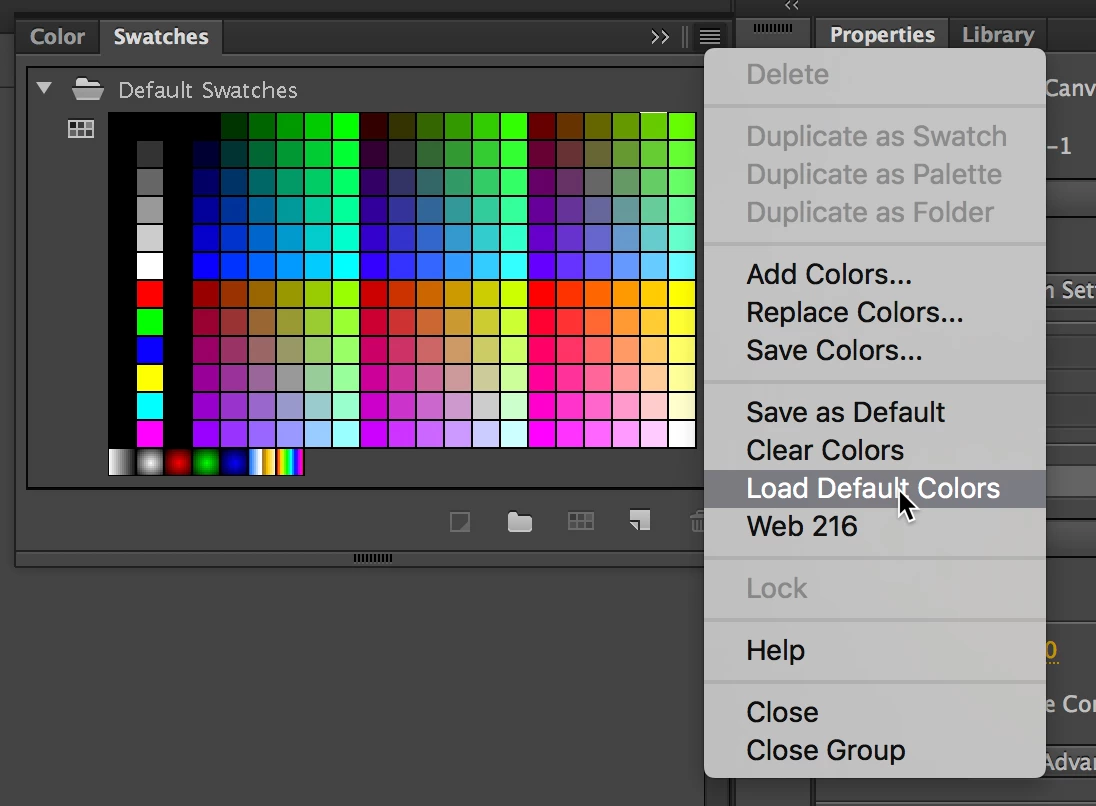
    In Animate CC, in the Swatches panel (upper right) options menu... choose Load Default Colors.
    3 replies

    Colin Holgate
    Inspiring
    April 18, 2017

    Thanks Barb for the move.

    The upper right of the main window has a menu that may currently say "Essentials". You can select Reset from that menu to fix the layout.

    Joseph Labrecque
    Community Expert
    Joseph LabrecqueCommunity ExpertCorrect answer
    Community Expert
    April 18, 2017

    In Animate CC, in the Swatches panel (upper right) options menu... choose Load Default Colors.

    Barb Binder
    Community Expert
    Community Expert
    April 18, 2017

    You posted your question in the non-technical Lounge forum, which is where you can connect with your peers for conversations that don't directly relate to product help and support. I’ll move your question to the Animate forum so that you can get the answer you are looking for.

    ~Barb

    P.S. For a list of all available product forums, see https://forums.adobe.com/welcome/

    ~Barb at Rocky Mountain Training
