


- Home
- Animate
- Discussions
- Re: Newbie question concerning sprites
- Re: Newbie question concerning sprites
Newbie question concerning sprites

Copy link to clipboard
Copied
Hi everyone. I just recently started playing around with Flash CS5 and this is the first time that I've used this kind of program before.
I've been following a tutorial on youtube for how to make a simple platformer game and it has gone smoothly up until now. You see, rather than drawing my own character, I just used a sprite sheet that I found on Google. The particular sprite that I wanted only had a walking animation so I had to modify it to also make a jumping animation. The idle animation for now is just a single frame of the character standing still.
This is the tutorial that I am using.
As you can see, he is not using sprites. When he wants to make the character switch to a particular animation, he tells Actionscript to go to a keyframe. For me, each key frame is a frame of the sprite's animation so that doesn't work.
At one point I thought that I had it figured out. I had each of the character's animations of seperate layers like this:
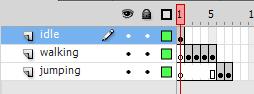
As you all probably know, this didn't work. When I don't press any keys, he cycles through each frame (as I would expect). The problem is that when I press the left or right key, he switches to keyframe 2, but it doesn't animate. My guess is that there is some way to code the Actionscript so that rather than using gotoAndStop(2), I need something that will go to frame 2, play to frame 5 and loop.


 3
Replies
3
3
Replies
3


Copy link to clipboard
Copied
You should create each animation as a separate movieclip so that you can either have them in single frames and just go to one frame for an animation to occur, or you can control which of them is visible instead.
Copy link to clipboard
Copied
Thanks for the tip. I think I'm at least on the right track now. I went with the invisible instances method because I don't know how to set an animation to a single frame.
So now what I'm trying to do is make it so that each instance; player_mc (that's the idle animation), jump_mc, and walkleft_mc (haven't made a flipped, walkright_mc symbol yet) is playing at the same time. Only one, however, is visible at a time. So for example, if you hold left, walkleft_mc.visible = true, and player_mc.visible = false.
I've played around with a lot of stuff but it still isn't working properly. I was hoping that I could save time by doing:
if (!rightKeyIsDown || !leftKeyIsDown || !upKeyIsDown || !canJump)
{
player_mc.visible = true;
}
else
player_mc.visible = false;
But for some reason, the idle player_mc symbol remains. I took a logic course a couple of years ago and I'm finding that the interesting-but-seemingly-useless knowledge that I got from that class is actually proving to be quite useful indeed. It makes me wonder though. Does Flash have an "if and only if" operator? Ideally, the idle animation would only be visible if no keys are being pressed AND if the player is touching the ground.
One last thing, too. Part of the tutorial that I linked to earlier had me include the following code:
for(var i:int = 0;i;<10;i++)
Now I understand that it is declaring a new variable which is an integer and that integer is equal to 0, but after that, I get a bit lost. First of a, I don't know why there are semicolons without a carriagereturn following them or if this even matters. I understand that ++ means (increase value by 1), but I don't see the i variable being used anywhere else in the code.
Thanks again. I really appreciate the help.
Copy link to clipboard
Copied
To use frames instead of visibility you just place each movieclip into a single frame. Kinda like you had earlier, just one frame apiece instead of 1 for idle, 4 for walking, 2 for jumping. Then you just jump between single frames.
For the keys you should have code checking for the non-idle keys being used, and if none are then default to the idle condition. It would involve a series of if statements or a switch statement.
In a for loop it is not always a case of using the loop count variable ( i ), though it will often be the case that it gets used. The loop counts primary function is to control how many times the loop occurs.


Get ready! An upgraded Adobe Community experience is coming in January.
Learn more
 AdChoices