

smeekles
Participant
December 20, 2020
Question

not able to change stroke color on brush tool

  • December 20, 2020
  • 1 reply
  • 670 views

i'm unsure of how this happened but now the stroke color of the brush tool (shortcut b) is stuck to this:
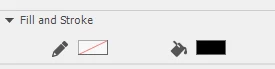
i've updated all my drivers, deleted and reinstalled animate and reset my preferences with ctrl+alt+shift as well but that didn't work. i am on windows 10 and i am using adobe animate cc 2019

    This topic has been closed for replies.

    1 reply

    Community Expert
    December 22, 2020

    Make sure you're using the right brush tool.

    When you press B you're using a classic brush tool to which only uses fill.

    When you press shift+B you get a fluid brush tool which also uses only fill

    When you press Y you get the Paint Brush tool which uses stroke and you should you be able to change the stroke color.

    You can also press shift+Y Which gives you the pencil tool and will allow you to choose a stroke color.


    You have to know the difference between the three brushes.  

    The classic brush tool and the fluid brush tool both use fill.

    The paint brush tool and the pencil to both use stroke.