
Participating Frequently
April 13, 2020
Answered

Onion Skin Outline Mode?

  • April 13, 2020
  • 1 reply
  • 1644 views

This must be really basic, but I can't figure it out. How do I switch to outline mode for onion skinning? Flash used to have its own button. 

I've found an icon that I think is supposed to control this (two overlapping squares) but it's always greyed out.
 

    This topic has been closed for replies.
    Correct answer n. tilcheff

    Hi mate,


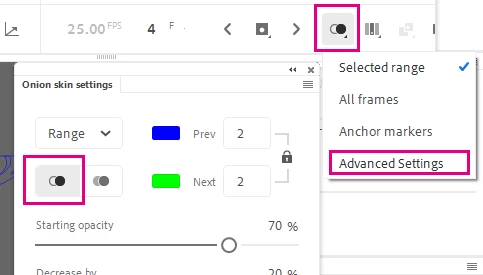
    Click and hold the Onion Skin button on the Timeline and a menu will pop. Choose Advanced; there you can control everything about Onion Skin, including Outline mode.


    But also, if you switch your layers to Outline mode, you will get almost the same result.


    1 reply

    n. tilcheff
    n. tilcheffCorrect answer
    Legend
    April 13, 2020

    Hi mate,


    Click and hold the Onion Skin button on the Timeline and a menu will pop. Choose Advanced; there you can control everything about Onion Skin, including Outline mode.


    But also, if you switch your layers to Outline mode, you will get almost the same result.


    Nick - Character Designer and Animator, Flash user since 1998 | Member of the Flanimate Power Tools team - extensions for character animation
    Participating Frequently
    April 14, 2020

    Thanks Nick,

    Yes I just found that just a minute ago. I wasn't notified of your answer so just saw it. Would have saved me some poking around. And thanks for the tip about the layers.

    Dan

    n. tilcheff
    Legend
    April 14, 2020

    You're most welcome, Dan!

    Pity you wasted some time, but then, you know - it's usually more satisfying when you discover things yourself 🙂


    All the best!

    Nick - Character Designer and Animator, Flash user since 1998 | Member of the Flanimate Power Tools team - extensions for character animation