
Inspiring
September 16, 2018
Answered

Onion skinning idea

  • September 16, 2018
  • 2 replies
  • 1257 views

Hello forum!

There has to be something to improve the onion skinning button on the timeline in Animate CC. I have attached an idea for an improvement. I'm constantly turning it on/off and always have to scroll down and it just slows down the flow... (anyone with me on this one?)
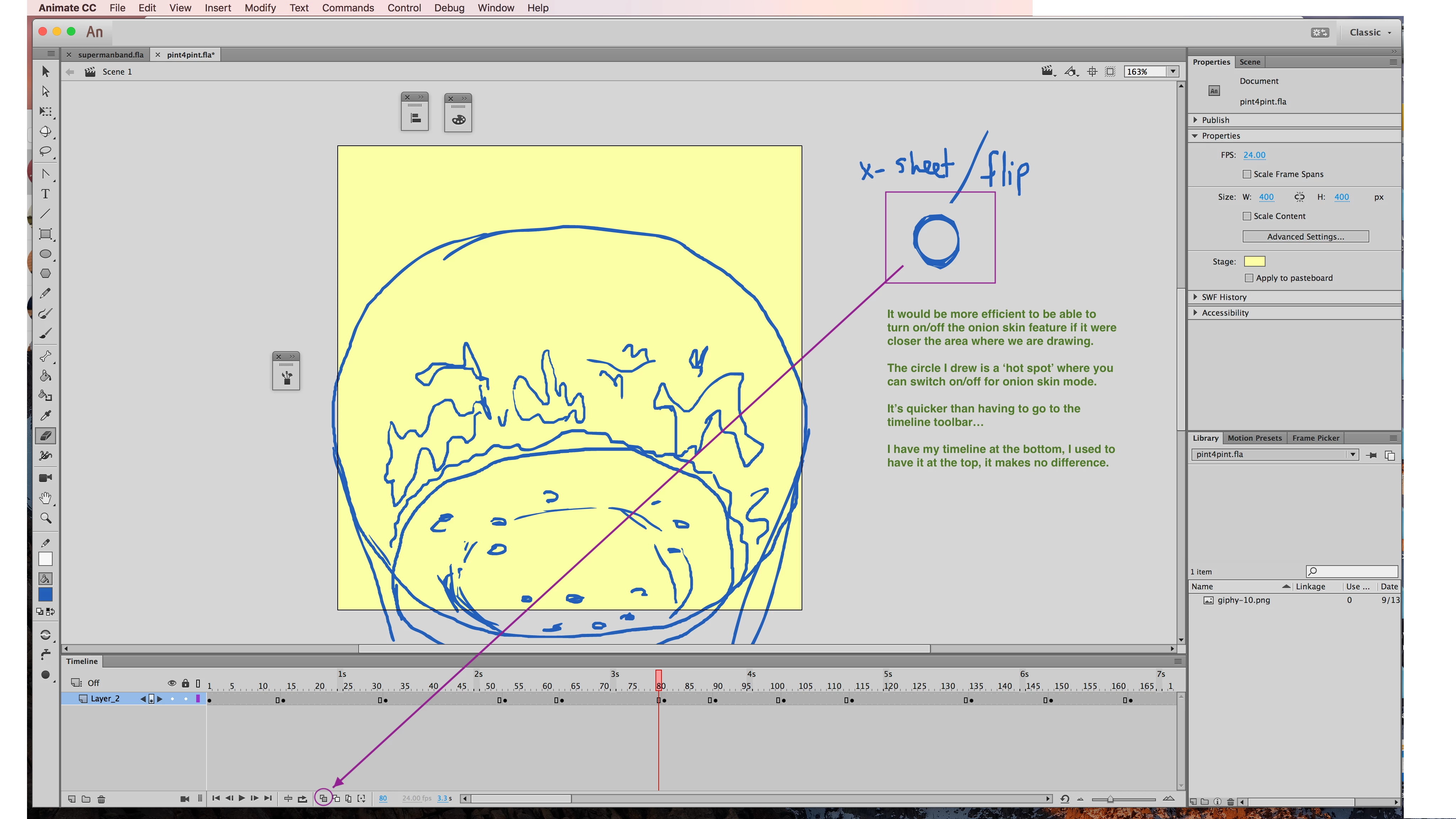
If there were a way to create some kind of hovering on/off button, it would be awesome. Forgive the rough KF on there, it's a beer ad I'm working on.

Your loyal cartoonist,

Camilo Anaya

    This topic has been closed for replies.
    Correct answer chenjil43641795

    Clay,

    You are splitting hairs, I love it.

    Again, I was wrong with the term for moving the mouse point from one part of the screen, to a different part of said screen... The transmigration, if you will, of the mouse arrow, or simply "arrow," from a (one) point, or, if you will, vertices, on the screen, or, if you will...

    What are your thoughts on the "docking" of the timeline, with respect to the "canvas" on Animate CC? More importantly, what would improve about the onion skinning button/feature?

    Camilo


    I don't know what you need till now.

    Maybe I don't know English.(I use Google Translate to come here)

    But if you just tangle, the position of the onion peel.

    Why not use the shortcut key to open it?

    SHIFT+ALT+O

    Shortcut keys can also be customized.

    You can also set buttons on the tablet pen.

    2 replies

    Legend
    September 16, 2018

    What do you mean you have to "scroll down"? It's right there on the screen.

    If you want the button closer to your workspace, dock the timeline to the top of the window instead of the bottom.

    Inspiring
    September 18, 2018

    Hey Clay,

    What I mean by scroll was a "drag" the mouse action. Sorry for the misunderstanding. Scrolling does imply some kind of window up and down movement, so I see my error in terminology. To elaborate: I'm used to flipping animation pages quickly, turning the light table off/on quickly, and basically drawing furiously as much as I can, during pencil testing. So, for me, dragging the mouse to that onion skin button is, kills my flow. Dig? I have the timeline underneath the canvas now, I used to have it above for years. I'm not a creature of habit.

    Inspiring
    September 19, 2018

    It's just "move". You move the mouse. Dragging is clicking and holding on an object to move it. You know... "drag and drop"?


    Clay,

    You are splitting hairs, I love it.

    Again, I was wrong with the term for moving the mouse point from one part of the screen, to a different part of said screen... The transmigration, if you will, of the mouse arrow, or simply "arrow," from a (one) point, or, if you will, vertices, on the screen, or, if you will...

    What are your thoughts on the "docking" of the timeline, with respect to the "canvas" on Animate CC? More importantly, what would improve about the onion skinning button/feature?

    Camilo

    kglad
    Community Expert
    Community Expert
    September 16, 2018

    make feature requests here, https://tracker.adobe.com/#/home