


Copy link to clipboard
Copied
I'm working in HTML5 on adobe animate and I have a button that goes from my game menu screen to my first part of the game on frame 1442. The first button I created, which is the start button that plays the game menu works
this.stop();
this.started = false;
this.addEventListener("click", startClicked.bind(this));
function startClicked()
{
if(!this.started){
this.started = true;
this.play();
}
}
However the second button I created to go to frame 1442 doesn't work, upon clicking the button it just does nothing. I heard that the action scripts timeline starts on 0 while the actual timeline starts on frame 1, so my code says this.gotoandPlay(1441).
this.nav.btn1.addEventListener("click", btn1Clicked.bind(this));
function btn1Clicked()
{
this.gotoAndPlay(1441);
}
My button is located inside of a bar that bounces onto the screen, the bar's instance name is nav and the button's name is btn1. I'm fairly new to learning how to code these kinds of things and wondering if someone could figure out my problem.


 1 Correct answer

Stick a console.log(this); in your second button handler to make sure it's referencing what you think it's referencing. Or just store a global reference to your game timeline and don't even bother with trying to keep this straight.
Also that's a really unfortunate choice of font for your Play button. It looks like it says "Peay" or "PCay".

 5
Replies
5
5
Replies
5



Copy link to clipboard
Copied
Hi.
The timeline starts from 0 in HTM5 (Canvas) documents. In AS3 documents, the timeline starts from 1.
Your code seems to be correct.
Please double check if you have the frame you're sending the playhead to and if you really have a object called 'btn1' inside of another object called 'nav' and that the addEventListener method is being called in a frame that really contains the button 'this.nav.btn1'.
Copy link to clipboard
Copied
In my animation I have a linkbar layer where I put my nav bar, it comes in bouncing using a motion tween, but my animation is longer than the motion tween and I could not figure out how to keep the motion tween on just those frames instead of extending it so I copied the nav bar and put it on another layer, I was wondering if the double nav bar was messing up the coding? The first nav bar goes off the timeline on frame 61 and then the next frame the new nav bar with the same instance names comes in on frame 62 along with the script
this.nav.btn1.addEventListener("click", btn1Clicked.bind(this));
function btn1Clicked()
{
this.gotoAndPlay(1441);
}


Copy link to clipboard
Copied
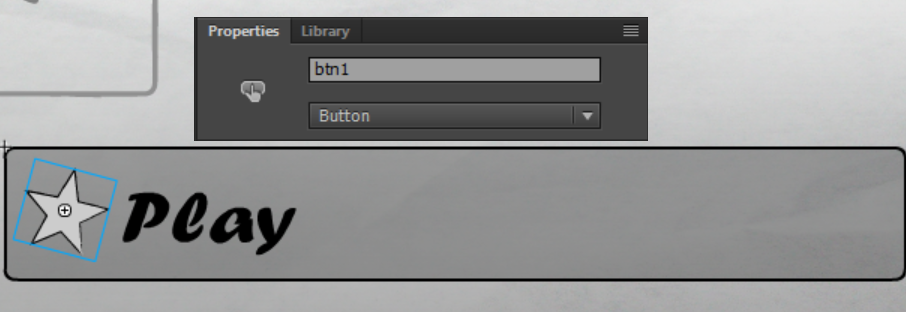


In my animation I have a layer named linkbar where I store my navigation bar, I had to create two link bar layers both with the same instance name of nav aswell as the buttons having the two smae instance names, I couldn't figure out how to keep the motion tween on the nav bar while extending the frames to go past it, that's why I created two nav bars. The first nav bar dissapears on frame 61 and then the second one comes in on frame 62 along with the script
this.nav.btn1.addEventListener("click", btn1Clicked.bind(this));
function btn1Clicked()
{
this.gotoAndPlay(1441);
}
I was wondering if maybe that is what is interfering with the code?
Copy link to clipboard
Copied
Stick a console.log(this); in your second button handler to make sure it's referencing what you think it's referencing. Or just store a global reference to your game timeline and don't even bother with trying to keep this straight.
Also that's a really unfortunate choice of font for your Play button. It looks like it says "Peay" or "PCay".

Copy link to clipboard
Copied
Sometimes we create buttons from existing buttons - check it (or prepare a new one with valid instance name) - maybe it helps?
pawel


Get ready! An upgraded Adobe Community experience is coming in January.
Learn more
 AdChoices