
Problems with Ñ and accents while editing flash template
Hello
Please, someone help!
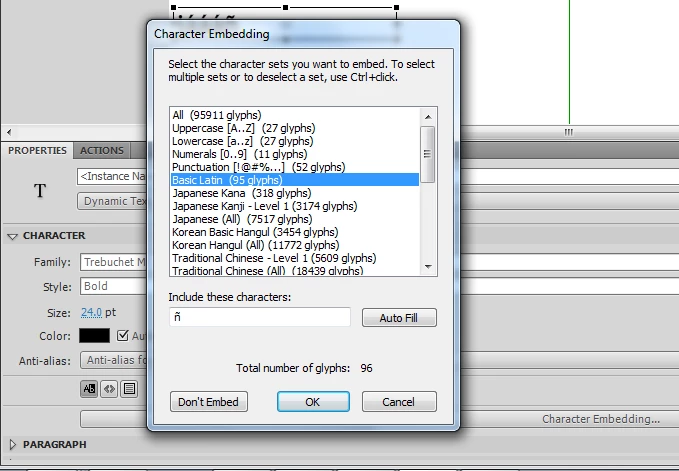
I have been trying to edit the text of a flash template and when i publish it, i cant see the Ñ and the accents
i have been looking for a solution and i have found over the internet:
system.useCodepage = true;
But that does not work, i still cant see that symbols when the file is published.
this is a dynamic generated text from code inside the fla. i am using cs5.
here is the code i have in the template:
var menu_label:Array = new Array("BIENVENIDO", "DISEÑO GRAFICO",
"DISEÑO WEB", "PORTAFOLIO",
"PUBLICIDAD ON-LINE", "IDENTIDAD CORPORATIVA",
"REGISTRO DE DOMINIOS", "CONTACTO",
"ALOJAMIENTO WEB" );
var total:Number = menu_label.length;
var i:Number = 0;
var page:Number;
var main_menu:MovieClip = new MovieClip();
stage.addChild(main_menu);
for( i = 0; i < total; i++ )
{
var btn = new flashmo_button();
btn.name = "flashmo_btn" + i;
btn.scaleX = btn.scaleY = btn.alpha = 0;
btn.item_no = i;
btn.flashmo_bg_color.gotoAndStop( i + 1 );
btn.flashmo_click_area.addEventListener( Event.ENTER_FRAME, btn_enter );
btn.flashmo_click_area.addEventListener( MouseEvent.ROLL_OVER, btn_over );
btn.flashmo_click_area.addEventListener( MouseEvent.ROLL_OUT, btn_out );
btn.flashmo_click_area.addEventListener( MouseEvent.CLICK, btn_click );
var each_substring:Array = menu_label.split("|");
btn.flashmo_button_label.fm_label.text = each_substring[0];
btn.item_url = each_substring[1];
btn.flashmo_button_number.fm_number.text = ".0" + ( i + 1 );
main_menu.addChild(btn);
}
function btn_over(e:MouseEvent):void
{
e.target.parent.over = true;
}
function btn_out(e:MouseEvent):void
{
e.target.parent.over = false;
}
function btn_click(e:MouseEvent):void
{
var mc = e.target.parent;
if( mc.item_url != undefined )
navigateToURL( new URLRequest( mc.item_url ), "_parent" );
else
change_page(mc.item_no);
}
function btn_enter(e:Event):void
{
var mc = e.target.parent;
if( mc.over == true )
mc.nextFrame();
else
mc.prevFrame();
}
function change_page(no:Number):void
{
page = no + 1;
play();
}
/*
var default_volume:Number = 0.60; // 0.00 to 1.00
var bg_music:Sound = new flashmo_music();
var music_channel:SoundChannel = bg_music.play(0, 10000);
var music_volume:SoundTransform = new SoundTransform();
music_volume.volume = default_volume;
music_channel.soundTransform = music_volume;
sound_control.stop();
sound_control.addEventListener( MouseEvent.CLICK, play_pause );
function play_pause(e:MouseEvent):void
{
music_volume.volume = default_volume;
if( e.target.currentFrame == 1 )
music_volume.volume = 0;
music_channel.soundTransform = music_volume;
e.target.play();
}
 AdChoices