
radial menu array instance names & parent/child rotation (canvas)
hi all.
and thank you, programmers, for the fact, that you endure the designer, and brightly talented copypaster))
i'm tryin to make interactive infographics, based on 60 pairs of personal human qualities (kind/evil, friendly/reserved etc).
something like that:
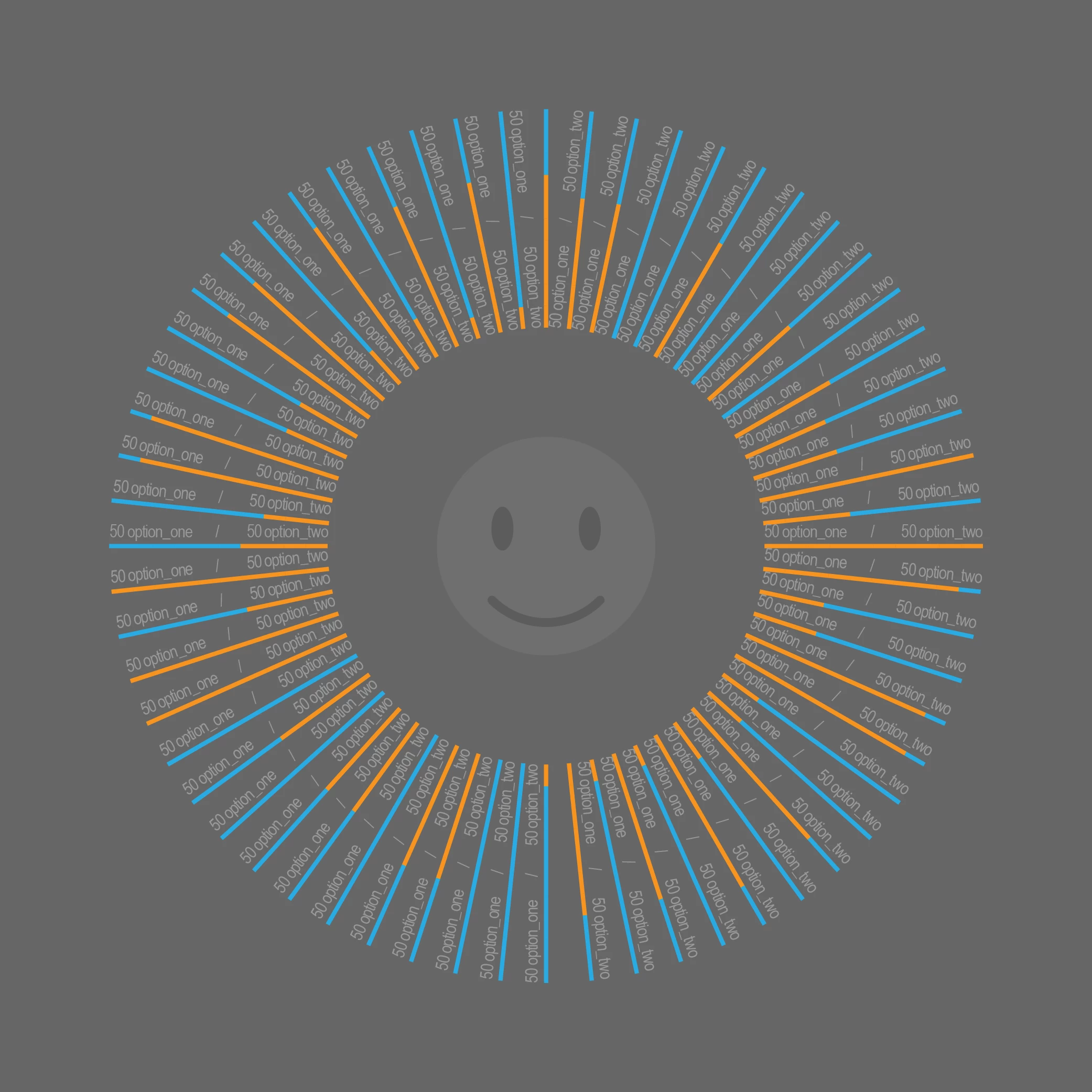
so, first of all, i built an example with one pair of words, (regpoint is right-center).
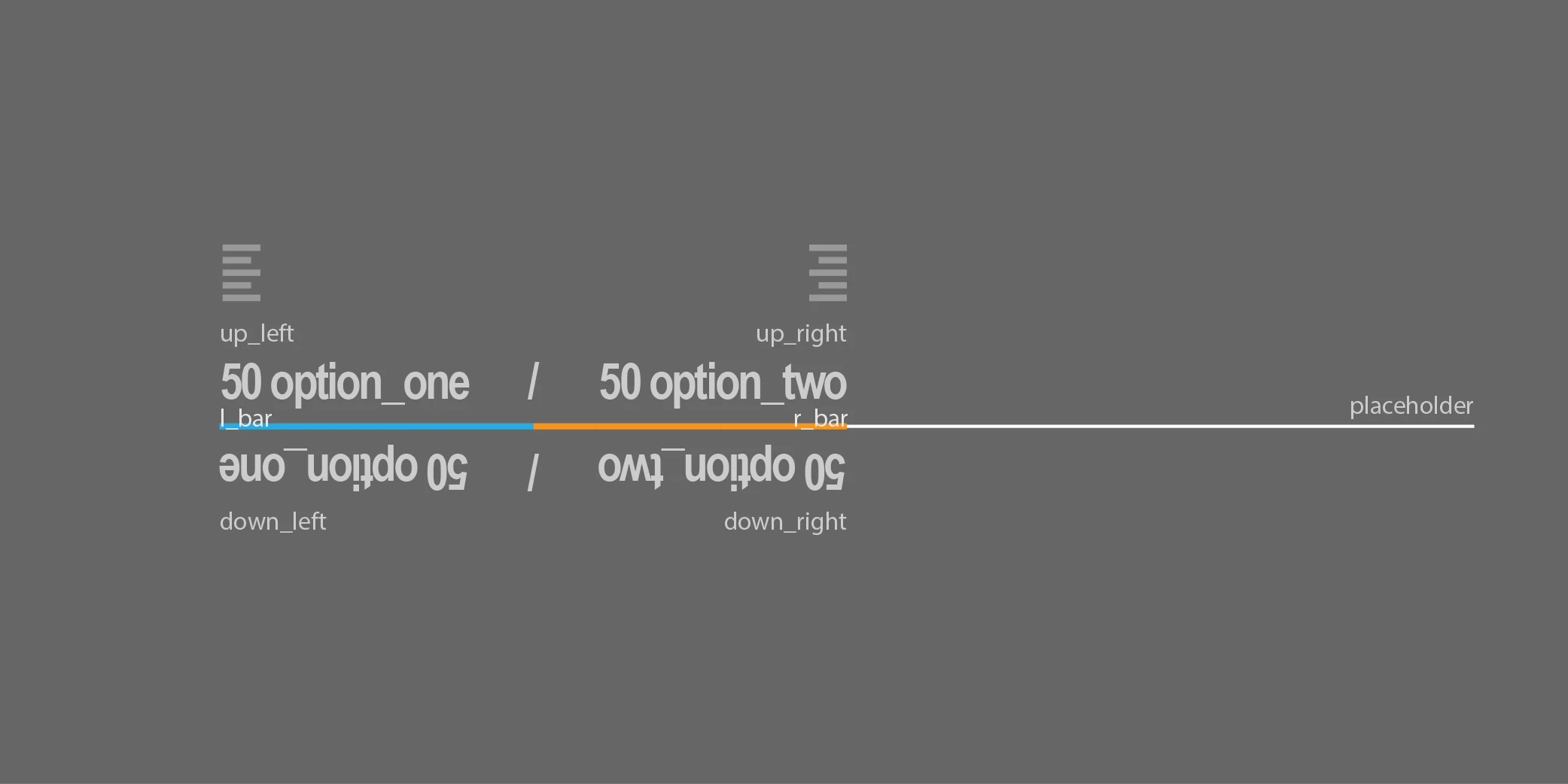
main mc (instance name = pair01) contains 4 texts: up_left, up_right, down_left, down_right, two color bars and a placeholder (will be removed later). i've added 2 pairs of text, cause i cannot come up with pixel perfect solution for flipped/rotated text - new flanimate doesn't let me to work accurate with it (any suggestions?). so, left text is ltr, right is rtl direction.
it might be more comfortable to user to have a possibility to rotate this circle of texts, so by using atan2, i can measure positive (0 to 360) angles for this kind of rotation. from the angle of 270 to 90 i show to the user upper texts, and from 90 to 270 – lower texts, for comfortable reading. color bar lenght = number values (substrings from texts).
now i need 2 buttons:
1-random order of pairs of the words inside main container (like in the first pic)
2-order from low to high values, (i.e. ”only strong sides of the person”) like this:

everything works fine with single mc.
now, i can add 60 mc's to stage manually, attach instance names and use a.rotation=b.rotation+6degrees but this is not the right way to do things? i think, that it's need to be done by adding instances from library to container on the stage with array. so i've looked up at a tutorial by joseph labrecque:
https://blogs.adobe.com/creativecloud/html5-canvas-javascript-basics, and added instances from library.
and then i faced a couple of problems:
1 – i cannot attach instance names (tried it in any possible combination) to word pairs inside main container. so, how i can call for specific instance if necessary? (getchildat? getchildbyname?)
2- i wrote a function for random placement of instances, that works fine, but return a couple of same numbers twice (as expected from the random function, btw), so the instances is placed one over another. i cannot understand, how i perform 6/12/18/24 etc angles randomly without duplicates, and put the instances exactly 6 degrees one from the another? may be it can be done by adding var+=6? well, i can generate a list of 60 numbers even manually, not big deal, but again, i don't have instance names to attach them to.
3– if i rotate a parent container – inner rotation values = 0! so the texts don't flips.. (localtoglobal? getbounds? parent/child?)
array code:
var infogr = new createjs.Container();
infogr.regX = 0;
infogr.regY = 0;
this.frame.addChild(infogr);
bringtheitems(60);
function bringtheitems(items){
for(var i=items-1; i>=0; i--) {
var item = new lib.mc();
var step = (Math.floor(Math.random() * 60) + 1)*6;
item.rotation = step;
infogr.addChild(item);
}
}
and here is a main code:
//main mc structure
this.pair01.up_left.text = "80 blabla";
this.pair01.down_left.text = this.pair01.up_left.text;
this.pair01.up_right.text = "20 bloblo";
this.pair01.down_right.text = this.pair01.up_right.text;
this.pair01.l_bar.scaleX = (this.pair01.up_left.text.substring(0, 2))/2;
this.pair01.r_bar.scaleX = (this.pair01.up_right.text.substring(0, 2))/2;
//rotate texts for comfortable reading
this.addEventListener("tick",flip_text.bind(this));
function flip_text(){
if(this.pair01.rotation>90&&this.pair01.rotation<270)
{
this.pair01.down_left.visible=true;
this.pair01.down_right.visible=true;
this.pair01.up_left.visible=false;
this.pair01.up_right.visible=false;
}
else{
this.pair01.down_left.visible=false;
this.pair01.down_right.visible=false;
this.pair01.up_left.visible=true;
this.pair01.up_right.visible=true;
}
}
//store global rotation as var for rearranging texts & 360=0
var globalrot;
this.addEventListener("tick",globalrotation.bind(this));
function globalrotation(){
globalrot = this.pair01.rotation;
if (this.pair01.rotation >= 360){
this.pair01.rotation = 0;
}
}
// atan2 for degrees from 0 to 360 & rotation follow mouse
loadThis = this;//to remove event listener later
loadThis.addEventListener("tick",mouse_pos_rotation);//i need to attach this function to main container, not to mc inside. here for developing/forum purposes.
function mouse_pos_rotation(){
angleInRadians = Math.atan2(stage.mouseY - loadThis.pair01.y, stage.mouseX - loadThis.pair01.x);
angleInDegrees = angleInRadians * (180 / Math.PI);
fixedDegrees = (angleInDegrees > 0.0 ? angleInDegrees : (360.0 + angleInDegrees));
loadThis.pair01.rotation = Math.round(fixedDegrees);//unnecessary digits after point
}
// rearrange button example
this.randRotateBtn.addEventListener("click", clickForRand.bind(this));
function clickForRand(){
loadThis.removeEventListener("tick", mouse_pos_rotation);//remove mouse rotation (in case of main container - don't have to)
loadThat = this;//to remove event listener later
loadThat.addEventListener("tick", selfkillRotate);//listen to reaarange texts function
loadThat.pair01.rotation = globalrot;//starting point = global rotation
function selfkillRotate(){//reaarange texts function
loadThat.pair01.rotation +=1;//rotate to new position
if(loadThat.pair01.rotation === 70/*may be var/any number/degree*/){
loadThat.removeEventListener('tick', selfkillRotate);//reaaranged. brake.
loadThis.addEventListener("tick",mouse_pos_rotation);//go back to mouse (in case of main container don't have to)
}
}
}
please help. burned a week for it. 
 AdChoices