
Answered
Radial wipe for animate?
I am trying to animate the drawing of a circle. Is there such thing as a radial wipe (as in After Effects) for Animate? If not, how can I accomplish the same outcome? I'm a beginner and don't know much yet 
Thanks!

I am trying to animate the drawing of a circle. Is there such thing as a radial wipe (as in After Effects) for Animate? If not, how can I accomplish the same outcome? I'm a beginner and don't know much yet
Thanks!
Hi mate,
A shape tweened mask with a couple keys will do the job.
Masks in Flash / Animate are of the 'what you see is what you get' kind, i.e. a revealing mask.
So create a Graphic symbol which will contain your mask animation. (Mask symbol)
It should be set to 'play once' and the first frame should be a small wedge.
Then you shape tween one of the sides of this triangle over the desired number of frames. You will need 2-3 keys to complete the transformation.
This Mask symbol is on its own layer and you make this layer a mask layer. The mask will reveal what is 'masked' in the masked layer(s) underneath.
On the masked layer underneath you put the stuff that will be revealed. You can have multiple masked layers.
So the layer stack will look like this:
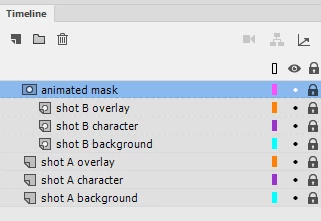
This will result in shot A transitioning into shot B with a radial wipe.
It's even better if your shots are nested inside Graphic containers (like compositions in AE).
Hope this helps!
NT
Already have an account? Login
Enter your E-mail address. We'll send you an e-mail with instructions to reset your password.
 AdChoices