
Regarding the new easing
So the 2017.5 release of Animate has added a long-requested new feature-- support for a greater variety of easing formulas. It works great, and I'm genuinely happy to finally have this capability.
However, I feel the UI they've developed to expose this functionality could use some work. I've started this thread in the hope to have a discussion that could lead to it being improved in subsequent releases.
This is the new easing UI:
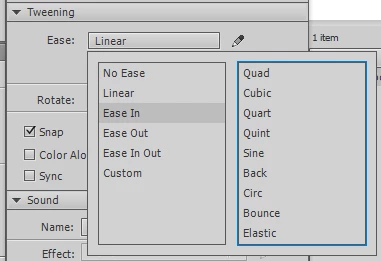
They've replaced the easing strength field with an easing type dropdown. The old strength field dynamically appears underneath only when the classic-style ease is selected. Pretty straightforward so far. But here's where we get into problems. The new "dropdown" isn't really a dropdown (note the lack of a down-arrow). It's a nonstandard GUI widget that's halfway between a dropdown and a modal dialog. Here are some usability issues I've identified with it:
- Unlike a true dropdown control, you can't click on it again to dismiss the popup. You have to click elsewhere on the screen.
- There are redundant methods for creating a custom ease. You can either click the pencil, or select "Custom".
- The default ease is labeled "No Ease", which is incorrect. It's a linear ease.
- The classic style ease is labeled "Linear". This is only correct as long as you leave the intensity at 0 (which makes it redundant to the so-called "No Ease" option). As soon as you change the intensity, it is by definition not a linear ease.
- Instead of just clicking on the ease type you want, for some reason you have to double-click it. This is inconsistent with basically the entire rest of the Animate interface.
- Some of the items in the left column display easing formulas, some don't. There's no visual indication of which are which... you have to click them to find out.
- The column ordering is, for the new eases, backward. Instead of picking the formula you want (quad, cubic, etc), then the variant (in, out, in-out), it forces you to pick the variant, then the formula... which it then displays in formula-variant order, e.g. "Cubic EaseIn".
If I were in charge of overhauling this, this is what I'd do:
I'd replace the current fake-dropdown with a true dropdown that lists the following items:
- Classic
- Quad
- Cubic
- Quart
- Quint
- Sine
- Back
- Circ
- Bounce
- Elastic
"Classic" would be the default, and when selected would display the old intensity field underneath. All other choices, when selected, would cause a second dropdown to appear underneath, labeled "Type:", with these choices:
- In
- Out
- In-Out
The pencil icon would remain in its usual place, acting to customize the currently selected easing curve.
Thoughts?
 AdChoices