Thank you so much, I'll try your suggestion of exporting the rotoscope with the option checked to set an alpha channel instead of the stage color tomorrow and put into After Effects.
I tried it putting both their rotoscoped animation and the music video into After Effects but I could only see one or the other. The only way I could see the animation on top of the video was if I lowered the opacity but your suggestion of exporting with the alpha channel instead of stage color may be my fix to that!
I'll try it tomorrow!
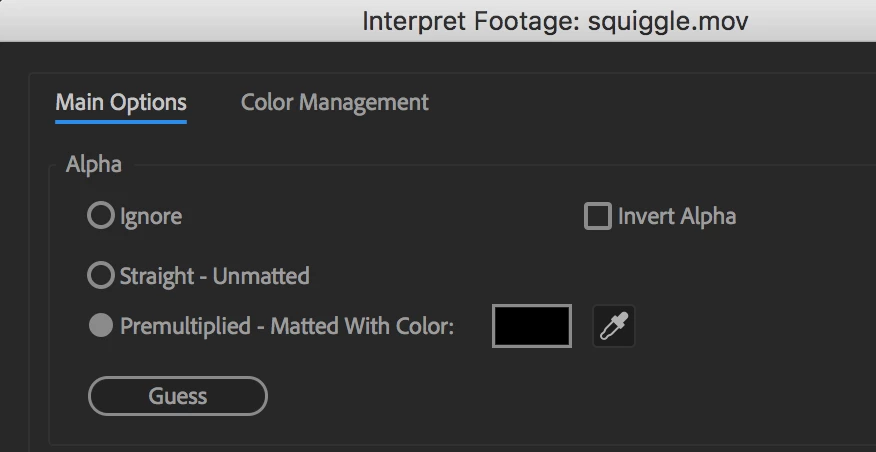
One thing to watch for, which I'm not sure applies to AE, but it might, is that you have to tell it to interpret the footage as having an alpha channel. In some video editing programs it defaults to ignoring the alpha. So, if your first attempt looks opaque, look around for an option like that.
I went ahead and tested that. AE does have interpret footage, and there are some alpha channel options you might need to try. I often suspect Animate of exporting with premultiplied alpha, and that's what AE defaults to, so it might work out ok. But if you see a fringe, try either the straight alpha option, or change the premultiply color to match the stage color. You get this by right-clicking on the movie in the project panel, and choosing Interpret Footage/Main:
I have more suggestions!
Have your students use an ActionScript 3.0 FLA, not an HTML5 Canvas one. The AS3 one allows more filter options.
Add this line to the Actions panel, for frame 1 of the timeline, it will significantly improve the quality of the exported video:
stage.quality = "16x16";
In the export video panel, don't send it to Adobe Media Encoder. You will still get an MOV file, and it will be larger than if AME had compressed it to MP4, but at least the quality stays good, and the alpha channel will survive the ordeal.


 AdChoices