Inspiring
June 15, 2018
해결됨

Searching a way for Animate to automatically replace each images with other ones

  • June 15, 2018
  • 2 답변들
  • 2176 조회

Hi,

When I import, from a psd file, multiple layers, the quality of each layer is really bad.

So, I open Adobe Photoshop, extract the images in a folder (png) and replace each one of them from Animate (see video).

Capturer 21 - Streamable

Is there a way to script it for making Adobe Animate automatically do that ? (like jsfl but if someone could help me with the script, it would be awesome)

이 주제는 답변이 닫혔습니다.
최고의 답변: JoãoCésar17023019

No problem if you don't have Illustrator.

As suggested by Chen, you can try some importing approach and hopefully your images will be replaced.

Alternatively, here is a small script to replace bitmaps from a imported PSD file.

Preview:
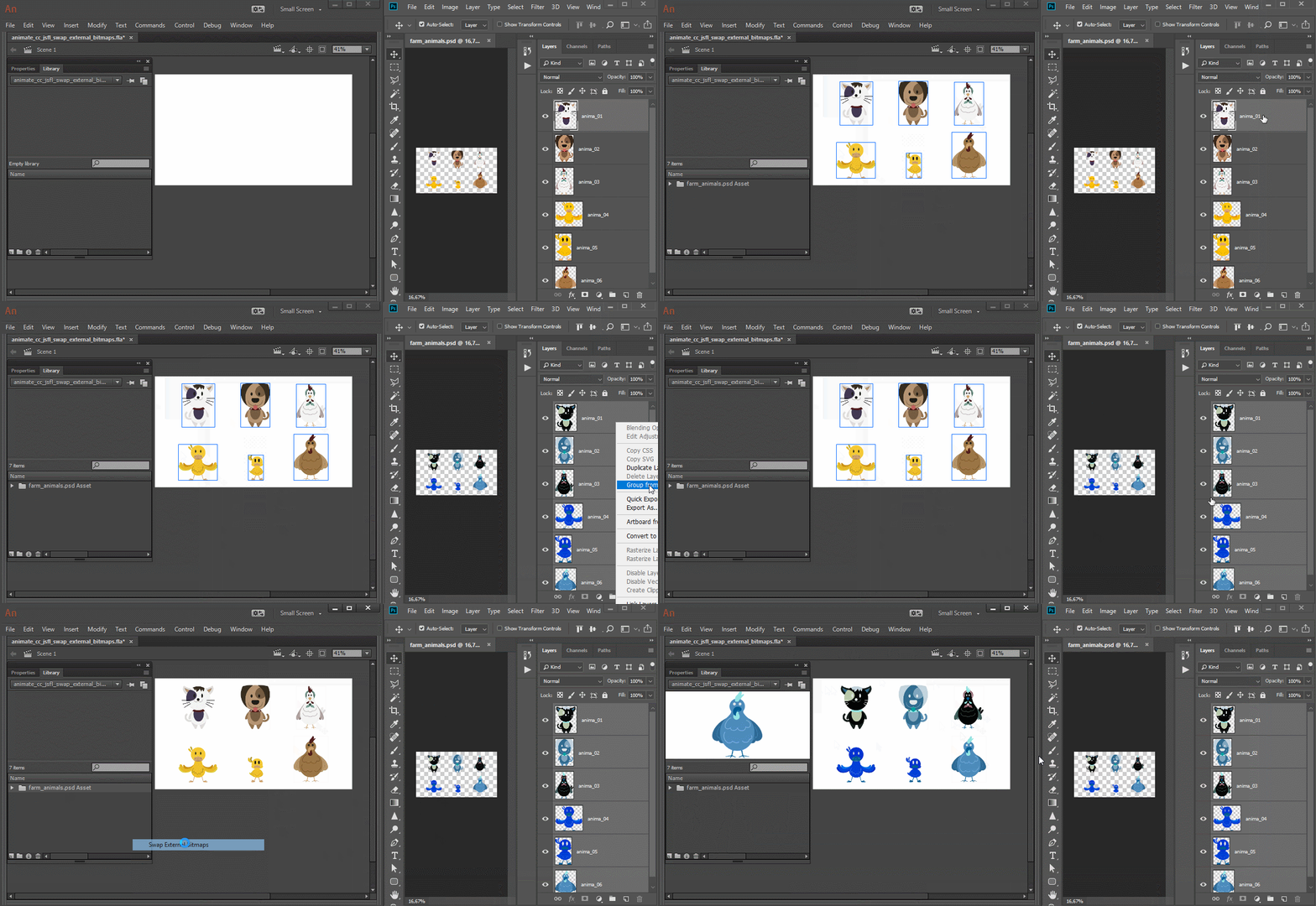
Usage/considerations:

- Select the folder that directly contains the imported bitmaps and run the script;

- Photoshop appends numerical indexes to layers with the same names using dashes while Animate CC uses underscores. So if one outputs to "image-1", "image-2", the other outputs "image_1", "image_2". So, for these cases, the images won't be replaced.

Swap External Images JSFL script download:

Swap External Bitmaps.jsfl - Google Drive

JSFL code for reference only. Feel free to fix and/or optimize if needed:

var uri;

function importImages()

{

     var doc = fl.getDocumentDOM();

     var lib;

     var libFolder;

     if (!doc)

          return;

     lib = doc.library;

     libFolder = lib.getSelectedItems()[0].name;

     if (!libFolder)

          return;

     try

     {

          var externalBitmaps = getExternalBitmaps();

          var path;

          var newName;

          if (!externalBitmaps)

               return;

          for (var i = 0, total = externalBitmaps.length; i < total; i++)

          {

               var path = uri + "/" + externalBitmaps;

               var newName = externalBitmaps.replace(".png", "");

               doc.importFile(path, true, false, false);

               lib.selectItem(externalBitmaps);

               lib.renameItem(newName);

               lib.moveToFolder(libFolder, newName, true);

          }

     }

     catch(error)

     {

          fl.trace(externalBitmaps);

          fl.trace(error);

          fl.trace("___________");

     }

}

function getExternalBitmaps()

{

     uri = fl.browseForFolderURL("select", "Select the folder containing the PNGs.");

     return FLfile.listFolder(uri + "/*.png", "Images.");

}

importImages();

I hope this helps.

Regards,

JC

2 답변

cocoua
Known Participant
April 11, 2023

How to import a PSD:


kglad
Community Expert
Community Expert
April 11, 2023

locked

JoãoCésar17023019
Community Expert
Community Expert
June 15, 2018

Hi.

This is possible.

But do you have Illustrator?

If you open your PSD in Illustrator and the import in Animate, I think you'll get much better results.

Stephdidou작성자
Inspiring
June 15, 2018

Hi,

Thanks for the answer. I don't have Illustrator. I could buy it but if you think it's possible with jsfl, maybe I could try before buying it ?

chenjil43641795
Legend
June 16, 2018

I don't think it's possible to solve your problem with illustrations.

Questions about replacing pictures.

Instead of swapping pictures, you can replace them when you import them.

Import Pictures First

File---Import--Import to stage.

Hint looks like sequence, whether to import sequence, point OK.

When you find that the quality of the picture is too bad.

You use Potoshop to make new pictures., export sequences

The name of the new picture sequence is the same as the name of the old sequence.

New Layer.And then again

File---Import--Import to stage.

Select a new picture sequence.

Hint looks like sequence, whether to import sequence, point OK.

You will then be prompted to replace the existing item. Select it.

This time your original layer picture is all replaced.

And then you delete the new layer,

Now, the picture in your layer is all new.

Of course, if the number of sequence pictures is not equal.

You need to delete 1-2 frames.
