


- Home
- Animate
- Discussions
- Re: TypeError: Error #1010: A term is undefined an...
- Re: TypeError: Error #1010: A term is undefined an...

Copy link to clipboard
Copied
I have created a simple Flash program with two buttons. When a button is clicked, it should switch to a new page, but I've been receiving this error:
TypeError: Error #1010: A term is undefined and has no properties.
at Main()
I know this error is common and I've been looking everywhere for a solution but I can't find one. It looks like there is a problem with the buttons but I feel like I've tried everything and it still won't work  Here is my code:
package
{
import flash.display.MovieClip;
import flash.events.MouseEvent;
public class Main extends MovieClip
{
var startPage:StartPage;
var yellow:Yellow;
var green:Green;
public function Main()
{
startPage = new StartPage();
yellow = new Yellow();
green = new Green();
addChild(startPage);
//add event listeners
startPage.yellowButton.addEventListener(MouseEvent.CLICK,onYellowButtonClick);
startPage.greenButton.addEventListener(MouseEvent.CLICK,onGreenButtonClick);
}
//event handlers
function onYellowButtonClick(event:MouseEvent):void
{
addChild(yellow);
removeChild(startPage);
}
function onGreenButtonClick(event:MouseEvent):void
{
addChild(green);
removeChild(startPage);
}
}
}


 1 Correct answer


that's supposed to be yellowButton, not YellowButton. case counts in actionscript
do the same for greenButton and you should be good to go.
p.s. please mark helpful/correct responses.

 11
Replies
11
11
Replies
11

Copy link to clipboard
Copied
line 21 contains the non-existant object. if that info doesn't help you solve the problem, indicate which is line 21.
most likely startPage doesn't have one or both of those buttons defined when your code executes.
Copy link to clipboard
Copied
Line 21:
startPage.yellowButton.addEventListener(MouseEvent.CLICK,onYellowButtonClick);
Here is the properties dialog for YellowButton:

Copy link to clipboard
Copied
that's irrelevant to this discussion, so far.
attach a screenshot of of your StartPage movieclip with the button (you think) is yellowButton selected and showing the properties panel.
Copy link to clipboard
Copied
Here is the StartPage movieclip - YellowButton is color A:

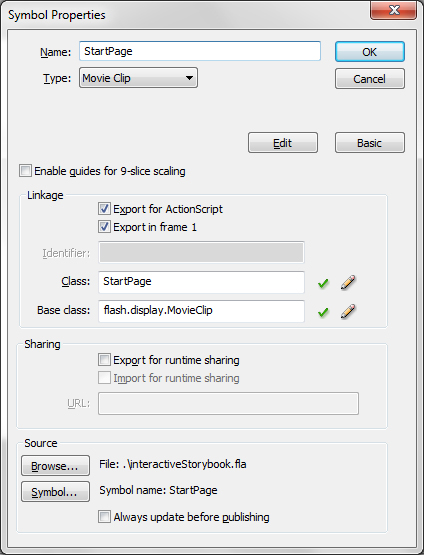
StartPage properties:
Copy link to clipboard
Copied
in the ide, click on color A (to select it), then take a screenshot showing the properties panel (not the symbol properties panel).
Copy link to clipboard
Copied
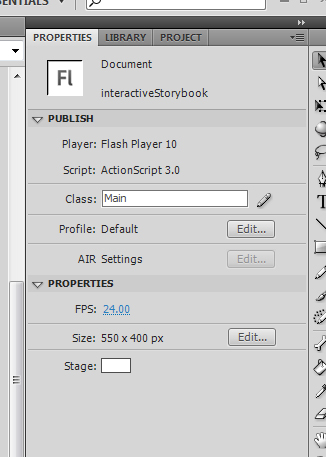
I apologize I am new to Flash but is this what you mean?
Copy link to clipboard
Copied
that's the correct panel but the screen shot shows the properties panel with the stage selected.
click the button you think is yellowButton in your StartPage movieclip (color A) and then take a screenshot showing that properties panel.
Copy link to clipboard
Copied
Okay so I opened the YellowButton properties panel and noticed the name was blank, so I changed the name to YellowButton:

Now though I'm getting these compiler errors:
1046: Type was not found or was not a compile-time constant: YellowButton.
1046: Type was not found or was not a compile-time constant: GreenButton.
Copy link to clipboard
Copied
that's supposed to be yellowButton, not YellowButton. case counts in actionscript
do the same for greenButton and you should be good to go.
p.s. please mark helpful/correct responses.
Copy link to clipboard
Copied
Thank you so much!
Copy link to clipboard
Copied
you're welcome.


Get ready! An upgraded Adobe Community experience is coming in January.
Learn more
 AdChoices