



Copy link to clipboard
Copied
So I'm creating an HTML5 site with Animate CC. I've done a bunch of actionscript stuff in the past but this is my first time with html5. I've barely done anything so far but I've noticed two weird issues that I want to address before I get too far along. When I did a test render, the upper layer appears to have a transparency on it that wasn't intentional and doesn't appear in the fla. Even the black linework on the background layer appears to have a white edge around it as well.
Here's a screencap of what I mean:
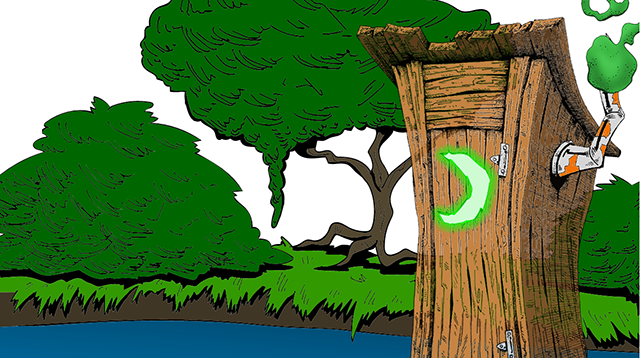
The white around the black lines is a little hard to see in this screencap but you can clearly see the bush through the outhouse even though there's no transparency there.
It was also kinda slow to render, which is odd considering how little I have done. I even got this error message:
"WARNINGS:
Frame numbers in EaselJS start at 0 instead of 1. For example, this affects gotoAndStop and gotoAndPlay calls. (5)"
At this point I haven't done any coding at all so this warning seems weird.
Can anybody advise me on these issues?
Thanks


 1 Correct answer

What you may be observing is a fundamental problem in current HTML5 canvas implementations with the way they anti-alias polygon edges.
graphics - How to avoid seams between filled areas in canvas? - Stack Overflow
If this is the problem you're experiencing, you can only work around it. Put solid colored backgrounds behind problem areas. Paint detail on top of solid colors instead of merged with it. Add thin outlines to vector boundaries. That sort of thing.

 4
Replies
4
4
Replies
4


Copy link to clipboard
Copied
With there being so many flat color areas I would try setting the bitmaps in the library to be lossless. If you're using spritesheets set them to be PNG, and 32 bit. You can optimize the PNGs after you publish, using sites like tinypng.com.
Copy link to clipboard
Copied
Those actually aren't bitmaps. The outhouse was a psd that I imported and then did a trace bitmap and the rest was drawn directly in animate. Or should I have set that to lossless before doing the trace bitmap?
I just tried upping the sprite sheet quality and it didn't make a difference.
Copy link to clipboard
Copied
What you may be observing is a fundamental problem in current HTML5 canvas implementations with the way they anti-alias polygon edges.
graphics - How to avoid seams between filled areas in canvas? - Stack Overflow
If this is the problem you're experiencing, you can only work around it. Put solid colored backgrounds behind problem areas. Paint detail on top of solid colors instead of merged with it. Add thin outlines to vector boundaries. That sort of thing.
Copy link to clipboard
Copied
Okay thanks. I'll definitely do that!


Get ready! An upgraded Adobe Community experience is coming in January.
Learn more
 AdChoices