
Participant
May 7, 2017
Answered

white space in paint brush tool overlap

  • May 7, 2017
  • 2 replies
  • 1470 views

in adobe animate cc when i use different brush styles or variable width settings with the paint brush tool and then draw a single line that overlaps i get this weird white space or deformation when the line intersects with itself. is there a way to change this?

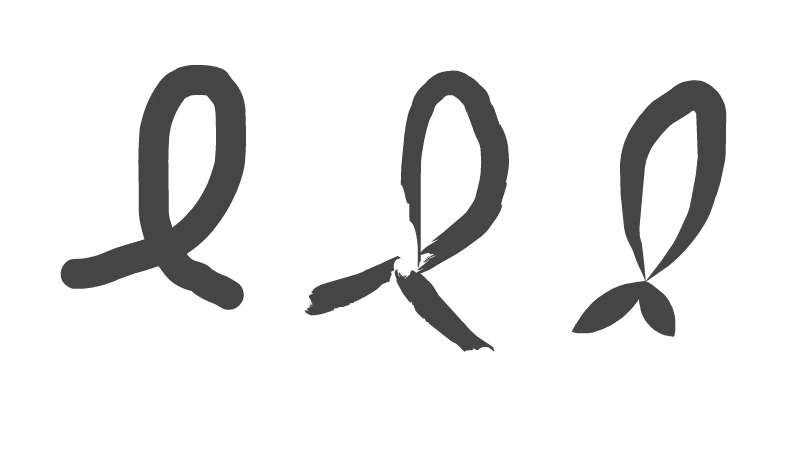
i was trying to find information about it online and i think it has to do with the "non zero winding filling rule" settings or something. here's an image - the first loop is the default paint brush tool, the second is with a stroke style artistic brush applied, the third is with the variable width setting changed. i'd like to make the second two brushes react like the first when they overlap.
    This topic has been closed for replies.
    Correct answer Myra Ferguson

    No, the changes to your path aren't due to the non-zero winding filling rule. That applies to how a fill (as opposed to a stroke) is determined based on how a path overlaps itself. What's happening with a paint brush stroke is that the intersection is telling Animate that despite how you've drawn the line, the there's a start and end to your path at that intersection. It's especially noticeable with the variable width profile. If you want to use a vector art brush and get an effect more like the default brush, look for a brush that doesn't have as noticeable of a tapered end like Chalk - Blunt. If you want tapered ends on the points where you do start and stop your path, draw the path with the uniform width profile and adjust the ends afterwards with the Width tool ( U).

    2 replies

    Myra Ferguson
    Community Expert
    Myra FergusonCommunity ExpertCorrect answer
    Community Expert
    May 8, 2017

    No, the changes to your path aren't due to the non-zero winding filling rule. That applies to how a fill (as opposed to a stroke) is determined based on how a path overlaps itself. What's happening with a paint brush stroke is that the intersection is telling Animate that despite how you've drawn the line, the there's a start and end to your path at that intersection. It's especially noticeable with the variable width profile. If you want to use a vector art brush and get an effect more like the default brush, look for a brush that doesn't have as noticeable of a tapered end like Chalk - Blunt. If you want tapered ends on the points where you do start and stop your path, draw the path with the uniform width profile and adjust the ends afterwards with the Width tool ( U).

    paperwaspAuthor
    Participant
    May 8, 2017

    hmm -  i was hoping there was some way to fix it with the available brushes, but it's good to know what the problem is -  thank you.

    robdillon
    Participating Frequently
    May 7, 2017

    It's difficult for me to understand what you're trying to achieve. The obvious question is: If the default brush works as you want, why not use that. But, I'm guessing that there is more to the problem. One option that comes to mind is that you can convert your brush line to a symbol and then apply a Blending option to the symbol. This may do what you want if you are creating an AS3 file. If you are working with an HTML5 project, then Blending is a bad idea, the display response is just awful.

    If you can give us more information, someone may be able to give you a useful solution.

    paperwaspAuthor
    Participant
    May 8, 2017

    thanks for answering - well i want to draw with more textured looking brushes, and don't want there to be weird white gaps whenever a single line overlaps itself.

    robdillon
    Participating Frequently
    May 8, 2017

    I see what you mean. Maybe someone else on this forum can provide a solution.