
why I can't use click go to frame and stop in HTML5 Canvas , is there any limit in using it ?
Hello I'm new in Adobe Animate
I wanna create an interactive multimedia using Adobe Animate with HTML5 Canvas, I use several buttons and labels on other buttons, I don't experience any problems, why can't the code go to Frame and stop be run in this section? I feel that I have used the labels correctly.
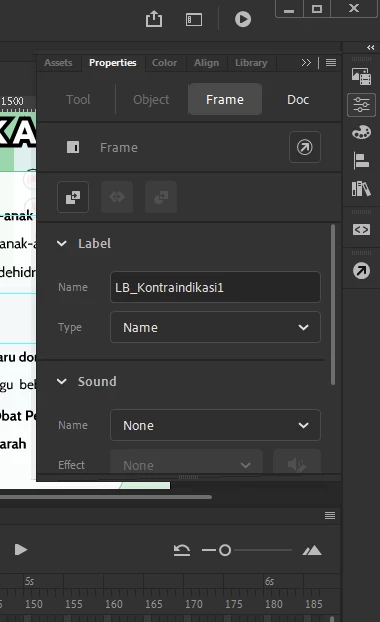
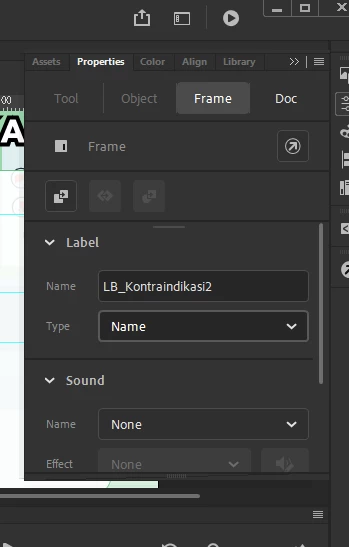
here the SS from previous label, I wanna goto next frame, I want to go to the next frame after that label
this.bt_back.addEventListener("click", fl_ClickToGoToAndStopAtFrame_33.bind(this));
function fl_ClickToGoToAndStopAtFrame_33()
{
this.gotoAndStop("LB_ProsedurBekam");
}
this.bt_home.addEventListener("click", fl_ClickToGoToAndStopAtFrame_34.bind(this));
function fl_ClickToGoToAndStopAtFrame_34()
{
this.gotoAndStop("LB_Home");
}
this.bt_nextmateri.addEventListener("click", fl_ClickToGoToAndStopAtFrame_35.bind(this));
function fl_ClickToGoToAndStopAtFrame_35()
{
this.gotoAndStop("LB_Kontraindikasi3");
}
this.bt_backmateri.addEventListener("click", fl_ClickToGoToAndStopAtFrame_41.bind(this));
function fl_ClickToGoToAndStopAtFrame_41()
{
this.gotoAndStop("LB_Kontraindikasi1");
}
Here the script I use
thank you for helping me


 AdChoices