
Participant
December 20, 2019
Answered

Why is Reverse Frames grayed out?

  • December 20, 2019
  • 1 reply
  • 4880 views

I'm very new to Animate, so I'm sure I'm missing something fundamental here. But I did a tutorial where we reversed the frames to keep the motion repeating. So I know it's possible to do this somehow.


I've created my first animation on my own. I'm using Motion Tween to move a lot of things. And I want to add a reversed copy of the frames to the end.


But for some reason the "Reverse Frames" option is grayed out from the menu:
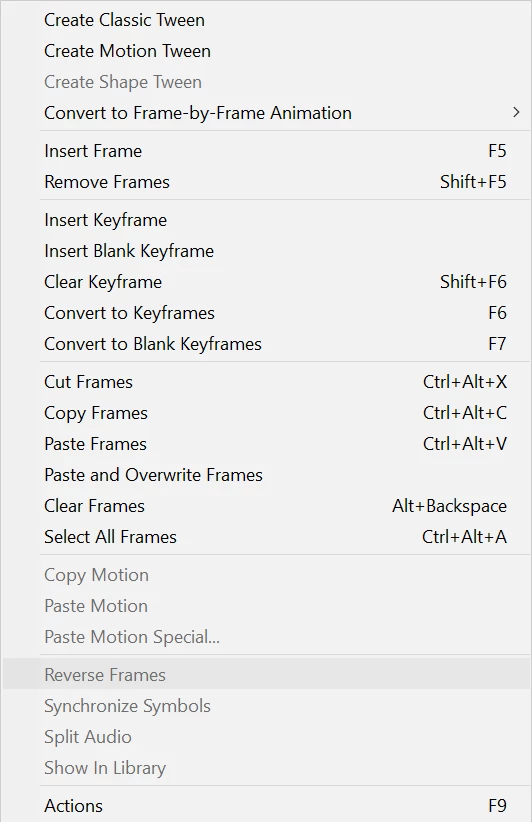


What do I have to do to be able to reverse my frames?

This topic has been closed for replies.
Correct answer TomaD

"convert to frame by frame animation" (on the top of the menu on your sreenshot), then "reverse frames" should be ungrayed


1 reply

TomaD
Inspiring
December 20, 2019

It's grayed out because you select multiple layers, I think

try layer one by one

or if you have lots of layers :

Convert your whole animation to graphic symbol. Then right click (or "Modify> timeline")> "convert in animation frame by frame" (not sure of the exact term, I 've got the french version), and after that you can invert all the frames.

Participant
December 20, 2019

I only have one layer. Here's a screenshot where I have selected the frames and right-clicked:


TomaD
TomaDCorrect answer
Inspiring
December 20, 2019

"convert to frame by frame animation" (on the top of the menu on your sreenshot), then "reverse frames" should be ungrayed