


Participant
Nov 22, 2019 5:38 PM UTC
Answered

Xp-pen tablet acting weird on adobe animate

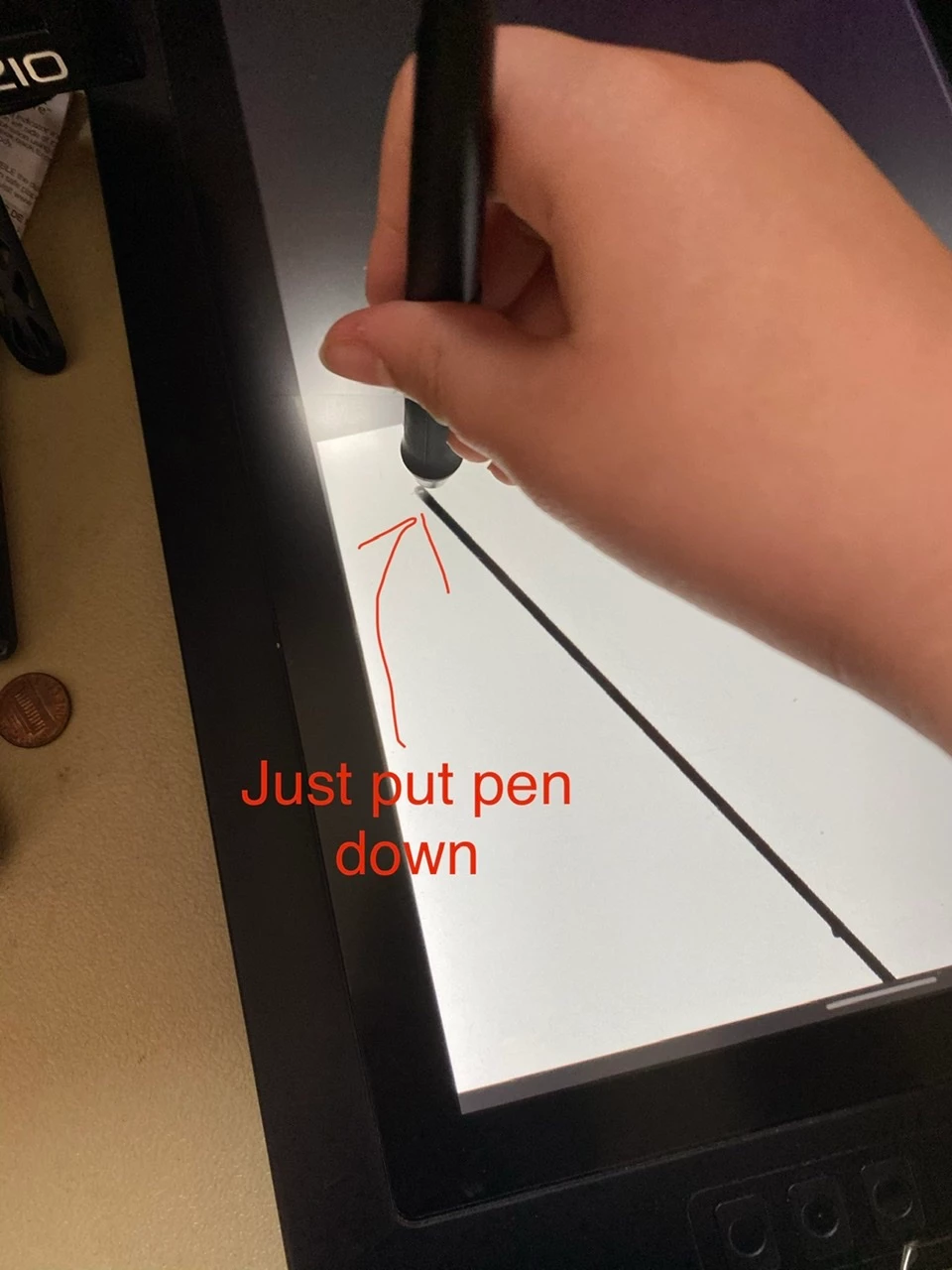
I've had Adobe animate for a while and just fired it up to see how it worked.I have the XP pen 15.6 inch tablet, and adobe animate doesn't seem to like it. For some reason, whenever I put the pen down it draws a huge line and then starts drawing very far down, nowhere near where I originally put down the pan. Can someone tell me what I did wrong, or how to fix it?
 

This topic is closed to new replies. Start a new post to keep the conversation going.
thomasp97947471Correct answer
Participant
Nov 25, 2019 10:51 PM UTC

Hey, so I finally figured it out. I just needed to switch my main display to my drawing tablet. It's not ideal, but it worked.

10 replies

Participating Frequently
Jan 23, 2022 6:44 PM UTC

There's already a correct answer in the reply section that works for drawing tablets with a monitor. For the ones without a monitor, setting the "Display Scale" on 100% in Windows settings can fix it.


I thought it would help some people who have drawing tablets without a monitor like me. 

Translate
Participating Frequently
Aug 22, 2020 11:01 PM UTC

Hi

I have the same problem with XP-pen Deco Pro Small and I have no idea how to fix it. Can you please help me?

Translate
Participant
Oct 15, 2020 5:53 PM UTC

I have the same problem in mi recently bought xp-pen deco mini 7, I cannot work with Animate. Is it problem of Adobe of Xp-pen?

Translate
Participant
Oct 17, 2020 4:00 PM UTC

Hi,


I fixed my problem of lines in Adobe Animate. In xp-pen config tool, I had selected the Relative mode (because it is easy for me). Then, I changed to Absolute mode and it works now!

I hope that this solution help you.

Translate
Inspiring
Nov 22, 2019 8:24 PM UTC

I think I have seen this issue mentioned before. Is your tablet the same resolution as your main monitor?


There is a Twitter thread here which sounds similar: https://twitter.com/stephenonguk/status/1194942811965132800?s=20

Translate
Participant
Nov 25, 2019 12:37 AM UTC

Hey, sorry but  im not that tech smart. Do you know how to do that?


If so, thanks.

Translate
thomasp97947471AuthorCorrect answer
Participant
Nov 25, 2019 10:51 PM UTC

Hey, so I finally figured it out. I just needed to switch my main display to my drawing tablet. It's not ideal, but it worked.

Translate