


Preran
Community Manager
Community Manager
June 16, 2020
Question

Adobe Animate version 20.5 (June 2020 update) is now live!

  • June 16, 2020
  • 20 replies
  • 7183 views

Hi everyone,


The latest update to Adobe Animate brings with it a many exciting features using which you can quickly create and share your animations. 


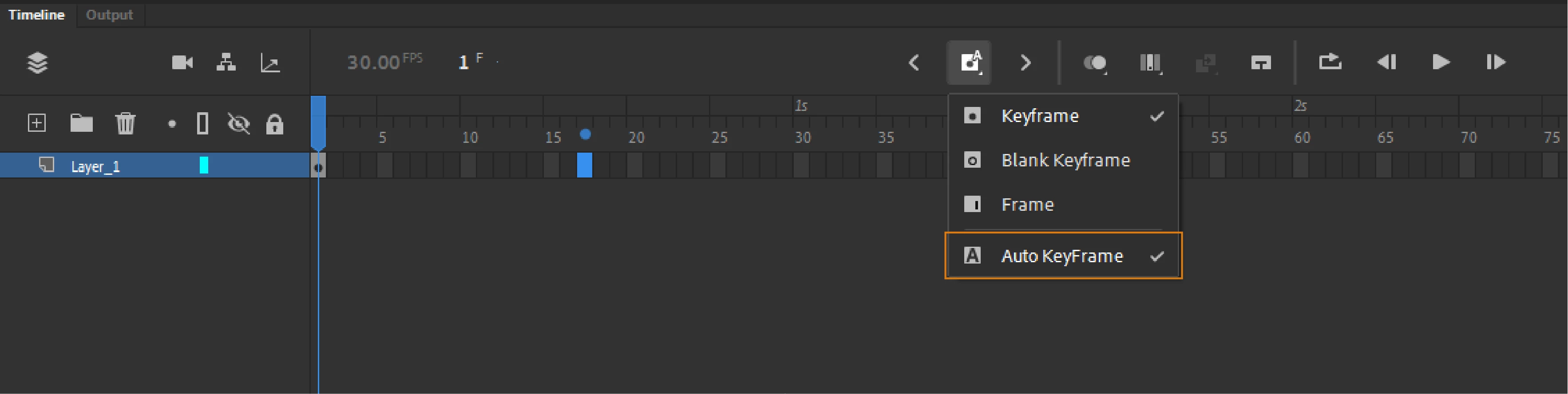
Auto Keyframe: When you edit your project on stage or using the Properties panel, Animate automatically adds a Keyframe. This is indicated by a blue dot on the Timeline panel. 


Assets Panel: Store, manage, and reuse assets across projects using the Asset panel. In the Library Panel, export an image or symbol using the Contex Menu. You can then import the exported images or symbols into the Assets panel from the menu.


Quickly share your animations through social media: Click the Share button and select Quick Social Share.


Extension - Hands On Tutorial creatorCreate a hands-on tutorial using Window> Extensions> Hands-on Tutorial Creator. Test your saved tutorial using Help> Hands-on Tutorial> Import Tutorial... 


Optimize file sizes using Selective Texture: When Export As: Texture is selected in Publish Settings,  Animate converts complex vector shapes into bitmaps and retains simple shapes as vectors without having an impact on the runtime performance.


For more information see https://helpx.adobe.com/animate/using/whats-new/2020-2.html


Thanks,

Preran

This topic has been closed for replies.

20 replies

Inspiring
July 12, 2020

My Animate CC became so slow, terrible performance. I have iMac 2017, 64 GB memory... Anybody know the reason?

Il-Cartoonatico
Known Participant
July 7, 2020

I'm having another problem. During Animate startup the gradients already applied are removed automatically. 

Adobe Employee
July 8, 2020

Hello,

The issue is not reproducible in our end. 

  • Does thois happen consistently? 
  • What is the version of Animate you are using?
  • Can you please share exact steps with sample FLA to reproduce this?


Thanks!


Known Participant
July 4, 2020

Could you please confirm whether, in this version, navigating within a movie clip doesn't work in vr projects, as gotoAndStop does not direct you to the correct frames? 

Known Participant
June 30, 2020

This is a problem in the latest version of 20.5v of Animate CC.

When I copy and paste a symbol or object, a lag occurs.

From the previous version, there was a loading time when copying and pasting symbols with many original frames, but there was no loading when copying and pasting regular objects.

However, in the latest version, when I copy and paste a light symbol or a single object, a lag occurs.

After testing, the more objects in a project, the longer the loading time when trying to paste.

When copying a simple image using Alt, I have to wait too long for loading. This is very inefficient.

I don't know why this suddenly happened,
We hope that optimization will be done as soon as possible.

SheaB
Inspiring
June 30, 2020

Hello,


I'm having a hard time viewing the Instance name in the Properties Panel. The instance name only shows partial view of the name, it's cut off and I can't find a way to expand the panel enough to view the entire name. The only option I've found is to hover over it to view full name (or click into Symbol Properties). To do that each time I need to view is very inefficient. Is there a way to expand the panel or rearrange the panel to view the full Instance name?


tashag3528105
Participant
June 29, 2020

I'm having trouble with changing text colour after this update. The only way I can do it is through the text properties panel (and awkwardly eyedropping from the colour picker, which lags), using swatches, or weirdly, by switching stroke/fill colours (X shortcut). What I'm used to doing is selecting the textbox or the text inside it, and using the colour panel to select a colour from the picker. I can't change text colour at all from the colour panel, or from the bottom of the tools panel after the update. A live-chat agent said the feature wasn't in the June 2020 update... but I wouldn't even go as far as to call this a 'feature', it's kinda... the bare minimum I expect? My colleagues are having the same problem. Wondered if this feature was intentionally removed or just an oversight?

Mohanaraj
Adobe Employee
Adobe Employee
June 29, 2020

Hi - This is an issue for Text and drawing objects in the update. We are working on a fix and this is not going to be removed.


Thanks!

Mohan

Known Participant
June 25, 2020

Hello,

This may seem like a trivial problem, but I find the new colour of the Animate icon and the files to be frustrating because, at a glance, its hard to tell them apart from After Effects files. I usually use Animate and AE together so regualrly have both types of files in the same folder.

What was the main reasoning behind this colour decision?


Many thanks, Steve

Legend
June 26, 2020

They've made the Animate icon BLUE???


Ah, it seems this is a bit of corporate-level stupidity.

https://www.creativebloq.com/news/adobe-icon-update-2020


Known Participant
June 29, 2020

Haha, well at least i'm not the only one thinking that the colour choices are a little unhelpful.

I understand the idea to try and group apps together, but this wasn't the best way to do it.

Oh well, we stuggle on.

Il-Cartoonatico
Known Participant
June 24, 2020

I appreciate your work, but this version is slowing some feature like ALT+drag-mouse on keyframe.

Adobe Employee
June 24, 2020

Hello,


This issues is not reprodcible at our end. Please help us with more details to reproduce the issue.


  • Does this issue occur with Auto Keyframe ON? Does it work fine if you disable Auto Keyfrmae? 


  • Are you using a graphics tablet to perform drag operation? If yes, let us know model of the tablet.
  • Also let us know your Tablet input settings under Drawing Preferences


  • Please share a screen recording of the issue if possible.

Thanks!

Il-Cartoonatico
Known Participant
June 24, 2020

I already setted Animate with the same options you showed. Anyway, my Animate version gets 6-8 seconds of delay when I try to copy and paste something, or when I try to duplicate one or more keyframes. This happens after installing the update.


p.s. I tested it on two different high end computer.

WhiteArrowhead
Inspiring
June 22, 2020

How come art disappears when I work inside a symbol?  I can't work inside symbols anymore. Any explaination? Why hasn't this been fixed in the last upgrade?

Adobe Employee
June 23, 2020

Hello,

Please eloborate the issue you are facing. It will be help full if you can share a screen recording or steps to reproduce the issue.

Thanks!

WhiteArrowhead
Inspiring
June 22, 2020

Adobe has made editing art within symbols in new Flash a buggy nightmare.  If I'm in a symbol and I select part of the artwork and delete, everything disappears.  My ability to view anything is broken and I have to exit the symbol.  The artwork is still there.. but If I want to edit it, I HAVE to edit it on the main timeline, then copy and paste it back into the symbol.  Another problem when working in symbols... If I select points and delete with the white arrow, everything gets deleted, or points and assets beyond what i selected get deleted.  The bug extends to the library window- the preview only shows a piece of what the symbol contains. None one of flashes tools work properly inside a symbol anymore, because they broke their program.  I mean come on .  This is a trainwreck. How can you continue to make upgrades and leave major bugs still in place?  CS3 worked smoother then this.  I wouldn't even call this a bug...these are basic functions that Adobe completely destroyed versions ago , and it's clear they know they are there, and are incapable of fixing them.   If I can't work inside a symbol I am added hours of time to any project.