


Copy link to clipboard
Copied
I posted this earlier in Data Integration but that forum seems to be a bit quiet so I thought I'd try my luck in here.
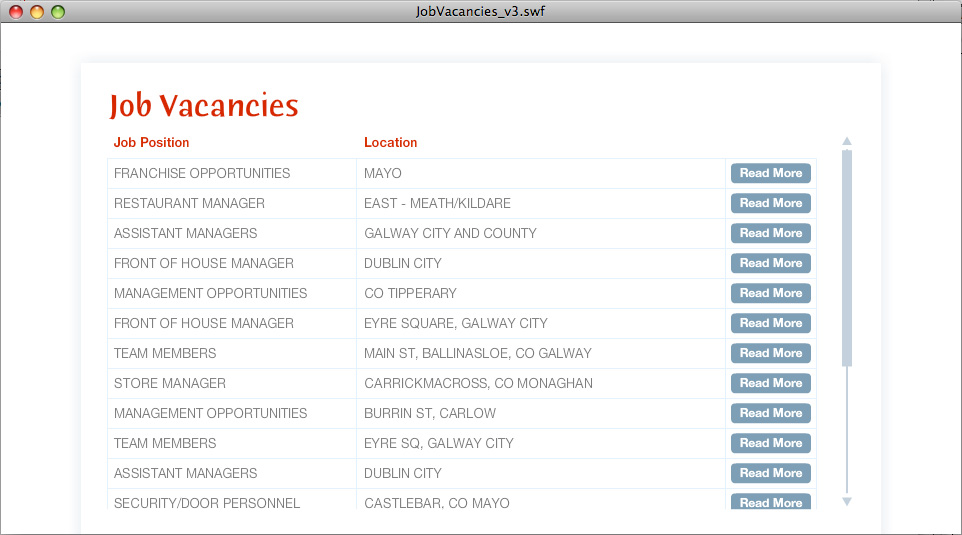
I've an XML file with data for job recruitment (position, location, salary, etc.). In my flash movie I have a scrollpane in the first frame of the root timeline which imports the position and location of all available jobs from the XML.
What I need to do now is allow the user to click on one of these jobs and take them to the second frame on the root timeline which also has a scrollpane that will load in further details for the appropriate job from the XML.
I'm sure this is pretty simple stuff but my actionscript knowledge is poor and I can't find anything in any of the tutorials I've been reading. Any suggestions or links to tutorials would be greatly appreciated.


 1 Correct answer


that's not the intended use of the scrollpane but if your rollovers work you should be able to use an onRelease:
jobMC.data=store the data needed to be used in the next frame
jobMC.onRollOut=function(){
moreGlobalData=this.data
whatevertimeline.nextFrame();
}
and in the next frame use moreGlobalData to populate your scrollpane.

 8
Replies
8
8
Replies
8

Copy link to clipboard
Copied
show your current code that parses the xml and populates the scrollpane. actually, you probably should be using a list component.
Copy link to clipboard
Copied
Thanks for the reply, kglad. Here's the code I'm using:
vacanciesXML = new XML();
vacanciesXML.ignoreWhite = true;
vacanciesXML.onLoad = function(success){
if(success) {
var depth = 0;
var nextY = 25;
count = 0;
var root = this.firstChild; // The root node
for(var i = root.firstChild; i != null; i = i.nextSibling) {
jobMC = attachMovie ("jobclip", "job" + count, depth ++, {_y : (nextY) , _x : (1)} );
nextY += jobMC._height - 1;
jobMC.jobPosition.text = i.childNodes[1].firstChild.nodeValue;
jobMC.jobLocation.text = i.childNodes[2].firstChild.nodeValue;
count ++;
jobMC.btn.btntxt = "Read More";
jobMC.onRollOver = function(){
this.btn.gotoAndPlay("RollOver");}
jobMC.onRollOut = function(){
this.btn.gotoAndPlay("RollOut");}
_parent.invalidate();
setup();
} else {
trace ('Error reading XML');
}
}
vacanciesXML.load("http://www.supermacs.ie/recruitment.asp");
Here's what the file looks like. Could I achieve a similar design with a list component?
Copy link to clipboard
Copied
where is the scrollpane and what's its name?
Copy link to clipboard
Copied
The scrollpane is in _parent
It's called myScrollPane1 but it's not referenced in the code because this code is in a movie clip which has been loaded into the scrollpane
Copy link to clipboard
Copied
that's not the intended use of the scrollpane but if your rollovers work you should be able to use an onRelease:
jobMC.data=store the data needed to be used in the next frame
jobMC.onRollOut=function(){
moreGlobalData=this.data
whatevertimeline.nextFrame();
}
and in the next frame use moreGlobalData to populate your scrollpane.
Copy link to clipboard
Copied
Thanks kglad. In the next frame, I now have the following code:
detailText.text = moreGlobalData;
Is that correct? Please excuse my noob-ness but I'm getting "undefined" in the text box when I export the swf!
Copy link to clipboard
Copied
Actually, it's ok - I got it!
I just needed to put "_root." before "moreGlobalData"
Thanks so much kglad!
Copy link to clipboard
Copied
you're welcome.


Get ready! An upgraded Adobe Community experience is coming in January.
Learn more
 AdChoices