
AS3 code help with drag and drop quiz
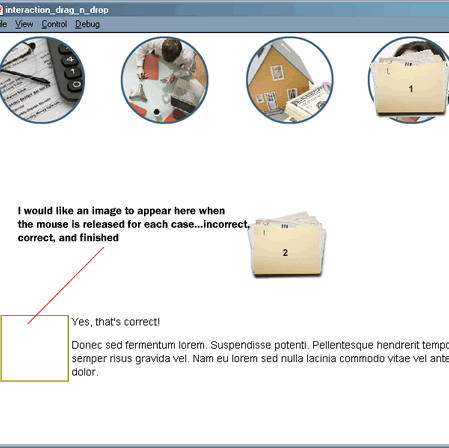
I have a flash drag and drop quiz that i would like to add different images to correspond to the correct veribage when the users have dropped the folder.
I have the text working ok when the user drops the folder (i.e. "yes, that is correct!", I'm sorry, that's not correct.", "Congrats, you're finished!")
I don't know where to start and I was wondering if it was possible to add an image from the library to the stage when the corresponding text is displayed on the stage?
I have the AS3 code below that I'm using.
Thanks for help in advance!
//////////////////////////////////////////////////////////////////////////////////////////////////////////////////////////////////////////////////////////////////////////
var startX:Number;
var startY:Number;
var counter:Number = 0;
folder_mc.addEventListener(MouseEvent.MOUSE_DOWN, pickUp);
folder_mc.addEventListener(MouseEvent.MOUSE_UP, dropIt);
folder2_mc.addEventListener(MouseEvent.MOUSE_DOWN, pickUp);
folder2_mc.addEventListener(MouseEvent.MOUSE_UP, dropIt);
folder3_mc.addEventListener(MouseEvent.MOUSE_DOWN, pickUp);
folder3_mc.addEventListener(MouseEvent.MOUSE_UP, dropIt);
function pickUp(event:MouseEvent):void {
event.target.startDrag(true);
reply_txt.text = "";
reply_txt2.text = "";
event.target.parent.addChild(event.target);
startX = event.target.x;
startY = event.target.y;
}
function dropIt(event:MouseEvent):void {
event.target.stopDrag();
var myTargetName:String = "target" + event.target.name;
var myTarget:DisplayObject = getChildByName(myTargetName);
if (event.target.dropTarget != null && event.target.dropTarget.parent == myTarget){
reply_txt.text = "Yes, that's correct!";
reply_txt2.text = "Donec sed fermentum lorem. Suspendisse potenti. Pellentesque hendrerit tempor nunc, vitae semper risus gravida vel. Nam eu lorem sed nulla lacinia commodo vitae vel ante. Cras ac nibh dolor.";
event.target.removeEventListener(MouseEvent.MOUSE_DOWN, pickUp);
event.target.removeEventListener(MouseEvent.MOUSE_UP, dropIt);
event.target.buttonMode = false;
event.target.x = myTarget.x;
event.target.y = myTarget.y;
counter++;
} else {
reply_txt.text = "I'm sorry, that's not correct.";
reply_txt2.text = "Lorem ipsum dolor sit amet, consectetur adipiscing elit. Fusce a massa tellus, ut euismod urna. Phasellus bibendum pretium porta. Praesent sed elit vel odio ultrices dignissim in in tortor."
reply_txt3.text = "Try Again";
event.target.x = startX;
event.target.y = startY;
}
if(counter == 3
){
reply_txt.text = "Congrats, you're finished!";
reply_txt2.text = "";
}
}
folder_mc.buttonMode = true;
folder2_mc.buttonMode = true;
folder3_mc.buttonMode = true;
 AdChoices