
Participant
July 20, 2017
Answered

Avoid the extension of previous frames

  • July 20, 2017
  • 2 replies
  • 930 views

Hi All, I know this look like a novice question, but I still haven't found any solution about that...

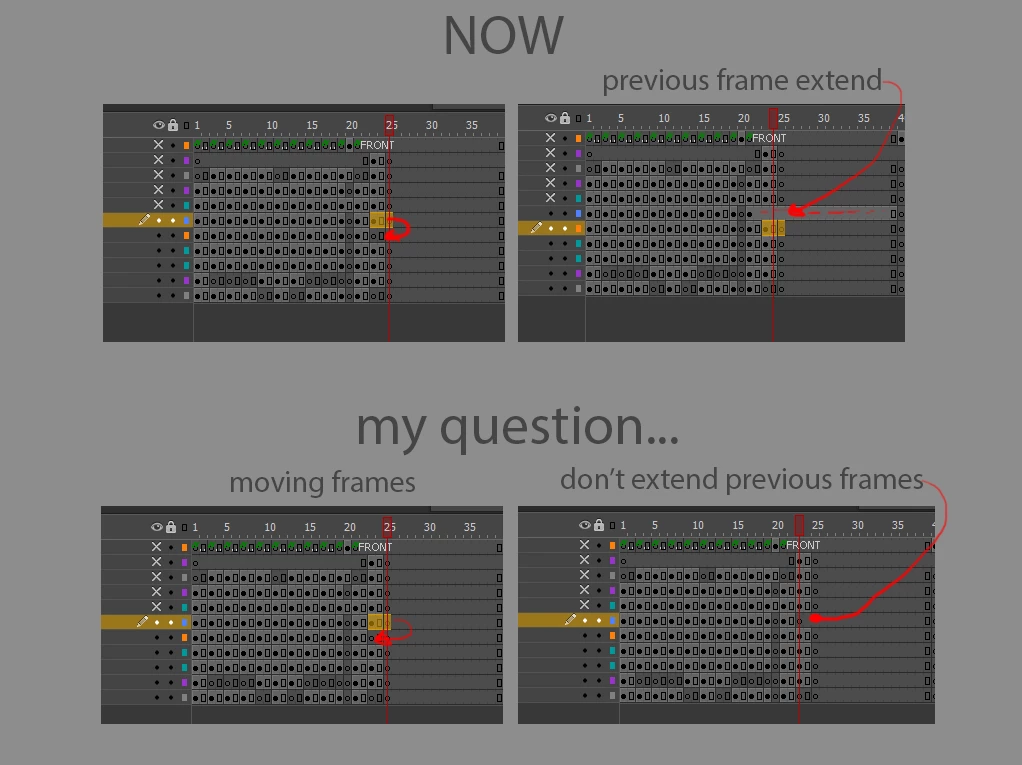
If I Move some frames in animate CC (2017), the previous frames are automatically extended, see the picture.

Does anyone know a method to stop it? it's a new feature that should I ask to be put in the new version as preferences?

Thanks

Luca
This topic has been closed for replies.
Correct answer kglad

use edit>cut (or ctrl-x)/with edit>paste (or ctrl-v) after selecting those frames to 'cut' them.  i think that will do what you want.

2 replies

Colin Holgate
Inspiring
July 20, 2017

After the move, if the previous key frame got extended you can select the frame where it shouldn't exist and use F7 to insert a blank keyframe.

kglad
Community Expert
Community Expert
July 20, 2017

those previous frames aren't inserted after moving.  they already are in your layer.   you just override them with the frames you're about to move.

if you were moving the last frames of that layer you would see no frames are added to that layer.

lucacostaAuthor
Participant
July 20, 2017

thanks, Klag,

Yes, I'm aware of the fact that the frames were already there. As you say, the frames aren't  added because the were already there, correct.

But unfortunately I've not understood you last sentence sorry:

..."if you were moving the last frames of that layer you would see no frames are added to that layer."...

can You explain to me again please :)? (English is not my first language and sometimes I get lost in translation :))

what I'm trying to do is move keyframes and leave blank keyframes in place. So I don't need to come back and add press F7 to add manually an empty keyframe

Many thanks for you help

Luca

kglad
Community Expert
kgladCommunity ExpertCorrect answer
Community Expert
July 20, 2017

use edit>cut (or ctrl-x)/with edit>paste (or ctrl-v) after selecting those frames to 'cut' them.  i think that will do what you want.