
Participant
June 21, 2018
Answered

How do I animate moving gradient?

  • June 21, 2018
  • 3 replies
  • 7094 views

Hi! I want to animate a circle with a little tail that fades away; imagine the powerpuff girls flying and the little color trail that follows them and fades out- that is what I am trying to do. I've been trying really hard but even the gradient tool itself is giving me trouble.

I have an ellipse set to move upwards in 20 frames.

I created a rectangle and put in a Gradient, but I can't even get it to become a vertical gradient at this point.

Can anyone help me?
This topic has been closed for replies.
Correct answer _keyframer

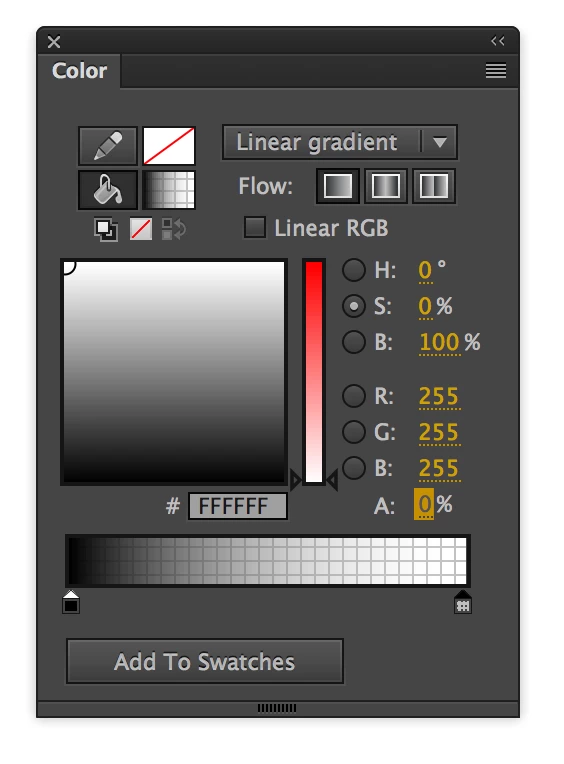
You can mix colors in the gradient to include any amount of alpha. Open the Colors panel. Select Linear or Radial gradient from the drop down. Click on the white swatch in the color panel to the right of the preview gradient. Set the Alpha transparency from 100 to 0.

3 replies

chenjil43641795
Legend
June 22, 2018

Color Adjustment

The trajectory is animation rather than painting.If you just let transparency follow, it's going to be stiff.

So it needs to be made into animation

_keyframer
Community Expert
Community Expert
June 21, 2018

hard to visualize exactly what you have but the Gradient Transform Tool (F) is what you want (3rd icon down in toolbar). Select this tool and click on the gradient in your shape. You'll see handles allowing you to edit the gradient in terms of scale and rotation. You can use shape tweens to animate the actual gradient. Great effect for this and for animations such as making a sky go from day to night

Animator and content creator for Animate CC
robdillon
Participating Frequently
June 21, 2018

Here’s a good tech note on working with gradients that should help you to control how the gradient looks: "Strokes, fills, and gradients with Animate CC" . Once you get the gradient as you want it to look you should be able to animate it. Are you working in Actionscript or html?

Participant
June 21, 2018

I'm creating something for Android so I chose AIR for Android. I've looked over that page several times and it doesn't even remotely include the information I'm looking for.

It's starting to get frustrating because it's not hard to visualize or it's not like this effect is uncommon.

When you create a Gradient- one side is black, and the other side is white- I want one side to be black and the other side to be transparent. I've been looking everywhere and I can't seem to find anything on this. Will I have to create this color-to-transparent gradient in Photoshop then somehow upload it to Animate cc? I just can't understand why this is so difficult or hard to do in this program.

Please someone, make this make sense.

Legend
June 21, 2018

allstardrew  wrote

I'm creating something for Android so I chose AIR for Android. I've looked over that page several times and it doesn't even remotely include the information I'm looking for.

It includes exactly the information you're looking for.