Known Participant
March 20, 2019
Answered

Preloader Freezing

  • March 20, 2019
  • 1 reply
  • 1253 views

I created animations using Animate CC HTML 5 Canvas. Published with a preloader. The preloader works fine when viewing the created html document directly. My problem occurs when I load the html doc in an iframe. Sometimes it loads fine but most of the time the preloader loads, seems to be working but never actually switches to the animation once it’s loaded. If I close the modal and reopen, the animation plays. Problem is the viewer will not know to do this. Do I need to alter the preloader code since I am using modal-body and iframe?

View the issue here. http://www.devotiondesign.com/InteractiveMedia.html

Any help would be appreciated!

This topic has been closed for replies.
Correct answer kdmemory

These sizes will make worthwile to try PreloadJS. Good luck with that.

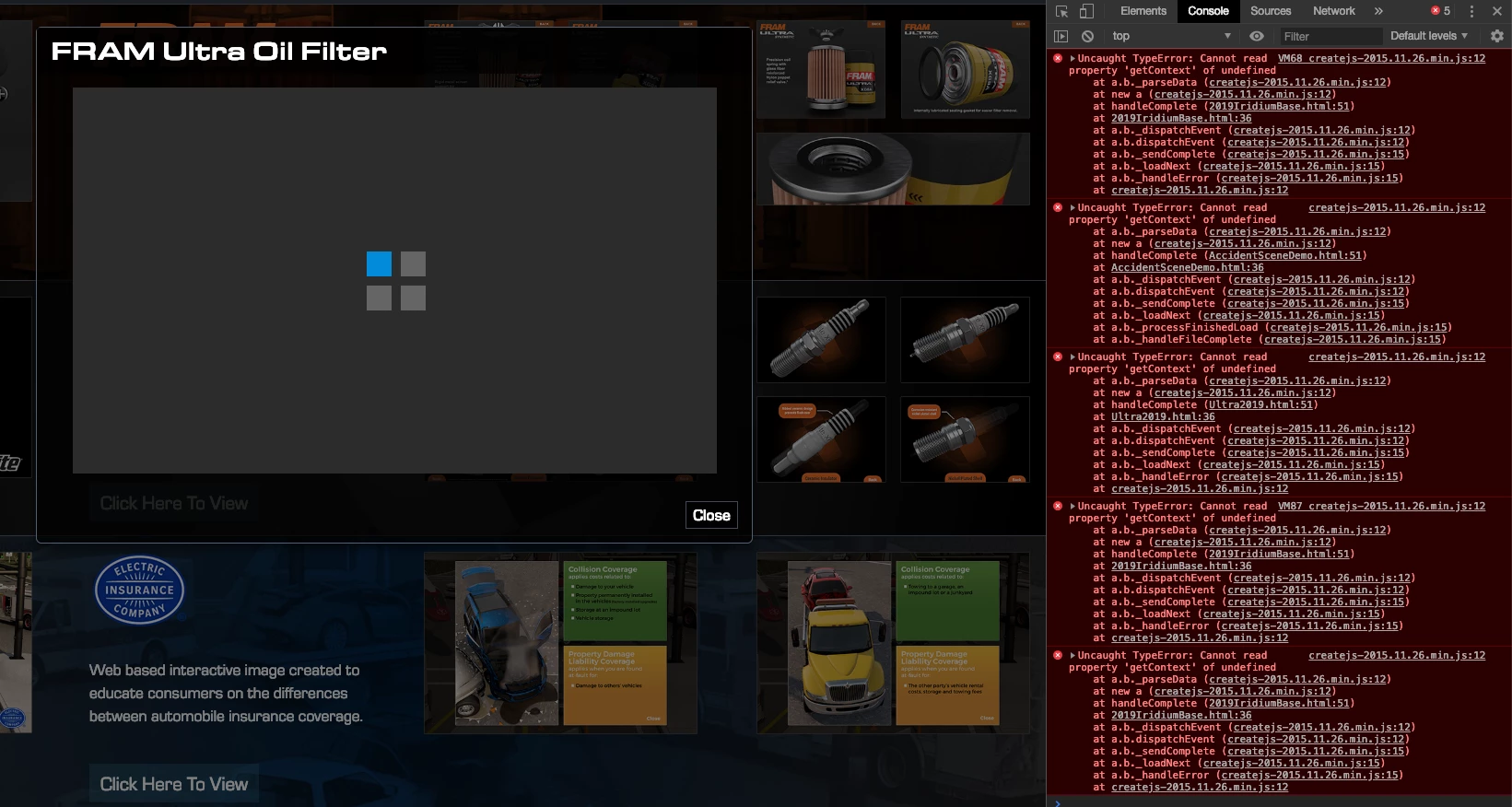
I had another look at your page and discovered that something is terribly wrong. Even without calling the modals and iframes with canvasses, there are errors which turn up in the console of both Chrome and Firefox. They are related to createjs-2015.11.26.min.js and here in particular to a handler called handleComplete().

It must be related to the init(0 function in the published HTML page (out of Animate), This section:

var canvas, stage, exportRoot, anim_container, dom_overlay_container, fnStartAnimation;

function init() {
canvas = document.getElementById("canvas");
anim_container = document.getElementById("animation_container");
dom_overlay_container = document.getElementById("dom_overlay_container");
var comp=AdobeAn.getComposition("F6C6FBEA064539469E0855582BCA859A");
var lib=comp.getLibrary();
var loader = new createjs.LoadQueue(false);
loader.addEventListener("fileload", function(evt){handleFileLoad(evt,comp)});
loader.addEventListener("complete", function(evt){handleComplete(evt,comp)});
var lib=comp.getLibrary();
loader.loadManifest(lib.properties.manifest);
}

In line 10 is the handleComplete(evt,comp thing, whereby the evt is the completion of loader.loadManifest(lib.properties.manifest); and comp is AdobeAn.getComposition("F6C6FBEA064539469E0855582BCA859A"); . The loadManifest thingie is the manifest close to the end of the published javvascript file (out of Animate. Here in your case a few PNGs are listed. Not many actually. I can't put my finger on it what's wrong, but something is.

Maybe somebody else here in the forum knows.

I attach a screenshot from the console in Chrome from this afternoon.
Klaus

1 reply

kdmemory
Inspiring
March 20, 2019

Hi Devoted

How large is your file? I mean all of it, the html, javascript, images - the whole package?

The thing is, that the preloader in Animate isn't actually a preloader. Animate generally preloads everything by default, no matter if Include preloader is checked or not. All that what include preloader does is to loop an animation while the default preloading is in progress. Hence if your file package isn't very large then maybe in your case with modal etc. you might consider not to check this option.

Otherwise if your package is large (which it looks a bit like) then you might want to look into PreloadJS and LoadQueue(). With those you can create your own preload routine and listen to complete and fileload events and play and make disappear a loader animation which might work better in your Modal - iFrame situation.

Klaus

DevotedAuthor
Known Participant
March 20, 2019

They are 20MB, 10MB and 60MB. The problem seems completely random, sometimes they load perfectly other times they hang. I will look into the suggested alternate method. Thank you.

kdmemory
kdmemoryCorrect answer
Inspiring
March 20, 2019

These sizes will make worthwile to try PreloadJS. Good luck with that.

I had another look at your page and discovered that something is terribly wrong. Even without calling the modals and iframes with canvasses, there are errors which turn up in the console of both Chrome and Firefox. They are related to createjs-2015.11.26.min.js and here in particular to a handler called handleComplete().

It must be related to the init(0 function in the published HTML page (out of Animate), This section:

var canvas, stage, exportRoot, anim_container, dom_overlay_container, fnStartAnimation;

function init() {
canvas = document.getElementById("canvas");
anim_container = document.getElementById("animation_container");
dom_overlay_container = document.getElementById("dom_overlay_container");
var comp=AdobeAn.getComposition("F6C6FBEA064539469E0855582BCA859A");
var lib=comp.getLibrary();
var loader = new createjs.LoadQueue(false);
loader.addEventListener("fileload", function(evt){handleFileLoad(evt,comp)});
loader.addEventListener("complete", function(evt){handleComplete(evt,comp)});
var lib=comp.getLibrary();
loader.loadManifest(lib.properties.manifest);
}

In line 10 is the handleComplete(evt,comp thing, whereby the evt is the completion of loader.loadManifest(lib.properties.manifest); and comp is AdobeAn.getComposition("F6C6FBEA064539469E0855582BCA859A"); . The loadManifest thingie is the manifest close to the end of the published javvascript file (out of Animate. Here in your case a few PNGs are listed. Not many actually. I can't put my finger on it what's wrong, but something is.

Maybe somebody else here in the forum knows.

I attach a screenshot from the console in Chrome from this afternoon.

Klaus