good afternoon. JoãoCésar.
I leave the link to show you the animation.
I need an XML that allows me to change the texts when the client needs it.
Thanks once again.
https://youtu.be/LIyyku2hW98
Hi again!
Really cool design!
Here is a sample.
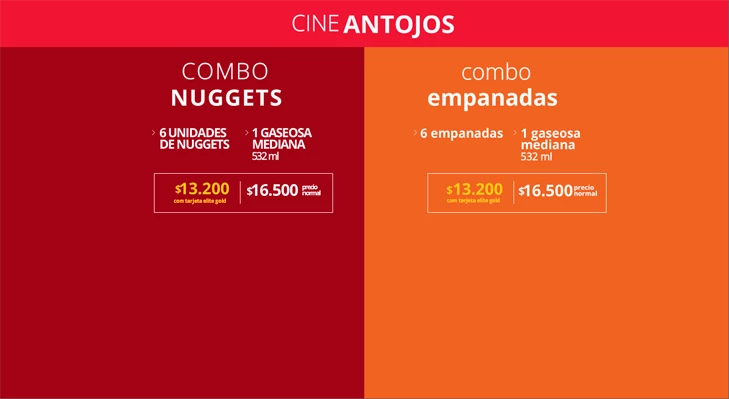
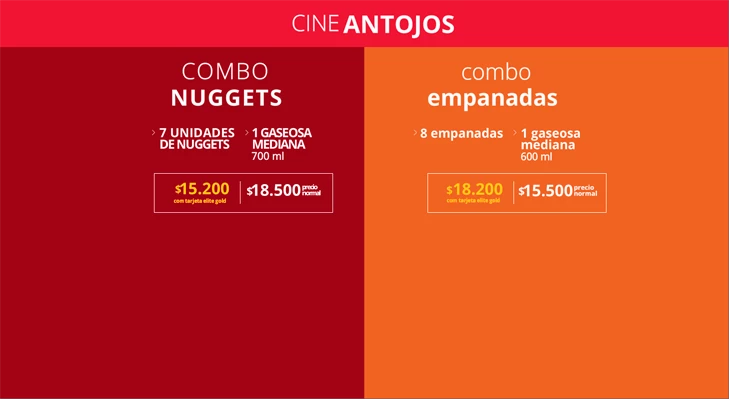
- Tried to loosely reproduce your design. Please don't mind. Haha;
- I think JSON is simpler and more organized, so I opted to use it;
- The JSON file is organized in a way that you can add as many profiles/versions for your design as you want. You just have to change the 'settings.currentProfile' key. In this example, there are two profiles: 'marzo' and 'abril'. The default one is 'marzo'.
Preview:
Fictional 'marzo' profile.
Fictional 'abril' profile.
AS3 code:
import flash.events.Event;
import flash.events.IOErrorEvent;
import flash.net.URLLoader;
import flash.net.URLRequest;

var jsonPath:String = "texts.json";
var json:Object;

function start():void
{
    var loader:URLLoader = new URLLoader();
    var request:URLRequest = new URLRequest();
    request.url = jsonPath;
    loader.addEventListener(Event.COMPLETE, completeHandler);
    loader.addEventListener(IOErrorEvent.IO_ERROR, errorHandler);
    loader.load(request);
}

function completeHandler(e:Event):void
{
    var loader:URLLoader = URLLoader(e.target);
    json = JSON.parse(loader.data);

    setTexts(json);
}

function errorHandler(e:Event):void
{
    trace(e);
}

function setTexts(obj:Object):void
{
    var profileName:String = obj['settings']['currentProfile'];
    var profile:Object =     obj['profiles'][profileName];
    var key:String;

    for (key in profile['title'])
        title[key].text =  profile['title'][key];

    for (key in profile['promo0'])
        promo0[key].text = profile['promo0'][key];

    for (key in profile['promo1'])
        promo1[key].text = profile['promo1'][key];
}

start();
JSON text:
{
    "settings":
    {
        "currentProfile":"marzo"
    },
    "profiles":
    {
        "marzo":
        {
            "title":
            {
                "txt0":"CINE",
                "txt1":"ANTOJOS"
            },
            "promo0":
            {
                "txt0":"COMBO",
                "txt1":"NUGGETS",
                "txt2":"6 UNIDADES",
                "txt3":"DE NUGGETS",
                "txt4":"1 GASEOSA",
                "txt5":"MEDIANA",
                "txt6":"532 ml",
                "txt7":"$",
                "txt8":"13.200",
                "txt9":"com tarjeta elite gold",
                "txt10":"$",
                "txt11":"16.500",
                "txt12":"precio",
                "txt13":"normal"
            },
            "promo1":
            {
                "txt0":"combo",
                "txt1":"empanadas",
                "txt2":"6 empanadas",
                "txt3":"1 gaseosa",
                "txt4":"mediana",
                "txt5":"532 ml",
                "txt6":"$",
                "txt7":"13.200",
                "txt8":"com tarjeta elite gold",
                "txt9":"$",
                "txt10":"16.500",
                "txt11":"precio",
                "txt12":"normal"
            }
        },
        "abril":
        {
            "title":
            {
                "txt0":"CINE",
                "txt1":"ANTOJOS"
            },
            "promo0":
            {
                "txt0":"COMBO",
                "txt1":"NUGGETS",
                "txt2":"7 UNIDADES",
                "txt3":"DE NUGGETS",
                "txt4":"1 GASEOSA",
                "txt5":"MEDIANA",
                "txt6":"700 ml",
                "txt7":"$",
                "txt8":"15.200",
                "txt9":"com tarjeta elite gold",
                "txt10":"$",
                "txt11":"18.500",
                "txt12":"precio",
                "txt13":"normal"
            },
            "promo1":
            {
                "txt0":"combo",
                "txt1":"empanadas",
                "txt2":"8 empanadas",
                "txt3":"1 gaseosa",
                "txt4":"mediana",
                "txt5":"600 ml",
                "txt6":"$",
                "txt7":"18.200",
                "txt8":"com tarjeta elite gold",
                "txt9":"$",
                "txt10":"15.500",
                "txt11":"precio",
                "txt12":"normal"
            }
        }
    }
}
FLA download: animate_cc_as3_texts_from_json.zip - Google Drive
I hope it helps.
Regards,
JC




 AdChoices