
Known Participant
July 23, 2020
Question

Text not aligning properly

  • July 23, 2020
  • 3 replies
  • 984 views

I'm working with Adobe Animate 20.5.1.

In Animate, my project has properly aligned text:
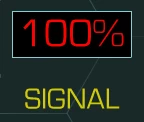


When I publish my HTML5 project and open it in a browser, the text is not aligned:
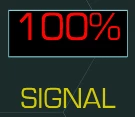


This happens no matter if my text is Static, or Dynamic.

Is this a bug? Or am I doing something wrong?

    This topic has been closed for replies.

    3 replies

    _tal_Author
    Known Participant
    July 24, 2020


    Browser rendering appears to be perfectly consistent, and is consistently different from what Adobe Animate shows.

    The fla, and the font file:

    https://drive.google.com/drive/folders/1jHOn9cgVJRfhPgBTODsC-N8WIhZSsJsU?usp=sharing


    Doing a little digging, this: https://community.adobe.com/t5/animate/html5-canvas-publish-dynamic-text-position-changes/td-p/9193609?page=1


    Fixes it in my Firefox, but does nothing for Chrome or Safari, and doesn't really explain what the issue is.

    _tal_Author
    Known Participant
    July 28, 2020

    Further testing with other fonts, like Arial, or Courier, shows that browsers are indeed inconsistent. Some will show the same font higher, and others will show it lower. It's a real pain when a font needs to be centered inside of a box like I have above, which makes it super noticeable. 

    Legend
    July 24, 2020

    This is an issue with different browser makers interpreting the HTML Canvas spec differently regarding which font metric to use to vertically position text. The problem is more severe in some fonts than others.


    https://github.com/CreateJS/EaselJS/issues/235


    Adobe Employee
    July 24, 2020

    Hi, Thanks for reaching out.

    Could you please share a sample FLA file to reproduce and investigate further ?