


P: Camera Matching Cinelike A2 problem on DC-S1M2
Dear Adobe Team,
I would like to report an issue regarding the Cinelike A2 profile on the Panasonic DC-S1M2 camera when processed in Adobe Lightroom/Camera RAW. Specifically, the Camera Matching setting for Cinelike A2 does not accurately replicate the colors seen in-camera.
To verify this, I conducted a test by simultaneously capturing two files—HEIF (10-bit) and RW2 (RAW)—and importing them into Lightroom for comparison. The discrepancies observed include:
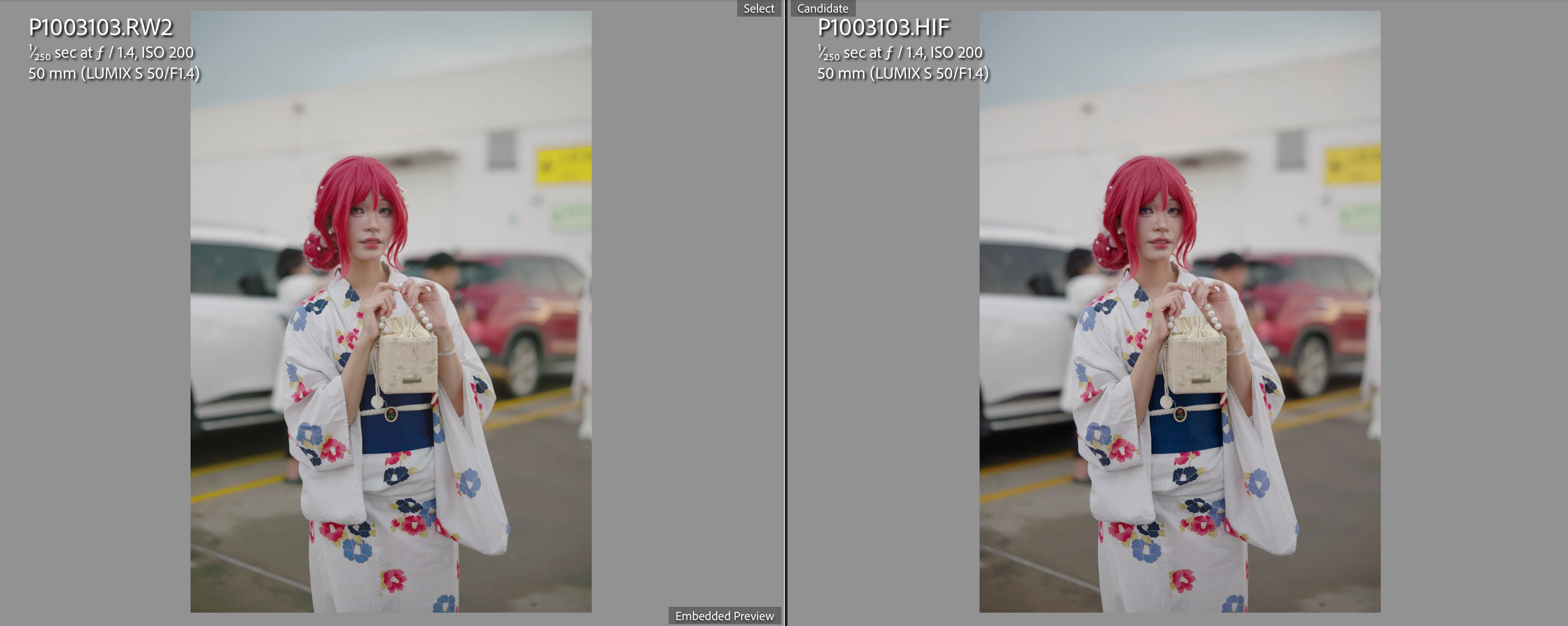
1. Black & White Point Compression:
- The Camera Matching Cinelike A2 profile exhibits excessive compression in Black Point and White Point, whereas the HEIF file remains unaffected.
2. Color Shift in Yellow/Orange Tones:
- The yellow/orange lines in a parking lot appear shifted and even clipped, creating unnatural edges.
3. Incorrect Saturation Transition in Reds:
- The red tones in hair show improper saturation gradation—instead of darkening naturally in shadowed areas, the saturation increases unnaturally.
For your reference, I have attached log file to assist in troubleshooting. For RAW file, I can't attach in this post due to it always get attachment error (though I converted to DNG by Lightroom)
I sincerely hope this issue can be addressed with a patch fix at the earliest convenience. Should you require any further details or assistance, please do not hesitate to reach out.
Thank you for your attention to this matter.
Best regards,
Tran Duc Duy
 AdChoices