

Known Participant
October 18, 2022

P: (ACR hosted by Bridge) results in parsing error when opening in PS

  • October 18, 2022
  • 19 replies
  • 7581 views

1) Open a file in Camera Raw hosted by Bridge

2) Create a mask using the new "People" feature, or use the new Content Aware tool (I guess other new features will trigger the same error, but these two are the ones I've tested)

3) Click open


When Photoshop opens, this errors message appears (and the file doesn't open):
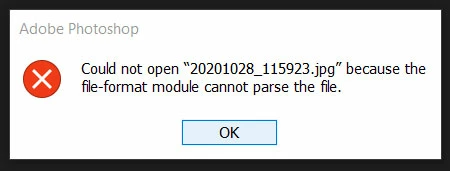


"Could not open "(file name) because the file-format module cannot parse the file"


I'm using Windows 10 and the lastest Bridge/ACR/PS versions at the time of writing, but more people have reported this to me on my blog/YT channel.

This topic has been closed for replies.

19 replies

Participant
November 2, 2022

Hi Jeff, thanks for the update. Hopefully the investigations will be fruitful and a fix can be implemented.

Rikk Flohr_Photography
Community Manager
Community Manager
November 2, 2022

The Bridge team is investigating. 

Rikk Flohr: Adobe Photography Org
Known Participant
November 1, 2022

I'm working on an iMac running Monterrey 12.6.1, Photoshop 24.0.0 and Camera Raw 15.0.0.1234.  As far as I know it's the latest of everything.  I'm working in Bridge with Raw files from a Nikon D 850.  I can open a file in Camera Raw, click on "Open"  Photoshop will open it.  However, if I do any dust spot removal on the file and then click on "Open" I get the following error message.  "Could not open "raw file name" because the file-format module cannot parse the file."


If I delete the XMP file that was created by Camera Raw I can now open the file in Photoshop.  No other modifications I do in Camera Raw seem to cause this problem.


This looks like a bug to me.  I never had this dust spot removal problem in earlier versions.

Participant
November 1, 2022

I updated to PS and Bridge 2023 a few days ago and now I am having a lot of issues opening my CR2 files into PS after editing in Bridge Camera Raw editor. For most attempts, I am in my usual workflow of editing in Bridge (v13.0.0.562), then opening them up in PS (v24.0.0) to resize and save (on to my computer (Windows 10 home, v19044.2130), not cloud). I've tried changing my performance settings, my cache size, restarting PS and Bridge, but to no avail.


Any help with this would be greatly appreciated. Thanks!

D Fosse
Community Expert
Community Expert
November 1, 2022

FWIW, I see a lot of these around the forums now, so I would suspect a bona fide bug in Photoshop v24, Bridge v13 or ACR v15.

Adobe Employee
November 1, 2022

Hi @Carlos_Oliveras ,

Thanks for your feedback, we are able to reproduce the issue. Team is investigating the same.

Thanks,

Bridge Team

eric_brb
Inspiring
October 28, 2022

I've been having similar issues with Canon RAW (CR3) files since the latest update.   I sometimes can't open them in Photoshop from Bridge's Adobe Camera RAW module (v15), but it doesn't always give me the "Could not open (file name) because the file-format module cannot parse the file" dialog...sometimes it doesn't do anything at all.  However, I have been able to open every single one of the files if I first drag the file's thumbnail from Bridge into Photoshop (which still opens the same version of Adobe Camera RAW)...which makes me think something weird is happening with the hand off between Adobe Camera RAW and Photoshop.

Either way, try dragging from Bridge to PS and see if that wokraround works for you.

Known Participant
October 23, 2022

The weird thing is, sometimes I get that error message and sometimes I get nothing at all and the image just doesn't open.  Hopefully they will fix it soon as it is slowing down my workflow. 

Participant
October 23, 2022

This is my way

Jeff Arola
Community Expert
Community Expert
October 21, 2022

Same here on the mac side with a Nikon D7200 nef file after using Content Aware Remove.

Photoshop 2023 (ps ver 24.0) ACR 15.0 and Bridge 13.0 (2023) Monterey 12.6


Only seems to happen when using ACR in Bridge 13.0 and then click Open to go to photoshop.

Doesn't happen if one uses File>Open from within photoshop.


Not an issue with Bridge 12.0 (2022) ps 2022 (ps ver 23.5.2) and ACR 15.0


TheDigitalDog
Inspiring
October 22, 2022

Does it work if Bridge isn't the host (used at all), just Photoshop?

Author “Color Management for Photographers" & "Photoshop CC Color Management/pluralsight"
TheDigitalDog
Inspiring
October 22, 2022

Hi, yes, it does work in "normal" use (Camera Raw hosted by Photoshop), at least for me. That's why I made sure to emphasize the "hosted by Bridge" bit, since I think that's the trigger of this bug. Or something related to it.


@Carlos_Oliveras wrote:

Hi, yes, it does work in "normal" use (Camera Raw hosted by Photoshop), at least for me. That's why I made sure to emphasize the "hosted by Bridge" bit, since I think that's the trigger of this bug. Or something related to it.


Many others are reporting similar issues with Bridge hosting ACR hence I recommend you post this as a bug in the Bridge forum so the team can see this.

Author “Color Management for Photographers" & "Photoshop CC Color Management/pluralsight"