
Inspiring
November 25, 2021
Answered

Applying to many images

  • November 25, 2021
  • 3 replies
  • 1732 views

I have 10 images selected, and first one is way I like it.  Stumped from there. In the past, I think there was an apply buttom?  Now I right click and get goofy copy from  soemthing text, and then click, done, nothing happens. Thanks!
This topic has been closed for replies.
Correct answer Rob_Cullen

With  the 10 images on the filmstrip- This is my method:

1)  Edit one image and Copy settings [Ctrl+C]

2) [Ctrl+A] to select all on the filmstrip.

3) [Ctrl+V] to Paste settings

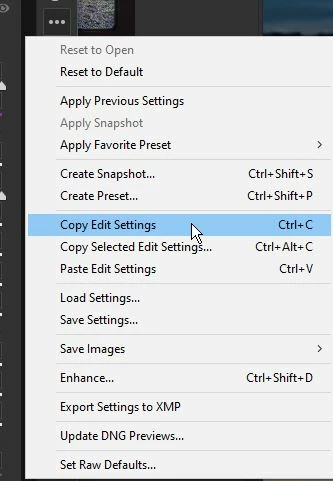
Or the three-dot icon [...] provides a menu-


3 replies

larry45Author
Inspiring
November 29, 2021

New issue: While I see the changes on my computer to the 10 jpegs I lightened with ACR. If I dropbox them to someone else, those images still look very dark.

TheDigitalDog
Inspiring
November 30, 2021

@larry45 wrote:

New issue: While I see the changes on my computer to the 10 jpegs I lightened with ACR. If I dropbox them to someone else, those images still look very dark.


You didn't burn the parametric edits into the JPEGs. Nor should you (lots of data loss due to the data being a JPEG but that's another story.)

Click Open and Save, you would see the edits.

Author “Color Management for Photographers" & "Photoshop CC Color Management/pluralsight"
larry45Author
Inspiring
November 30, 2021

Thanks Rob and Andrew.


Ok I"m in Bridge or ACR, I see all images in Bridge with ACR adjustment. From here, What is the easist way to gets all these applied?


BTW, in past, why do I remember these were just done or saved ready go out the door, has something changed in last few years? Thansk!

Rob_Cullen
Community Expert
Rob_CullenCommunity ExpertCorrect answer
Community Expert
November 26, 2021

With  the 10 images on the filmstrip- This is my method:

1)  Edit one image and Copy settings [Ctrl+C]

2) [Ctrl+A] to select all on the filmstrip.

3) [Ctrl+V] to Paste settings

Or the three-dot icon [...] provides a menu-


Regards. My System: Windows-11, Lightroom-Classic 15.1.1, Photoshop 27.3.1, ACR 18.1.1, Lightroom 9.0, Lr-iOS 10.4.0, Bridge 16.0.2 .
larry45Author
Inspiring
November 26, 2021

Got it Rob, actually now even easier than before I think.. as long as you select all first,  and then do an adjustment on any, I think it then applies it to all right away right? And did not do that in years past.

TheDigitalDog
Inspiring
November 25, 2021

Done: writes the parametric instructions you've made. Dismisses ACR. 

Open: Does this but renders the image with those edits. 
Note, what images you select when using Open plays a role of course. 

Move your cursor over each button (one seen below) for more details. 

Author “Color Management for Photographers" & "Photoshop CC Color Management/pluralsight"
larry45Author
Inspiring
November 25, 2021

Thanks Dog,  but still lost.  I have 10 selected, how tell ACR to apply what I did on first one to all 10?