
Pamela99
Known Participant
June 16, 2019
Question

Camera Raw interface is too large for 15" laptop screen

  • June 16, 2019
  • 7 replies
  • 17637 views

Hello,

I am hoping that someone can help me solve this problem. The Camera Raw Interface is too large to fit on my Dell 15" screen. I have searched the forums, tried adjusting the display interface, and I am still not having any luck adjusting the size of the interface. This is what it looks like. Can anyone help me here?
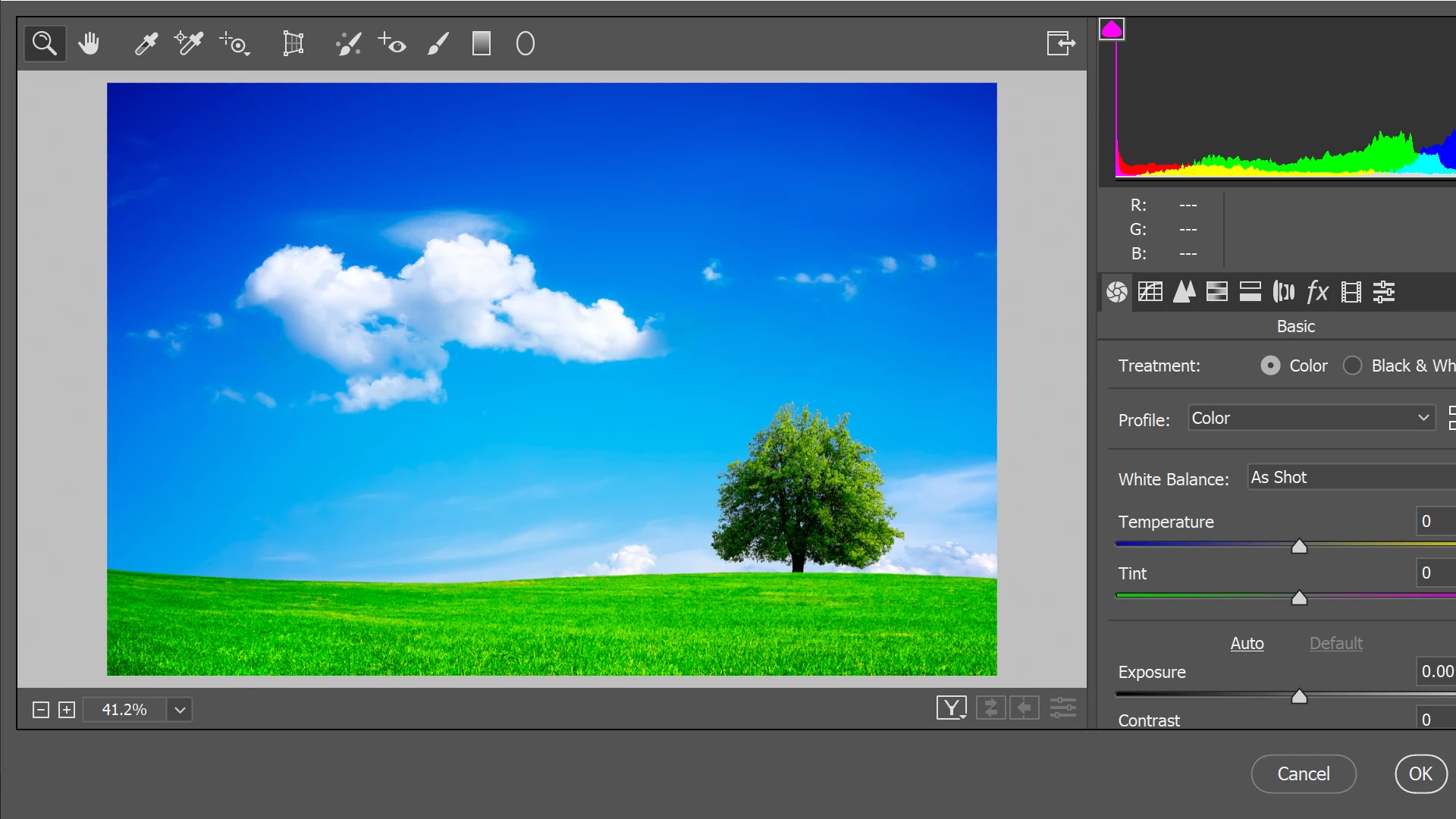
This topic has been closed for replies.

7 replies

rudytheelder
Participating Frequently
May 2, 2024

Yes, I have this problem too.  In Windows 10, I can change size of image, but not size of Camera Raw editor interface. Can't even get to the Save button below.  To me changing Display Scale to something like 125 really isn't an acceptable solution at all.  I work at 350, and can't read anything at 125. 
But I have a new fix, not yet mentioned in this thread.  Just about all of the useful RAW controls like Dehaze are at the top level in Lightroom, so I just use Lightroom most of the time. I wondered why this was true, and now, NEWS FLASH an a big Homer Simpson DOH!  Google AI search summary tells me:
"Lightroom's develop module is based on the Camera Raw engine, so the edit controls in the two programs are almost identical. Lightroom embeds an internal copy of the Camera Raw code that's updated in sync with the Camera Raw plug-in, but Lightroom doesn't load the Camera Raw plug-in." (Why didn't anyone ever tel me this?)
Case closed, it's all good...if you're willing to learn both programs. IMHO it's really worth learning Lightroom as it has lots of other goodies, a very fluid interface, compatability with all creen resolutions,  and is, of course, a great file manager.  So I use Lightroom 80% of the time, and go over to Mother Photoshop when I want to do delicate pixel-peeing tweaks on the image.
Also I'm addicted to the Photoshop Ctrl+Shift+L shortcut which does an automatic setting of levels which is very often better than what I'd get by hand...but that's for a different thread.


New Participant
April 21, 2022

Hi, here's the easiest way I found to do it. I have the same issue with my Asus 15" laptop. Go to your Desktop > Display Setting > change Scale and Layout from 150% (recommended) to 125%.

 Hope this works for you to. It was veeeery annoying. Control O didn't even open the file after tweaked in Raw if I made any adjustments and I could't get to the Open button.

New Participant
November 7, 2022

This is the only one thing that have worked! Thanks!


Participating Frequently
August 26, 2021

You can try to Reset the Workspace of Photoshop if you need too.

New Participant
November 10, 2019

Hello, I've run into the same problem. 145% is the one you want without losing functionality in everything else. The way to change this in Windows 10 is to go to Display, select Advanced Scale Settings and in Custom Scaling type in 145. After that sign out and everything should be good to go!

Pamela99
Pamela99Author
Known Participant
June 17, 2019

Michael Bullo
Community Expert
June 17, 2019

But can you move the window far enough in one direction to give you access to a corner with which to resize the window?

Pamela99
Pamela99Author
Known Participant
June 17, 2019

Sadly, even though I can expose a corner, the interface is just not resizable …..

Pamela99
Pamela99Author
Known Participant
June 16, 2019

Hello Michael and thank you for your response.

Unfortunately on a PC the Camera Raw filter does not seem to be sizable and there is no scroll bar available. That was one of the first things I tried.

Michael Bullo
Community Expert
June 17, 2019

Happy to help.

How are you opening your Raw images?

- Photoshop

- Bridge

- Other...

Can I assume that when you were playing with the display settings you tried the maximum pixels available?

Pamela99
Pamela99Author
Known Participant
June 17, 2019

I generally start my workflow in Lightroom and then edit in Photoshop. There is no problem with the Lightroom Interface.

I don’t have a problem opening Raw Files in Photoshop.

I’m just doing a learning session on Lynda where the concentration is on the Camera Raw filter and I am just getting a bit frustrated with the interface. I can physically move the screen over, but then I lose everything on the left … I would really just like it to fit properly.

Michael Bullo
Community Expert
June 16, 2019

I've just confirmed on my Mac laptop that the Camera Raw window can be resized. When you do, scroll bars will appear giving you access to anything that falls outside the window.

Can you grab a corner and shrink the window? Can you even see a corner? Is there a portion of the title bar that you can grab to move the window to give you access to those corners?

New Participant
August 29, 2021

I am having the same issue, and other than rezising my laptop settings everytime I want to use raw, which is a real nightmare. But it works ok on a PC. something adobe need to address.