
Participant
April 16, 2018
Answered

RAW from Sony A7III

  • April 16, 2018
  • 3 replies
  • 7072 views

Hello, I have a problem with DNG converter. I downloaded a 10.3 version that should support Raw from Sony A7III, but when I want to upload photos, DNG Converter does not read it. Does anyone know where the problem is? Thanks.
This topic has been closed for replies.
Correct answer JP Hess

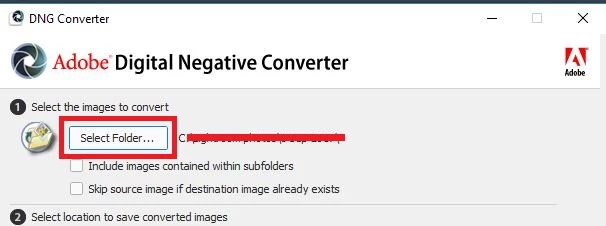
The DNG converter works at the FOLDER level. Choose a folder, but don't open the folder containing the raw images. If you open the folder containing the raw images you will receive a message that there are no images to convert.

3 replies

Participant
June 25, 2018

Hey there!! So I have done this and I have half the images not converting. I have tried about 3 times now and half of my images still aren't converted. Not sure what to do next!!!

ssprengel
Inspiring
June 26, 2018

Since this is your first post on this thread, we don't know anything about your situation except the DNG Converter isn't working how you expect, but only for some of the images.

What camera are the raw images from?

What version of the DNG Converter are you using?

What's different about those images?  Are they created in a "fancy" mode of the camera, like HDR or Pixel-Shift or I don't know what else.  Are they in a different folder from the images that do work?  Is it all of a sequence of images, and none of the next sequence, or are the ones that don't work sprinkled more evenly amongst the ones that do work?

Do you get an error in the DNG Converter for those images?  If so what does it say?

Participant
June 27, 2018

You can share a large file by uploading it to somewhere like dropbox or googledrive or onedrive and post a public share link to it in a message, here.

How do you know half your images aren't converting?  If you point the DNG Converter to a folder of ARW files and output the DNGs COPIES to the SAME FOLDER, then half the files will be DNGs and the other half will be the original ARWs that the DNGs were converted from.  The DNGs are compatible with older software but the original ARWs won't be.  The fact you've renamed the files that do open makes it difficult to tell whether the ARW files actually correspond to the renamed ones or not.

What software are you using that you need DNGs and what version?  Is this Lightroom and it is an older version so you need to convert to DNGs?  An older version of LR will only be able to open the DNG copies not the original ARWs so half the files, the DNG copies, will import and the other half, the ARW originals, won't.  Same with an older version of PS and Bridge.

The two screenshots you've shown us only prove that you have some photo files that Windows Explorer can read thumbnails from (we don't know the extension of those), and ARWs that Windows cannot read the thumbnails from.  That's about all that the screenshots show.


DSC01117.ARW - Google Drive here is a link to one of the images.

I am using lightroom cc and am up to date. I don't keep the ARW's. I convert them right off the card and put them in their file. I am missing about half my images so I am assuming that half of them aren't converting. I also have another file of backups for my second card, I tried to convert those as well with no luck.

JP Hess
JP HessCorrect answer
Inspiring
April 16, 2018

The DNG converter works at the FOLDER level. Choose a folder, but don't open the folder containing the raw images. If you open the folder containing the raw images you will receive a message that there are no images to convert.

Participant
April 17, 2018

Thank you very much.

Mohit Goyal
Community Manager
Community Manager
April 16, 2018

Hi philodryas.

Thanks for posting this issue on our forum and we're really sorry for all the trouble caused you. Have you copied the raw images straight from SD card or you have used any images transfer software to move the images from camera to your local machine or hard drive?

Regards,

Mohit