


- Home
- Captivate
- Discussions
- Re: Adding numbers in separate boxes
- Re: Adding numbers in separate boxes
Adding numbers in separate boxes

Copy link to clipboard
Copied
Hi Folks,
Not sure if Captivate can do this or not but what I want to do is. Add numbers from three different boxes that will create the total in a fourth separate box. Can Captivate do this with Advanced Actions or Math Magic?
Any help would be greatly appreciated!
Cheers
Steve


 5
Replies
5
5
Replies
5


Copy link to clipboard
Copied
Yes you can do this using the Expression action in a Standard or Conditional Action. It allows you to perform simple math such as addition, subtraction, multiplication and division. Values entered into Text Entry Boxes are automatically stored in user variables (usually given the same name as the TEB). You can use these values in Advanced Actions to perform math with Expressions.
If you have a need to perform more complex math you may need to consider using JavaScript instead. Advanced Actions are still quite limited in this regard.
The MathMagic plugin that comes with Captivate is really more about creating an image of a formula or equation that you need to use in your project. It's not a tool for performing calculations at runtime.

Copy link to clipboard
Copied
To add to Rod's answer, if you only want to make the total it is pretty easy. But you'll need a 'trigger', an event to launch the advanced action that will calculate the total (maybe a 'Sum' button) by launching this advanced action:
Expression v_sum = v_one + v_two
Expression v_sum = v_sum + v_three
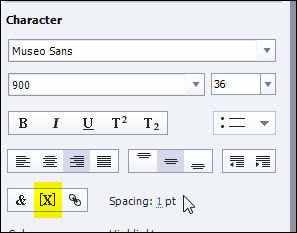
The variables v_one, v_two and v_three are associated with the three Text Entry Boxes (I prefer not the use the default variables, you can create immediately a custom variable using the X button next the variable field). The variable v_sum is another variable that had a default value of 0. You have to display that variable in a text container (caption or shape) using the other X button in the Character part of the Properties panel of the text container:
Copy link to clipboard
Copied
Hi Rod and Lilybiri,
Thanks for this information! So it looks like I can achieve what I want to do in a couple of ways, either using Advanced Expressions or using Javascript. I have another question.
Once the sum has been arrived at say 2 + 1+ 3 = 6 can I then have (using javascript or conditional variables) take the number 6 and place it into, and have it displayed, in one of 4 new boxes that are based on a range of numbers. For example 1-3, 3-6, 6-9, 9-12. Since the number is 6 it would land in the second box.
Does that make sense? If so what would be the better choice Advanced Actions or Javascript?
Cheers
Steve
Copy link to clipboard
Copied
Either method would do but if you don't know JavaScript then use Conditional Advanced Actions.
You'll need one decision block in the conditional action for each of the four break groups. You'll also need a different User Variable for each group since you are going to be displaying the result in a different Shape or Caption depending on where the value falls.
Copy link to clipboard
Copied
Perfect ... thanks Rod!


Get ready! An upgraded Adobe Community experience is coming in January.
Learn more
 AdChoices