


- Home
- Captivate
- Discussions
- Re: Captivate 2017; PhoneGap 3.7.0 not supported E...
- Re: Captivate 2017; PhoneGap 3.7.0 not supported E...
Captivate 2017; PhoneGap 3.7.0 not supported Error

Copy link to clipboard
Copied
I am using the Trial of Captivate 2017. I would like to test the "Publishing for Devices (App)". the PhoneGap desktop App shows "listening on 192.168.178.21:3000". After pressing"Publish" processing is shown:

When 100 % is reached the error is shown.
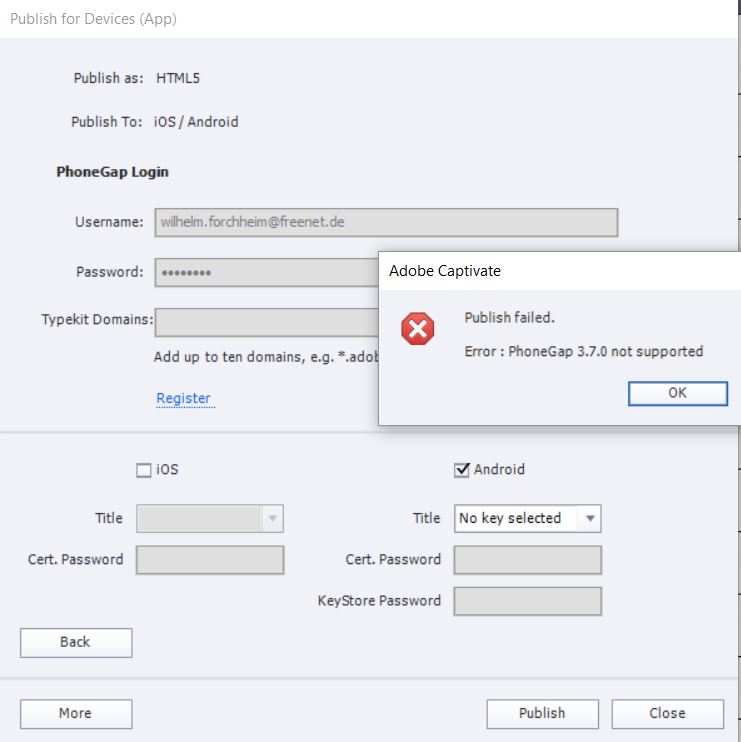
I would be very graatfull, if sombody could give mea helpful advice.
Ruediger


 5
Replies
5
5
Replies
5


Copy link to clipboard
Copied
This issue has been reported before, e.g. here: https://elearning.adobe.com/discussion/2423703/ and here: https://elearning.adobe.com/discussion/2418944/ . I haven't seen an answer yet.


Copy link to clipboard
Copied
Hi Rudy,
Please try to download the XML file from link and replace it under Captivate installation folder give below:
Download the XML file from here: Shared Files - Acrobat.com
For Windows 32 Bit Machine:
C:\Program Files (x86)\Adobe\Adobe Captivate 2017\Templates\Publish
For Windows 64 Bit machine:
C:\Program Files\Adobe\Adobe Captivate 2017 x64\Templates\Publish
For MAC:
Applications>Adobe Captivate 2017>Templates>Publish
Once done please try again to publish it to PhoneGap. Let me know if you still face any issues.
Regards
Ashish Kumar
Adobe Systems
Copy link to clipboard
Copied
That worked for me, thanks!
Copy link to clipboard
Copied
My big sigh of relief !
Thanks a lot Ashish. It is working now.

Copy link to clipboard
Copied
Hello. I am trying to do the same thing, but am unable.
I have an AdobeID, but am unable to log in at the PhoneGap Login prompt (below). No matter what I try, I can not get beyond this error. I have the PhoneGap Desktop app installed, am running Captivate 2017, and also have a PhoneGap Build account (below). Please help!


Get ready! An upgraded Adobe Community experience is coming in January.
Learn more
 AdChoices