


- Home
- Captivate
- Discussions
- Re: Captivate Quiz locks when using Back button th...
- Re: Captivate Quiz locks when using Back button th...
Captivate Quiz locks when using Back button then going forward...

Copy link to clipboard
Copied
...but not always and not at the same spot...
I have built a short Captivate 5.5 project with only 30 slides. It contains content, 7 practice quiz questions sprinkled in (score = 0), and a 5 question quiz at the end (score = 20 each).
Some of the practice questions have content slides between them. (This is where the locking occurs; usually)
The client wanted the practice questions to be answered before moving on so I have a global quiz setting of "Answer All" and set up each practice quiz with Advanced Answer Options that give specific feedback; forcing you to get it correct before moving on.
I first built this with no back button. It is so short I put a button just before the graded quiz that would take the person back to slide 1 (outside of quiz scope), allowing them to view the content again before the graded quiz.
The feedback I received is that it is irritating to have to A. go back to the beginning, and B. re-answer the questions. I fixed the "re-answering" problem by adding a non graded quiz element to slide 1, fooling captivate into including the entire project within quiz scope.
I fixed the "go back to the beginning" problem by allowing backward movement and adding a skip button to the practice questions. This works beautifully by disabling the skip button until the question is answered corrrectly. Also, if I use the BACK button to return to this question the SKIP button is now active - this is good!.
The problem is: most of the time, if I do a lot of clicking back and forth the project locks up. I am unable to move forward (NEXT button does not work). I can still keep going back, but if I go forward again, I can never get past the slide I originally locked on. USUALLY this is a content slide between two of the practice quiz slides. However, I have also made it lock on some of the practice quiz slides if I revisit them (SKIP button does not work).
If I click through from start to finish and don't do "too much" backward movement, I have no issues. Grading works great and reporting functions to the LMS.
I have attached a picture of the process that might help describe what I am trying to accomplish.

Any help would be appreciated...
dk


 40
Replies
40
40
Replies
40



Copy link to clipboard
Copied
I'm actually having the same issue as the above... Once I arrive at a quiz question, I have the Clear, Back, and Submit buttons available. If I use the Back button without selecting any answers as if to go back and review previous information, once I come forward again, I cannot answer the quiz slide, nor can I advance past it. Any advice?


Copy link to clipboard
Copied
What's happening here is that you entered the Quiz Scope (at the first scored object or quiz question slide) and then backed out of it again. Captivate's designed behaviour is to lock the quiz at that point.
If you want to give users the ability to go back and look at content slides when doing quizzes, you need to expand the Quiz Scope to encompass those content slides. You do this by placing a scored button or clickbox on the opening slides somewhere.
Copy link to clipboard
Copied
Rod, are you answering the problem that rhybeka32 is having or providing me with a solution? I can assure you I have read every post in this forum and others regarding quiz scope and I am pretty sure it has nothing to do with scope. I can make my projects lock without going out of the scope.
Now, if you are saying that the fact that I have non question slides between my questions, is causing the locking, then that is new information.
Copy link to clipboard
Copied
Thanks Rod! Does the button or click box have to be interacted with, or can it be transparent?
Copy link to clipboard
Copied
@rhybeka32: Users do not need to click the interactive object for this to work, but be aware that since this is a scored object, it will be counted as part of the quiz and if the users do not click it, then they will not be credited with those points and will not be able to score a perfect 100% in the quiz. So it's probably better that you require them to click it.
@franclemon: Captivate counts non-graded quiz questions as part of the Quiz Scope anyway. If you want to resolve your issues with the quiz locking up I would suggest you rethink the workflow to disable backward movement once the users enter your quiz scope. I've found that once you start clicking backward and forward too much at runtime, even within the quiz scope, Captivate can get confused and lock the quiz. It's an area that could be much improved by just getting rid of Quiz Scope altogether.
Copy link to clipboard
Copied
Thanks for the information Rod! I have a button on my first screen that can double as a scored object. I'm using graded quiz items with no points attached because they are just review questions, and I wanted to be able to tell them correct/incorrect/try again. I didn't know about QuizScope but getting rid of it would seem logical since I don't know many people who would want to have it difficult to navigate back through their training (our LMS team is giving me fits about that currently). I don't mind that they can't change their quiz answers since there's an answer slide right after the question. Franclemon might have a different scenario. Sorry - I didn't mean to jack the thread!
Copy link to clipboard
Copied
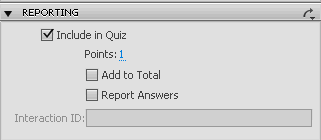
Rod, I have put a button on slide one that the learner must use to move from slide one to slide two. I have editied the properties (see picture) of the button to "Include in Quiz". Although you must have a point value of at least 1, you can choose not to "Add to Total". This will not modify your final score at all. I have tested it thouroughly and the only score passed to the LMS is the score on the actual quiz, and does not include this fake quiz question point total.
That being said, like I mentioned in my original post, it doesn't prevent locking when clicking back and forth.
In regard to your suggestion about not allowing backward movement - I think you have the wrong idea. I have a bunch of content slides interspersed with PRACTICE questions about the content. Why wouldn't it be perfectly acceptable for learners to want to go back and look at material? Now, later in the same captivate there is a graded guiz that I DO NOT allow backward movement on. The difference is that it is graded so I don't want them to be able to go back and find the answer in the content.
Copy link to clipboard
Copied
If you have quiz questions in a project, graded or not, as far as Captivate is concerned they are all just part of the same quiz and the same quiz scope. Allowing or disallowing backward movement applies to the entire quiz scope in the project file.

Copy link to clipboard
Copied
RodWard- I have used Captivate since CP1, but usually for simulations. Usually courses I have worked with are a combination of HTML, XML, Javascript, and Flash. Right now, I'm attempting to leverage Captivate to create a course template for instructional designers to access and create more than PPT style captivate with existing CP interactivety.
"Good eLearning" includes a host of interative elements sprinkled in a lesson, and usually a Knowledge Check section at the end of a lesson. How Captivate has lived this long and not included Knowledge Checks is truly beyond me. I highly suggest that Adobe develop such features with less bugs if they want to keep up with other rapid dev tools that are starting to surpass Captivate with little effort. I would list names but I assume my post will be delete if I do so.
Everytime I have a Captivate issue I find it documented and usually without a decent solution or no solution at all attached to it.
Intergrating Flash with Captivate is always an option, but hand building inline knowledges checks in the Captivate enviroment are optional as well (this is what i'm doing now), but how in the world is there not a solution for this issue. I have been in this field for almost 10 years. I have never seen a good piece of eLearning that did not include some form of knowledge check for learners. This is a basic, yet important, aspect of eL design. Adobe needs to recognize that.
Copy link to clipboard
Copied
@candygrin: You will no doubt be delighted to hear that the new version of Captivate 6 that is about to be released (checks watch) VERY soon, now includes the ability to add a Pre-Quiz knowledge check section that is a separate quiz to the main scored quiz in the same project. I agree that this is a welcome enhancement as many Captivate authors on this forum have struggled to comprehend Quiz Scope issues over the years.
I've also been using Captivate since version 1. This app has always included the ability to sprinkle interactive elements throughout the project file. It allowed inclusion of a knowledge check quiz in a project that was unscored. The issue was always that the way Captivate's Quiz Scope worked meant that each project file could only include ONE quiz of any type. So the Quiz Results slide always shows all quiz questions, knowledge check or otherwise.
Now in Cp6 there is no longer a Quiz Scope issue. You can have both types of quiz in the same project and more explicitly choose which questions get reported to the LMS.
If you have other Captivate issues that have remained unresolved. I'd be more than happy to hear about them. I don't claim to have a solution for every issue, but having used the product as long as I have, I've gained a pretty good knowledge about it.
While I also like the concept of Knowledge Checks and feel they definitely have their place in Instructional Design, I would hesitate to make sweeping statements to the effect that "I have never seen a good piece of eLearning that did not include some form of knowledge check for learners".
I've seen lots of great e-learning courses that did NOT include knowledge checks. In fact, as an instructional designer myself, I LIKE to see IDs challenging old ways of doing things. Knowledge Checks are not mandatory in e-learning, nor are they the ONLY way good e-learning can be created. They are simply ONE good tried and tested way to do it.
Copy link to clipboard
Copied
I stand by my comment, "I have never seen a good piece of eLearning that did not include some form of knowledge check for learners." And I agree creativity is a must. I do not see Knowledge Check pieces as Multiple Choice, Multiple Answer, Drag and Drop, etc. Those are the quick and dirty way to meet deadlines and project scope. I do not come from a background of read, click, read, test. Examples of "gpood" Knowledge Checks could be a simulation that includes a customer call and the learner practicing using a system while taking the call in a real-time format, it could be a branching interview showing how your questions directly impact how a person responds/reacts/thinks, an interactive video piece, a game with a strategic goal, a piece that completes a puzzle to show the learner how their actions and choices effect the overall product/experience of a customer. I prefer a Knowledge Check to be an almost tangible/all encompassing interative piece that allows the user to take the information they have recieved and encode it, then during an end assessment allowing the memory recall to be accurately stored in long term memory and not just in the short term.
But again, sometimes the budge, scope, and deadline do not allow for such.
Copy link to clipboard
Copied
Fair enough. I took your original reference to "Knowledge Check section at the end of a lesson" to mean some form of quizzing that verified the user's knowledge prior to unleashing the main assessment on them.
In any case, using your more expanded definition of what constitutes a knowledge check, in the hands of a good designer, Captivate can now do almost all of those things too. Its interactive abilities are equal to or better than any other 'rapid' authoring app I've seen. Only Flash surpasses it when it comes to the power of interactivity. But then in my experience all the other downsides of building everything from the ground up in Flash tend to outweigh the benefits in most cases.
Like you said, it all depends on the budget, scope, and deadline you have to work within.

Copy link to clipboard
Copied
I have a (Captivate 7) project in which I have used a Graded Quiz to 'scatter' questions throughout the presentation (using quiz pools). The user has 3 attempts to get each question correct, then can move on. The quiz scores don't matter, they are just knowledge checks, but we do want people to attempt the questions before moving on. We also want the user to be able to move freely through the presentation, back and forth.
However, I am facing the same problem as above: once the user completes a quiz question, then goes back past it, they can't then proceed forward past it again - the quiz is locked, which means the 'submit' button no longer works. However, I can't have the Next button showing, because that also means that the user can simply skip past the question without answering it.
Each slide in the presentation has a back and forward button, and I have tried making these part of the quiz to extend the scope, but it makes no difference. Is there perhaps some way to only enable the 'Next' button once the quiz has been completed one way or the other?
Copy link to clipboard
Copied
Check your Quiz > Settings > Required option. Set it to Optional if it's not already set that way. That might fix the navigation issue.
Copy link to clipboard
Copied
The quiz is already set to Optional unfortunately.
I have tried to fix the issue by checking for the cpQuizInfoPassFail variable OR the cpQuizInfoAttempts variable < 3 and then enabling the Next button, but as said button seems to be 'special' I can't actually target it. Why won't Captivate let me add my own #$@! buttons to a quiz?

Copy link to clipboard
Copied
Buttons on Question/Score Slides in Captivate 6? - Captivate blog only if you use CP6 or later.
Copy link to clipboard
Copied
Ah ha. Thanks, I'll give that a try.
Copy link to clipboard
Copied
You can only add Shape objects set to act as buttons to a quiz slide. Normal buttons or interactive objects cannot be placed on a quiz slide.
I take it you must have Backward movement enabled in the quiz? (You mention going backward.)
Try taking all of your questions OUT of the Quiz Pools and placing them back in the project itself. Temporarily HIDE your Randomized quiz slides. Does the issue go away when you are only using questions that are NOT in pools?
Copy link to clipboard
Copied
No, I get the same problem if I take the quiz slides out - the 'Next' button works, but I don't want to have the next button displayed, unless they have already answered the question correctly or tried it 3 times.
Copy link to clipboard
Copied
You cannot script the Next button that comes by default with the quiz question slide.
If this is about forcing the user to answer the question correctly before moving forward then you can control that with the Quiz > Settings > Required options, but then you lose the freedom of navigation that you've got your heart set on.
I'm afraid you can't have everything.
Copy link to clipboard
Copied
I will hopefully be able to create a pseudo-Next button using a shape which will allow me to only 'unlock' free movement past a completed quiz. I'm aware I can't 'have everything', but the decision to lock a quiz after its completion does seem to be fairly arbitrary and something that should be changeable by the designer.
Copy link to clipboard
Copied
You might find that if Captivate doesn't believe you SHOULD be allowed to navigate away, then it won't let you, even if you DO create and add your own buttons.
Captivate is 'thinking' in terms of how quizzes are expected to work according to standards such as the SCORM standard. In that world, once a learner has completed a quiz it DEFINITELY would be expecting that quiz to be locked. Otherwise, how will Captivate know when or how to submit scoring?
Copy link to clipboard
Copied
That's fine for SCORM quizzes, but I'm not doing a SCORM quiz, and seeing as how Captivate is billed as an all singing all dancing e-learning package, I should also have the option to do simple knowledge check quizzes without having to do workarounds. But hey. C'est la vie.
Copy link to clipboard
Copied
Regardless of whether Captivate sings, dances or plays boogie-woogie it still follows certain design principles. One of them is that as far as Captivate is concerned you can only have ONE real quiz per module and all scored quiz questions or interactive objects belong to that quiz. So while YOU may think of your knowledge check questions as merely incidental and NOT part of the quiz, Captivate thinks otherwise. Cp6 and later also have the option to include Pretest questions, but these are not treated as another 'quiz' per se. Just a pretest that gives your learner the option of testing and taking a shortcut to the end of the module. There's still only ONE real quiz per module.

-
- 1
- 2

Get ready! An upgraded Adobe Community experience is coming in January.
Learn more
 AdChoices