


Copy link to clipboard
Copied
Hello,
So I am working on pretty straightforward demonstrations but am running in to a big problem with click boxes.
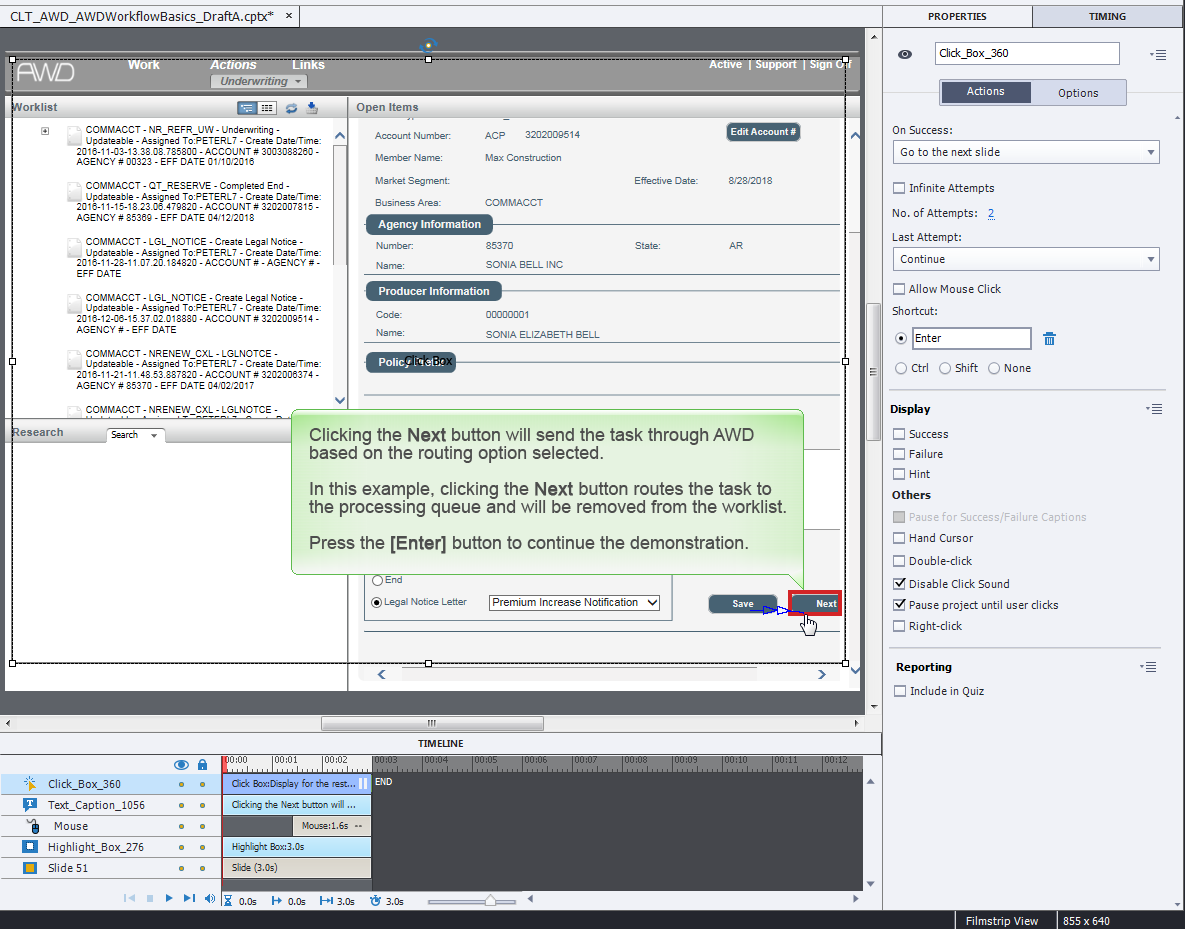
In my demonstrations, users watch the action being performed and press the Enter key to advance the slide when they are ready. To accomplish this, I have a click box on each slide with the shortcut being Enter. For several months this worked perfect. The issue now is that 50-75% of the time, the click boxes (in any preview mode, published HTML, published PDFs) will not respond and the user can't advance or must use the playbar.
Below is a screenshot of both the timeline and the click box properties. Any help is greatly appreciated!!
(Windows 7, Captivate 9.0.1.320)


 1 Correct answer

Pretty difficult to know the origin, because you offer very little details. You don't tell which output you want? If it is to HTML you should have the click box on top of the Text caption, not the reverse. Good practice is to have all interactive objects on the top of the stack. For SWF output it is less important, because the interactivity will be preserved when covered with a static, non-interactive object.
However want to add a ti: do not use a click box over a text caption on each slide, but

 3
Replies
3
3
Replies
3


Copy link to clipboard
Copied
Hard to say without looking at your project but it sounds like the browser window with the Captivate project loaded into it is losing focus.
How are these courses deployed? In an LMS?
If you can share a cptx via Dropbox or some other service, I'd be happy to take a look.
Copy link to clipboard
Copied
Pretty difficult to know the origin, because you offer very little details. You don't tell which output you want? If it is to HTML you should have the click box on top of the Text caption, not the reverse. Good practice is to have all interactive objects on the top of the stack. For SWF output it is less important, because the interactivity will be preserved when covered with a static, non-interactive object.
However want to add a ti: do not use a click box over a text caption on each slide, but use a shape button which acts both as a button and as a text container. You have even more formatting features than for a simple text caption, but moreover you can put a shape button on the master slide, thus avoiding to have a copy on each slide. Advantage of such a button: if you check the option to have that button pausing, it will pause at the end of each slide, whatever its duration. Another solution is to put that button on the first slide, timed for the rest of the project, always on top. That second solution is better if you want to hide the shape button on some slides, because it will have an ID (name), which is not the case with objects on the master slide. More info in this article:
Copy link to clipboard
Copied
Thank you Lilybiri! I want this in both HTML and SWF but my issue was when I was using HTML (sorry I didn't provide that info up front).
Issue was fixed by putting the click box on top (this also fixed an issue with another interactive object  )! Also, that is a great idea on the shape button, but unfortunately it is too late to change my courses now. I will remember that for the next round when these CBTs get updated.
Thank you again!
Lisa


Get ready! An upgraded Adobe Community experience is coming in January.
Learn more
 AdChoices