


Custom Pause/Resume Button

Copy link to clipboard
Copied
Hi everyone,
I'm trying to figure out how to create a custom play/pause button in Cap 7. Ideally, I will be bringing a graphic over from illustrator and using transparent buttons. My question is, is it possible to have these buttons on a master slide using advanced actions? Do note that I know nothing about advanced actions. From what I've seen, and tried a master slide cannot do this. If I go the route of pasting these 2 buttons on every slide of my tutorial, how would I write up the action to show the button toggle and allow for infinite play/pause actions on every slide?


 6
Replies
6
6
Replies
6


Copy link to clipboard
Copied
Hi
I done something similar lately where i created 2 buttons on master slide
the Pause graphic has a button over with an advanced action attached to it that says
Assign - cpCmndPause with 1
Assign cpCmndResume with 0
The Play graphic has a button over with an advanced action attached to it that says
Assign - cpCmndPause with 0
Assign cpCmndResume with 1
I have seen people saying they dont like using this workflow as they have had problems but it seems to work fine for me.
Hope this helps
Copy link to clipboard
Copied
Thanks for the response. This does work, however I was hoping to have the images toggle and placed on top of each other. So when play is clicked, pause gets hidden. Possible?

Copy link to clipboard
Copied
Want a toggle button, try this work flow:
Since a couple of versions (think since 5.5, or 6.0) you can have two interactive objects in the same location, at the same time, provided they are not visible at the same time. That was the problem before, and maybe that is what Darren is referring to. It works perfectly for all toggle buttons, but for Play/pause if you want to use a shape button because that can be put on a master slide (or timed for the rest of the project), there is still a problem. However, I have a solution that you could try out:
About shape buttons you can read: http://blog.lilybiri.com/why-i-like-shape-buttons-captivate-6 And I did also a webinar only on those shape buttons (look for Lilybiri's favourite on the Captivate blog, or the On Demand Webinars list).
Also have a look at : http://blog.lilybiri.com/toggle-shape-buttons where the example used is for toggling audio, but the logic is the same concerning the shape buttons if you go to scenario 4. Cannot be used for Play/Pause if you want it to display for the rest of the project.
Step by step:
- Create shape button on the first slide (can be made transparent, will be over the graphics), time it for the rest of the project (be sure to check 'Use as button'), and put it always on top to avoid it to be covered eventually by other objects (if you are using interactions or widgets, check those slides in particular).
- You can have the graphics for Pause and for Play on top of each other without any problem. Make the Pause graphic (Im_Pause) visible, but make the Play (Im_Play) invisible in the Properties panel.
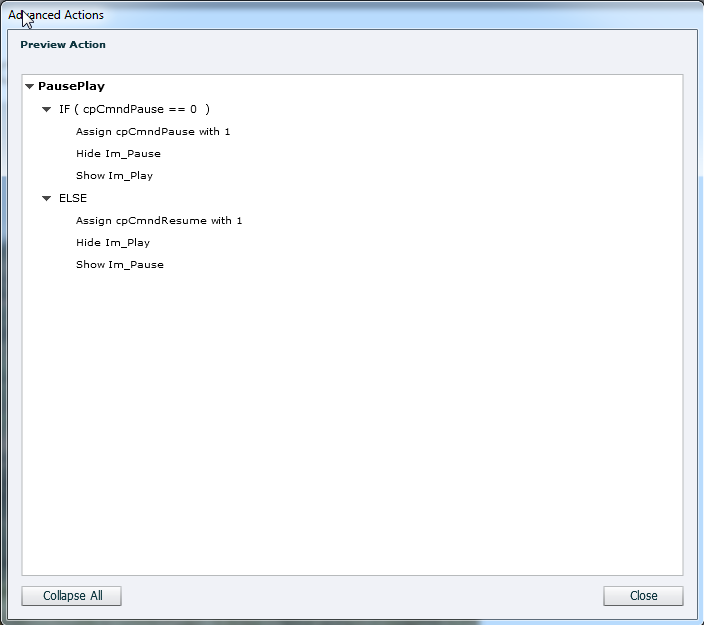
- Create this conditional advanced action (I used the statements that will work also in 6 and 7.0, for 7.01 could have used some other statements):
- IF cpCmndPause is equal to 0
Assign cpCmndPause with 1
Hide Im_Pause
Show Im_Play - ELSE
Assign cpCmndResume with 1
Hide Im_Play
Show Im_Pause
- IF cpCmndPause is equal to 0
- This action has to be triggered As Success for the transparent shape button.
Lilybiri
Copy link to clipboard
Copied
I'll give it a try. Thanks!
Copy link to clipboard
Copied
This youtube video basically has what I'm trying to do...it just doesn't fully work. There is no way to delete the "IF statement" on a conditional action. Has there been a work around since this video was recorded using cap 6, and I'm using cap 7?
Copy link to clipboard
Copied
I didn't watch that video, but mostly this guy is, trying to remain polite, not very 'accurate'. I did send him some remarks on other tutorials, where he gave clearly incorrect, or better 'half' advice.
And no, nothing has changed concerning toggle buttons from 6 to 7 (tried out this work flow both on 6.1 and 7.0.1.237 because I was not sure about your version). I was in the prerelease, and testing of advanced actions is something for which the team always counts on me. If you visit my blog, you'll understand why.
You cannot use a standard action in this case, as I tried to explain. It will work if you copy/paste the same buttons on each slide, but I find that not acceptable when there are shape buttons. Please, take my advice and use the work flow I gave you, never tell something without trying it out. The file in which I tried this is still open on my desktop. Could share the action but a while ago I stopped offering everything for free.
Here is the Preview (new feature in 7.0.1):
Lilybiri


Get ready! An upgraded Adobe Community experience is coming in January.
Learn more
 AdChoices