


- Home
- Captivate
- Discussions
- Drop down boxes in matching slide question
- Drop down boxes in matching slide question
Drop down boxes in matching slide question

Copy link to clipboard
Copied
Hello all,
I'm working on a responsive project.
Something strange happened when I changed slightly the slide by having temporarily ticked the "Unlock from Fluid Box" option. I have 3 questions and 3 answers. I changed the size of the captions and moved them (both answers and questions) making sure the text has enough space but the first out of three drop down boxes remained smaller. It didn't follow the other two. I would call it "Renegade".
Any ideas how to fix this issue, please?
Thanks a lot for your time.


 7
Replies
7
7
Replies
7


Copy link to clipboard
Copied
Not a good idea to unlock them from the Fluid boxes. Did you read my blog post about master slides for quizzing when using Fluid Boxes?
Tips for 'Fluid' Quiz Slides - Captivate blog
Maybe post some screenshots to illustrate the problem?
Copy link to clipboard
Copied
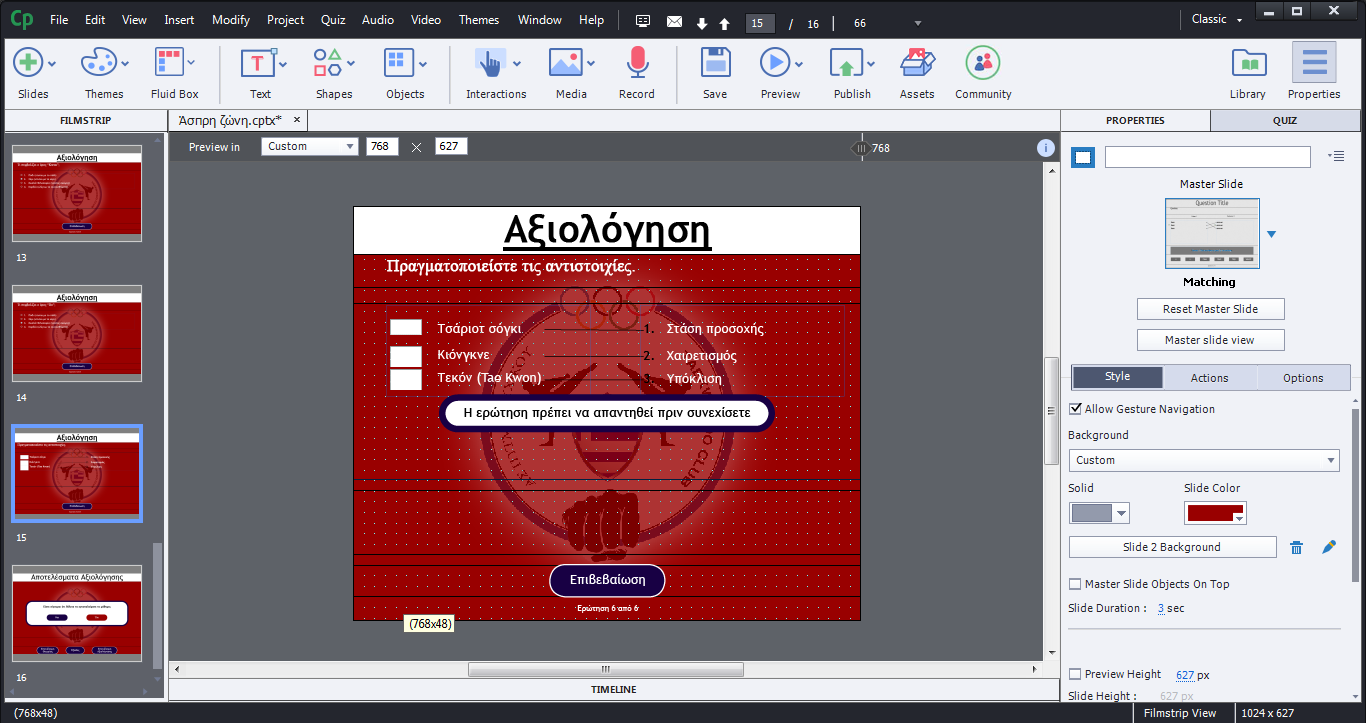
I post a screenshot of what I exactly mean and what I face. As you see, the first drop down box is smaller than the other two.
Copy link to clipboard
Copied
Greek? Did you read that blog post? I showed what happens with answer text with different settings. You have to select the individual answer containers and make sure they are set (Align) to exactly the same size.
Copy link to clipboard
Copied
Greek, indeed. I read it while I was at work but apparently I missed something.
Thank you very much for your reply. I will read it again more carefully and I will come back later if I have any questions.
Copy link to clipboard
Copied
Lieve, I read your article. I had all the captions (answers and questions) aligned and of the same size from the beginning. Anyway, I deleted the slide and rebuild it. Thankfully, there is no problem when it comes for the size of the drop down boxes.
Thank you so much for your help! I really appreciate it.
Copy link to clipboard
Copied
That is very weird, cannot imagine at all what is the cause. You cannot time answers in a question at all, they don't have individual timelines. It is really the first time I leanr about such an issue, and I have spent a lot of hours on these forums since 2009. Can you reproduce this problem in a brand new project?
Copy link to clipboard
Copied
Just for the record, because I deleted the question you have commented on thinking that it may belong to another thread, and for the rest of the members to know, one out of the three captions from the left column appears a couple of seconds later.
I will create another project and I will edit this reply.
Unfortunately, I cannot replicate it. I can't figure out what is happening. I will build more courses similar to this one having the same theme. If it happens to the others, I will come back with a new thread.


Get ready! An upgraded Adobe Community experience is coming in January.
Learn more
 AdChoices