


- Home
- Captivate
- Discussions
- Hi Guys After publishing project ....
- Hi Guys After publishing project ....
Hi Guys After publishing project ....

Copy link to clipboard
Copied
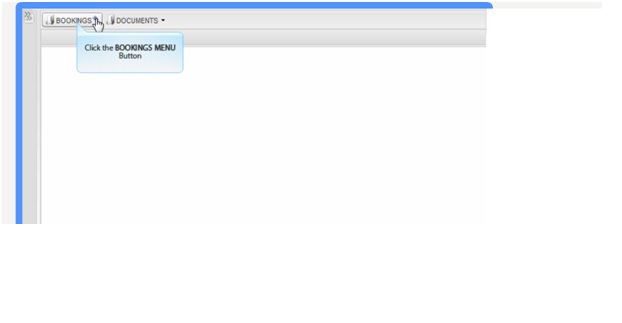
I lose the right hand border, the content area seems to extend and overlap the border, any suggestions.



 3
Replies
3
3
Replies
3


Copy link to clipboard
Copied
It looks to me like the HTML frame that your SWF sits in is cutting off the content.
Either your Frame isnt the right size for some reason, or your SWF file has zoomed in within the frame.
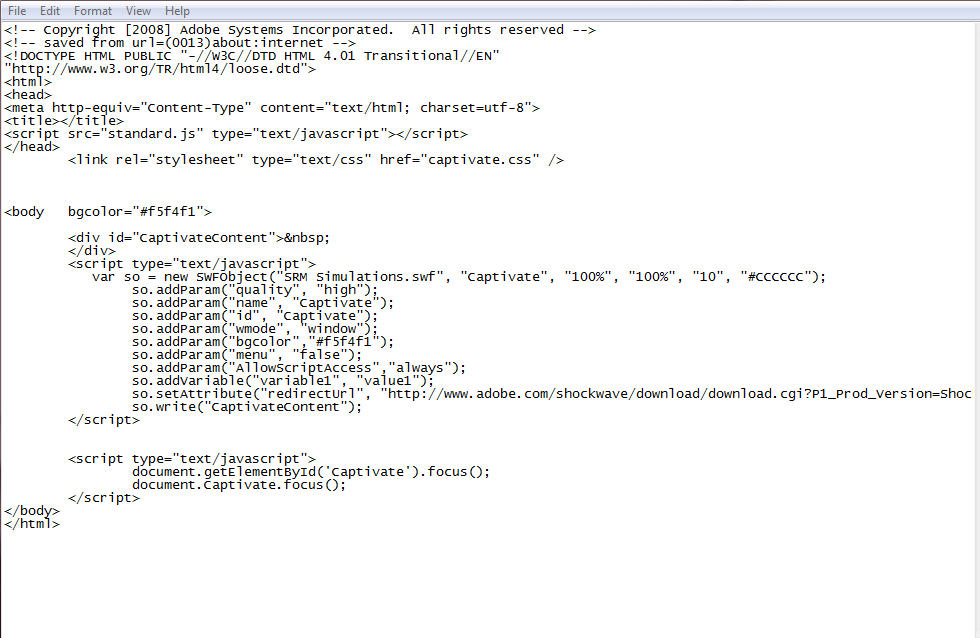
I would try re-publishing your file and make sure you select scalable HTML content.
Then take you .html file and drop it into notepad. Where it says the line var so = new SWFObject("SRM Simulations.swf", "Captivate", "100%", "100%", "10", "#CCCCCC"); change the 100% to either number greater than 100% or type in the size of your project. The first 100% is Width , the second is height. e.g. var so = new SWFObject("SRM Simulations.swf", "Captivate", "1280", "720", "10", "#CCCCCC");. Also bear in mind that if you have a TOC permentaly displayed it adds width to your project. (i thinks its something like 121 pixels).
Hopefully that helps.
Copy link to clipboard
Copied
Thanks for that I will give it a go.
Paul

Copy link to clipboard
Copied
TOC = minimum 250pixels.


Get ready! An upgraded Adobe Community experience is coming in January.
Learn more
 AdChoices