


Copy link to clipboard
Copied
Hi I have used informatics slider widget may I add this is cool. My only problem is it does not do fractions. I have set the slider max count to 6. I've added another a variable to show the slide counter in movement. I've also added another variable which I used in a conditional action which should change to the fractions I want to use but this does not work. I'm not sure if this logic is correct or not? Any advice much appreciated. Thanks


 1 Correct answer


The Slider Component Widget works with Captivate variable values. However, Captivate variables are only either integers (whole numbers) or strings (text). If you insert a value such as 0.5 or 0.25, Captivate will interpret this as a string since it's not a whole number.
So you need to use variables with whole number values. And from the sound of it, you'll need to adjust the design of your interaction to work this way.

 15
Replies
15
15
Replies
15

Copy link to clipboard
Copied
The Slider Component Widget works with Captivate variable values. However, Captivate variables are only either integers (whole numbers) or strings (text). If you insert a value such as 0.5 or 0.25, Captivate will interpret this as a string since it's not a whole number.
So you need to use variables with whole number values. And from the sound of it, you'll need to adjust the design of your interaction to work this way.
Copy link to clipboard
Copied
Rod would it be possible to show me an working example of this proposed solution I'm not so sure I follow. Are you saying this would be a conditional action? widget variable = is say eaqual value (1-4) then my variable is "equal to" empty, quarty, half, full. Thanks
Copy link to clipboard
Copied
Take a look at this tutorial by Tristan that explains how Variable Binding works with a Component widget like the Slider or Rotator widgets:
http://www.youtube.com/watch?v=rDijYxd3WyQ&src
You can control how much one object slides in comparison to the other via the length of their respective tracks. So for example if the slide being used as the Handle has a track that is 100 pixels in length and it is linked to drive another slider that has a track of 300 pixels in length, but they are both bound to the same user variable, then moving one the main slider handle 100 pixels will move the other object 300 pixels.
You can use this same principle to get your fractional differences.
Another alternate method that is a bit trickier and more advanced is to use the Component widget's ability to be an Interactive widget that can evaluate Success or Failure on every frame. You just need to turn on Evaluation in the widget properties dialog and set it to evaluate Continually. Then you need to use its On Success event to execute an Advanced Action that manipulates the value of one user variable in relation to another. For example, if you have one slider bound to VariableA and the other bound to VariableB, you could have the slider evaluating continually and executing an action that used an Expression to multiply VariableA's value by some amount and then Assign that value to VariableB.
Like I said...it's a bit advanced. So you might struggle to pull that off. But it's all possible with Captivate and the Component widgets.
Copy link to clipboard
Copied
Let's say in the first of your examples I want variable A to increment empty, 1/4, 1/2, 3/4, full as(string). Do I need to assign variable A with a value? Before I link the slider widget to the variable? I follow Tristan's video in fact I've seen all four of them which are amazing. But I think I.m still struggling to get my head around declaring variables. I thought somewhere I would declare the variable then assign the variable with string/numeric values. What I'm intending to achieve is that when the user moves the slider the values go up in fractions as above, to show the fuel level remaining in a car. Using 1slider widget and 1variable.
Copy link to clipboard
Copied
As I mentioned in my previous answer, you can store strings in Captivate user variables, but any bound variable referenced by our widget needs to be using integers.
In Captivate's Advanced Actions, you don't need to 'declare' a variable the way you do in normal coding. If you've created the user variable in the UI then its available.
You really need to forget about trying to store these fractions in the variable that is being manipulated by the Slider widget. You can store these strings (Empty, 1/4, 1/2, 3/4, Full) in other user variables if you like and then just use a Conditional Action executed by the widget to select the correct string to display.
Since you only really have 5 separate values, the bound variable that works with the widget only needs to go from 0-4. 0 equates to Empty and 4 equates to Full.
Copy link to clipboard
Copied
A couple of things Rod, by UI are you refering to User Interface (propbably not) and "other user variables" is there a container type vairable?
In your solution propopsed would this be written as
if
"widget" is equal to 0
Action
Show "Empty" (refers to empty text caption)
This would be repeated in they next statement to show the 1/4 when the widget is to 1.
Maybe I could this totally wrong Rod?
Copy link to clipboard
Copied
Yes by UI I'm referring to the Captivate User Interface where you would create a user variable using the Variables dialog.
No, it's not the 'widget' that would be equal to 0, it would be the widget sets the variable at 0 and the Decision Block in your Conditional Action would check this value and then SHOW something that indicated Empty. There are a couple of ways you can achieve that. You could have 5 captions on the screen and SHOW whichever one applies to that particular variable value, or alternatively you could just have another user variable that holds the string value inserted into a single caption and use the Conditional Action to change the string value of that variable based on the integer it finds in the variable bound to the widget.
Copy link to clipboard
Copied
I have gone with the option using 5 captions but I can't get this to run. In the evalution section of the widget what setting do i need to have? I've set my action as follows but not sure if the widget is excute the contional action
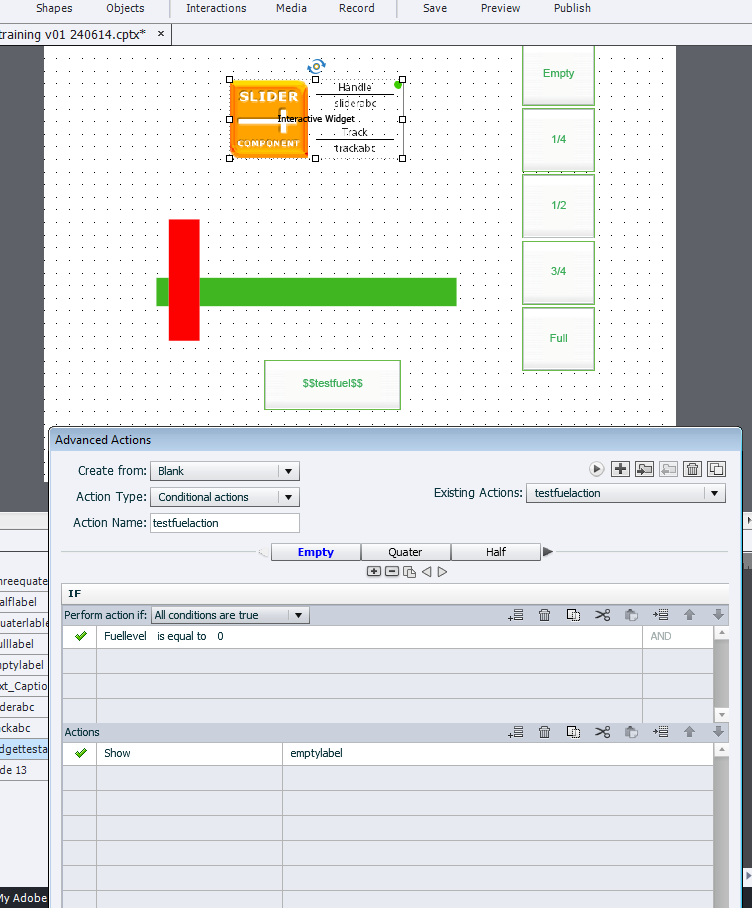
Copy link to clipboard
Copied
Yes the widget can execute the same Conditional Action continuously if you set the Evaluation option to Continual. Your screenshot above does not show the Widget Properties interface, only the Advanced Actions interface.
By the way, if you want the Conditional Action to show ONLY the relevant text caption for that particular variable value then you need to have extra Action lines that HIDE all the other captions that would NOT apply, otherwise they will all show up eventually.
Copy link to clipboard
Copied
I have added the widget image for you. I thought if I made the cation invisible on output then with the slider is dragged the caption will show up? Maybe that why it didnt w
work.

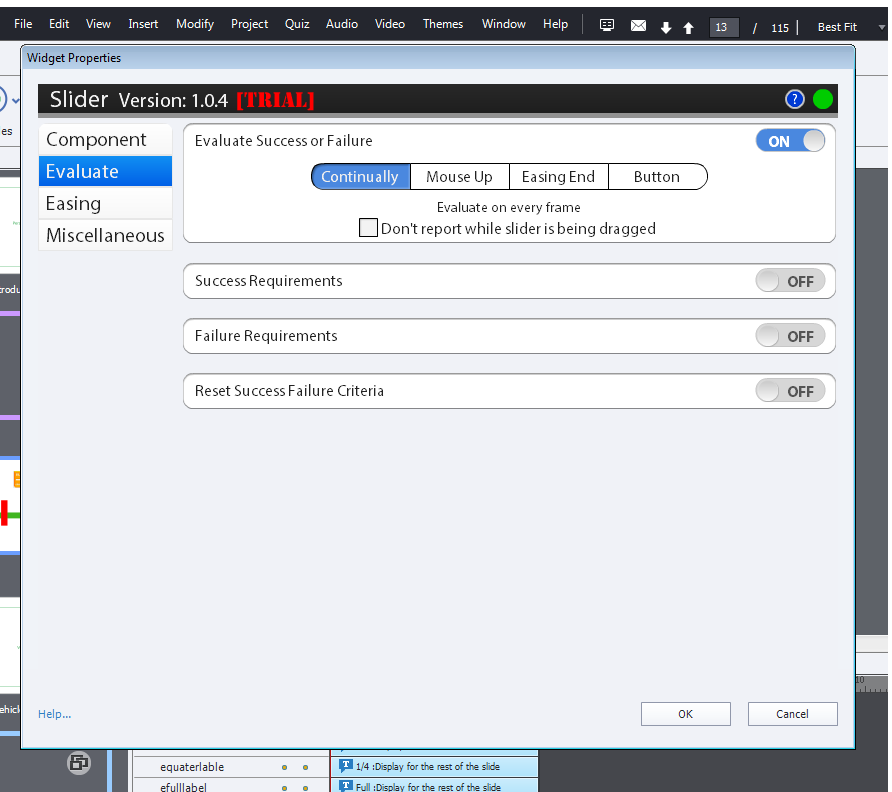
Copy link to clipboard
Copied
You haven't set the Widget to evaluate properly.
You need to turn on the Success Requirements and set it to something that will always evaluate to Success (e.g. Score Greater Than or Equal To 0). You shouldn't need Failure Requirements in this case. But you will need to set the Reset Success Failure Criteria to ON so that the widget will repeatedly reset and execute the variable on each frame.
Try that and see what happens.
Copy link to clipboard
Copied
Still no luck Rod even though I've changed the setting as proposed. My concern it maybe something to do with my conditonal action. I have left the "else" section blank not sure whether there needs to be something in this part. But then the first "if" should exceute anyways. heres a screen shot if I'v missed anything. 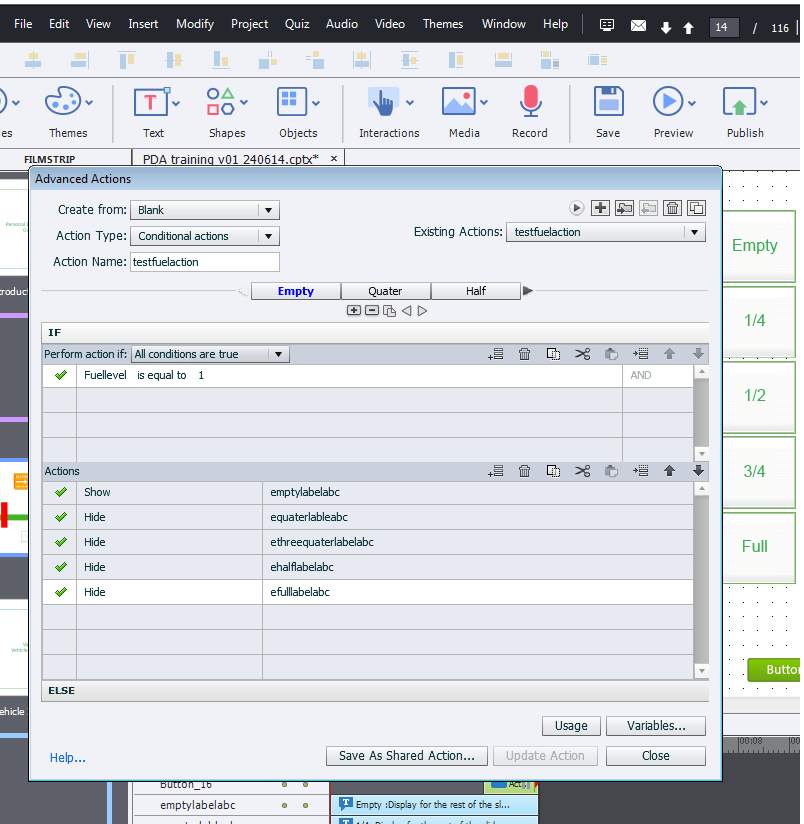
Copy link to clipboard
Copied
I've on my screen a caption which shows the number going 0 to 4, I've called the variable in my action too. so the are linking together. Bit furstrated now as I'm not sure what to do. Any more ideas Rod plz?
Copy link to clipboard
Copied
I'll send you a private message to allow you to send me the CPTX so that I can take a look and see why this is not working.
Copy link to clipboard
Copied
Okay Rod. Thank you for this help! You are awesome.


Get ready! An upgraded Adobe Community experience is coming in January.
Learn more
 AdChoices