


Line Breaks in Text Entry Boxes

Copy link to clipboard
Copied
I want to use a text entry box to capture learners' throughts about a topic at the beginning of a course, and then call their text back once the course is over to ask whether their impressions about the topic changed.
I'm anticipating that the users might enter a paragraph or two of text, but I'm running into two problems with the text entry box.
1) The text doesn't wrap to the next line when the user reaches the right margin of the text entry box. It just keeps running to the right into infinity.
2) The user can't use the enter key to add a line break, because hitting the enter key automatically triggers the submit button attached to the text entry box.


 6
Replies
6
6
Replies
6


Copy link to clipboard
Copied
To have text wrapped, you need to check this option:
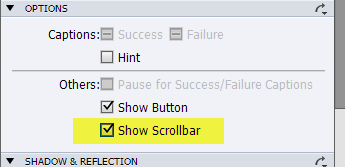
To avoid that Enter triggers submitting, change or delete the Shortcut key as alternative for the Submit button. Now the user will be able to use the Enter key for a line break. Beware: only tested this on CP7, you didn't tell which version you are using.
Copy link to clipboard
Copied
Thanks!
Copy link to clipboard
Copied
Running into an issue with the output.
I'm using a text caption to display the content, but if the amount of text the learner enters exceeds the size of the text caption, the excess text just gets cut off.
Is there any way to generate a scroll bar in the text caption?
Copy link to clipboard
Copied
Did you enable the scrollbar as I showed? If this text caption is filled by the value of a user variable, did you set the width of the variable, when inserting it into the caption, sufficiently high? Depending on your version, the default width is 15 or 50 characters.
Lilybiri
Copy link to clipboard
Copied
I enabled the scrollbar on the text entry box, which is where the user enters their text, and that works well.
The issue is on the other end of the course, where I display the learner's initial responses back. I'm using a text caption with the variable $$student_response$$ to do this.
I don't want to set an upper limit to the amount of text the user can enter, so I didn't set a maximun length.
My issue is that if the learner plugs more text into the text entry box at the beginning of the course than will fit into the area I've assigned for the text caption at the end of the course, the extra text gets cut off.
I'm looking for something like this, but I'm using CP6 so I don't think this one is compatible.


Copy link to clipboard
Copied
When you insert a variable to display in a caption you MUST specify the number limit of characters to display otherwise Captivate 6 will default to 15 characters. I find that you should never really need more than 250 characters for a user response, otherwise their writing a novel instead of an answer.


Get ready! An upgraded Adobe Community experience is coming in January.
Learn more
 AdChoices