


Copy link to clipboard
Copied
Can you assign multiple actions to a button? For example, would I be able to have a button show certain information while simultaneously hiding other information? Thanks!


 1 Correct answer

Indeed, the buttons triggering an advanced action will not release the playhead at all (see link I gave you). Text caption 1 just starts at the pausing point of the button, where the playhead will remain, not sure it will become visible. The two other texts will only get visible after the pausing point, which means not when executing the advanced action.
My suggestion: use a shared action since you are on Captivate 8. Group the three texts in a group Gr_Text. More information: Dare to Share - part 1 - Captivate blog
...
 12
Replies
12
12
Replies
12

Copy link to clipboard
Copied
Of course, you have to execute an Advanced action. If it is just a sequence of simple actions, it is a standard advanced action. With a conditional advanced action you get even more power.
Why choose Standard over Simple action? - Captivate blog
In this blog post you'll see even another reason for choosing a standard action: it doesn't release the playhead, contrary to a simple action. If you have several buttons (or other interactive objects) on a slide with the same pausing point, replacing a simple by a standard action will allow as many clicks on the buttons as you want.
Copy link to clipboard
Copied
I tried an advanced action before posting this, but it didn't work. Not 100% anyway. The button I applied the advanced action to hid the information it was supposed to, but it didn't show the information it was supposed to. I have a feeling it has to do with how some things are laid out on my timeline, but I'm not sure.
Copy link to clipboard
Copied
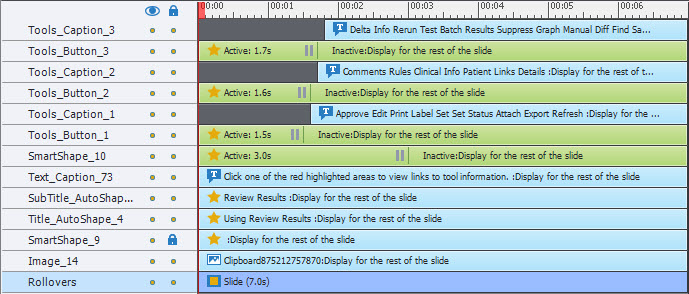
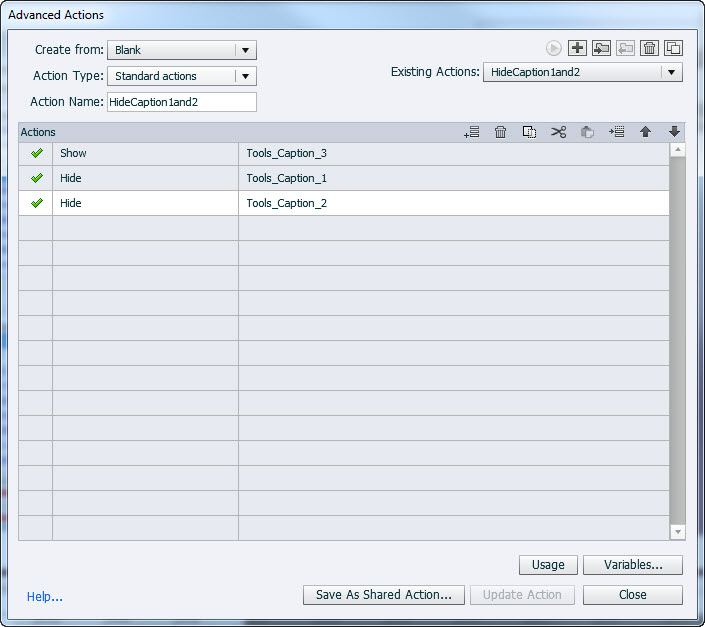
OK, give us a screenshot of the timeline, and of the advanced action that you used. Are you using Captivate 8?
Copy link to clipboard
Copied
I'm using Captivate 8.
Copy link to clipboard
Copied
Indeed, the buttons triggering an advanced action will not release the playhead at all (see link I gave you). Text caption 1 just starts at the pausing point of the button, where the playhead will remain, not sure it will become visible. The two other texts will only get visible after the pausing point, which means not when executing the advanced action.
My suggestion: use a shared action since you are on Captivate 8. Group the three texts in a group Gr_Text. More information: Dare to Share - part 1 - Captivate blog and Dare to Share - part 2 - Captivate blog
Those were written for CP7 but I tell there about a shared action that I labeled Show1Hide1 which is what you need:
Hide Gr_Text
Show Caption 1
The italic written objects will become parameters. You can use that shared action 3 times, you'll only have to fill in the parameters, the first will always be the group (has to be the first), the second the text that you want to show.
Drag the timeline of the Text captions to the beginning of the slide, and make them invisible in the Properties panel (click the eye icon top left).
Make the pausing point of the three buttons at the same time, no need to stagger them at all.
Assign the shared action to each of the buttons.
You have to be aware that the playhead will always remain in place. I see another interactive object, a shape button, with a Pause later than the three other buttons. User can always click that shape button as well, and then they'll get past the first three buttons pausing point which means they cannot use those buttons anymore. What is the goal of that 4th shape button?
Copy link to clipboard
Copied
I'll try this out. The button with the later pause is a "Finished?" button that will take the user to an end slide. The other buttons are just buttons to show some information. After the viewers are done with that, they can click that finished button to do just that and finish up.
Copy link to clipboard
Copied
OK, that is fine, since the Finished button has its pause later than the three information buttons.
Copy link to clipboard
Copied
That worked for me. I marked the answer correct. Thanks!
Copy link to clipboard
Copied
Thanks! Glad I could help you out.

Copy link to clipboard
Copied
It's a piece of cake. You just use Advanced Actions.
I'm sure Lilybiri will come along any moment now with a link to one of her blog posts that will show you exactly how to do it!
Cheers... Rick 
Copy link to clipboard
Copied
LOL, I spoke too soon. 
Copy link to clipboard
Copied
Sorry, Rick.


Get ready! An upgraded Adobe Community experience is coming in January.
Learn more
 AdChoices